

Fiber optic networks depend on clean, properly connected cable ends to transmit data reliably. Even a small amount of dust, oil or other contamination on a fiber connector can affect signal quality and cause network performance problems.
Fiber optic connector cleaning is an important part of fiber installation, maintenance and troubleshooting. However, cleaning is not simply a matter of wiping the connector with a cloth. The correct tools, inspection methods and cleaning procedures are essential to avoid damaging delicate fiber end faces.
In this guide, we explain why fiber optic cleaning matters, which tools are commonly used, how connectors are cleaned and what businesses should consider when maintaining their fiber infrastructure.
Why Is Fiber Optic Connector Cleaning Important?
Fiber optic connectors contain precisely finished end faces that must align correctly to transfer optical signals between connected components.
When two connectors are joined, contamination on either end face can interfere with the connection. Even particles that are difficult to see without magnification can affect optical performance.
Regular inspection and proper cleaning help address several potential problems:
- Signal loss: Dust and other contaminants can interfere with light transmission and increase insertion loss.
- Poor connection quality: Contamination can prevent connector end faces from making proper contact.
- Signal reflection: Certain types of contamination or surface defects can increase optical reflections.
- Equipment problems: Dirty connectors can transfer contamination to other connectors or optical equipment.
- Network interruptions: Poor optical connections can contribute to unstable links and troubleshooting issues.
Keeping fiber connectors clean is especially important before making connections, performing testing or completing fiber optic installation work.
Common Causes of Fiber Connector Contamination
Fiber connectors can become contaminated during installation, maintenance, testing and everyday handling.
Some common causes include:
1. Dust and Airborne Particles
Dust can settle on exposed connector end faces when protective caps are removed. Leaving connectors uncovered for extended periods increases the possibility of contamination.
2. Fingerprints and Skin Oils
Touching the connector end face can transfer oils and residue. These contaminants may be difficult to remove with basic dry cleaning methods.
3. Dirty Protective Caps
Protective caps help prevent physical damage and additional contamination. However, they can also contain dust or debris. Removing and replacing a contaminated cap does not guarantee that the connector remains clean.
4. Improper Handling
Placing connectors on dusty surfaces, reusing cleaning materials or handling fiber components without appropriate care can introduce additional contamination.
5. Contaminated Cleaning Tools
Cleaning materials that have already collected dust, oil or residue can transfer contamination instead of removing it.
Tools Used for Fiber Optic Connector Cleaning
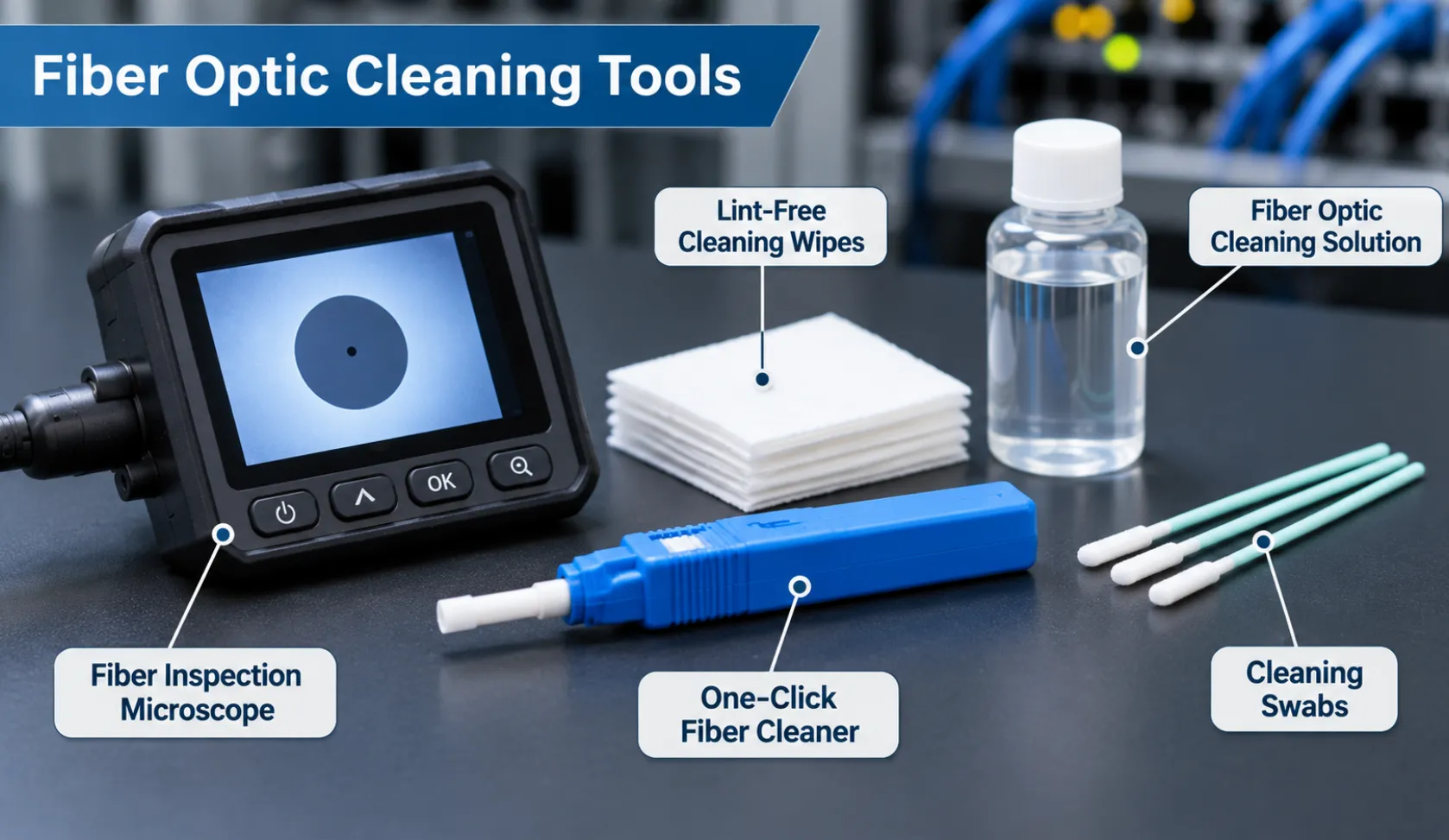
Different tools are designed to clean different connector types and connection points. Technicians should select products specifically intended for fiber optic cleaning.
Common tools include:
1. Fiber Optic Inspection Microscope
A fiber inspection microscope or video fiberscope is used to examine the connector end face.
It helps technicians identify:
- Dust and debris
- Oil and other residue
- Scratches
- Surface defects
- Remaining contamination after cleaning
Inspection is an important part of the process because a connector may appear clean to the naked eye but still contain contamination.
2. One-Click Fiber Connector Cleaner
One-click cleaners are handheld tools designed to clean compatible fiber connector end faces.
They use a cleaning tape or similar mechanism to remove contamination. Different models are available for different connector types, so compatibility should always be checked.
3. Fiber Optic Cleaning Wipes
Lint-free wipes are designed to clean delicate fiber connector surfaces without leaving fibers or unwanted residue.
They are commonly used with compatible fiber cleaning solutions when wet or wet-to-dry cleaning is required.
4. Fiber Optic Cleaning Swabs
Specialized cleaning swabs are used for certain connector adapters, ports and other accessible surfaces.
The swab must be compatible with the component being cleaned. Incorrect sizes or materials can cause damage or leave additional contamination.
5. Fiber Optic Cleaning Solution
Fiber-specific cleaning solutions are designed to remove contaminants from optical connector surfaces.
The solution must be compatible with the connector and cleaning materials. Technicians should follow the cleaning product manufacturer’s instructions rather than assuming that any alcohol or general-purpose cleaning fluid is suitable.
How to Clean Fiber Optic Connectors
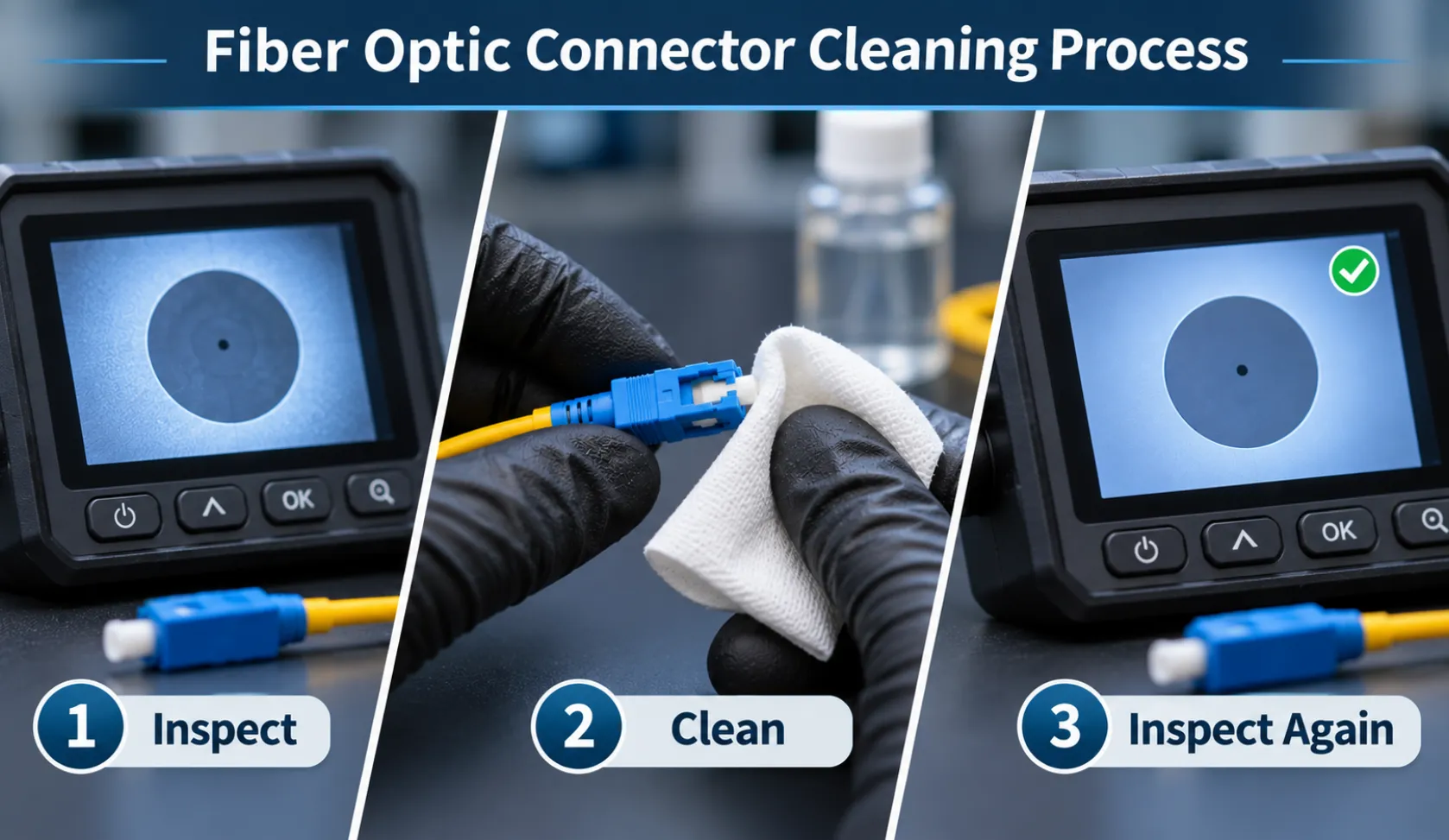
A common industry approach is the inspect-clean-inspect process. The connector is inspected first, cleaned if contamination is found, and inspected again to confirm the result.
The following steps explain the general workflow used by trained technicians.
Step 1: Follow Laser Safety Precautions
Before inspecting or cleaning a fiber connection, ensure the optical source is disabled and the equipment is handled according to the manufacturer’s safety instructions.
Never look directly into a fiber connector or optical fiber. Invisible laser radiation may be present even when no visible light can be seen.
Use appropriate inspection equipment and safety procedures.
Step 2: Inspect the Connector
Use a compatible fiber inspection microscope to examine the connector end face.
Look for visible contamination, scratches, residue and other surface defects.
If the connector is already clean and undamaged, unnecessary cleaning should be avoided.
Step 3: Select the Appropriate Cleaning Method
Choose a cleaning method based on the connector type, contamination and cleaning product instructions.
Common methods include:
- Dry cleaning with an approved fiber connector cleaner.
- Wet cleaning using a compatible cleaning solution and lint-free materials.
- Wet-to-dry cleaning, where a damp cleaning surface is followed by a clean, dry surface.
Dry cleaning is often attempted first. If contamination remains, an appropriate wet-to-dry method may be used.
Step 4: Clean the Connector Carefully
Use the selected cleaning tool according to its manufacturer’s instructions.
Avoid touching the connector end face with your fingers. Do not reuse dirty wipes, swabs or cleaning surfaces.
For wet cleaning, use only the recommended amount of compatible cleaning solution. Excess liquid or residue can create additional problems.
Step 5: Inspect the Connector Again
After cleaning, inspect the connector end face using the inspection microscope.
Check whether the contamination has been removed and whether the surface is acceptable for connection.
If contamination remains, repeat the appropriate cleaning procedure or have the connector evaluated by a qualified technician.
Step 6: Connect and Protect the Fiber
Once the connector has passed inspection, connect it carefully to the compatible adapter or optical equipment.
Keep unused connectors protected with suitable protective caps and avoid unnecessary exposure to dust or handling.
Dry Cleaning vs. Wet Cleaning: What Is the Difference?
Both methods are used in fiber optic maintenance. The appropriate choice depends on the type of contamination and the connector manufacturer’s recommendations.
| Factor | Dry Cleaning | Wet Cleaning |
|---|---|---|
| Method | Uses a specialized dry cleaning tool or material | Uses compatible cleaning solution with lint-free materials |
| Common use | Routine removal of loose contamination | Contamination that may not be removed by dry cleaning |
| Equipment | One-click cleaners, dry cleaning cassettes | Cleaning solution, wipes or compatible swabs |
| Important consideration | Use a clean cleaning surface | Avoid excess liquid and residue |
| Follow-up | Inspect after cleaning | Follow with appropriate drying and inspection |
Wet-to-dry cleaning combines the two approaches. A compatible cleaning solution helps loosen contamination, while the dry portion removes remaining liquid and residue.
The final inspection is essential regardless of the method used.
Common Fiber Optic Cleaning Mistakes to Avoid
Incorrect cleaning practices can introduce more contamination or damage connector surfaces.
Businesses and technicians should avoid these mistakes:
- Using ordinary cloth or tissue: General-purpose materials may leave fibers or residue on the connector.
- Touching the connector end face: Skin oils can contaminate the optical surface.
- Skipping inspection: Cleaning without inspecting the connector can result in unnecessary handling or missed contamination.
- Using incompatible cleaning solutions: General-purpose chemicals may leave residue or damage certain materials.
- Reusing cleaning materials: Used wipes and swabs can transfer contamination back onto the connector.
- Connecting without checking: A connector should be inspected before it is mated with another connector.
- Assuming protective caps guarantee cleanliness: Protective caps can also carry contamination.
- Looking directly into fiber connectors: Never inspect an optical fiber by looking into its end.
Following the correct procedures helps reduce avoidable connection problems and protects sensitive fiber components.
When Should Fiber Optic Connectors Be Cleaned?
Fiber connectors should be inspected before connection, testing or mating with another optical component.
Cleaning should be performed when inspection identifies contamination or when the applicable equipment and installation procedures require it.
Situations where inspection and possible cleaning are particularly important include:
- Before connecting newly installed fiber cables.
- Before performing fiber optic testing.
- During troubleshooting of suspected optical connection problems.
- After connector handling or exposure to potentially contaminated environments.
- During maintenance when connections are disconnected and reconnected.
Cleaning should not be performed automatically without inspection. Unnecessary cleaning can introduce contamination or create avoidable wear.
When Should You Contact a Fiber Optic Technician?
Some fiber connection problems cannot be resolved through basic cleaning. Scratched end faces, damaged connectors, faulty terminations, incorrect splicing or other installation issues may require professional assessment.
A qualified technician can inspect the connection, identify possible causes and determine whether cleaning, repair, retermination or further testing is required.
Business Communication Solutions (BCS) provides fiber optic cabling services that include installation, fusion splicing, termination, testing, troubleshooting and repair.
If your business is experiencing fiber connectivity problems or planning fiber infrastructure work, explore BCS Fiber Optic Cabling Installation and Maintenance Services to learn more.
Frequently Asked Questions
1. Why is fiber optic connector cleaning necessary?
Fiber connector cleaning helps remove dust, oil and other contamination that can interfere with optical connections. Proper inspection and cleaning help reduce avoidable signal loss and connection problems.
2. How often should fiber optic connectors be cleaned?
There is no universal fixed cleaning schedule for every connector. Connectors should be inspected before connection and testing, then cleaned when contamination is identified or when the applicable maintenance procedure requires it.
3. What is a one-click fiber cleaner?
A one-click fiber cleaner is a specialized handheld tool that uses a cleaning mechanism to remove contamination from compatible fiber connector end faces. Different models are designed for different connector types.
4. Can I use ordinary alcohol to clean fiber optic connectors?
No. General-purpose alcohol should not automatically be used for fiber cleaning. Use a cleaning solution specifically approved for the connector and cleaning method, following the manufacturer’s instructions.
5. What is the difference between dry and wet fiber cleaning?
Dry cleaning uses specialized tools or materials without liquid cleaning solution. Wet cleaning uses a compatible solution to help remove contamination and is generally followed by an appropriate drying step. Both methods require inspection afterward.
6. Can dirty fiber connectors affect network performance?
Yes. Contamination can increase optical loss, affect connection quality and contribute to network performance problems. In some cases, contamination can also transfer between connected components.
7. Should fiber connectors be inspected after cleaning?
Yes. Post-cleaning inspection confirms whether contamination has been removed and helps identify scratches or other defects that cleaning cannot fix.
Related Guides
- Fiber Optic Splicing: Everything You Need to Know
- Fiber Optic Termination: Best Practices
- How Fiber Optic Installation Can Transform Your Business Connectivity
- Fiber Optics: Everything You Need to Know
- Singlemode vs Multimode Fiber: Which One Should You Choose?
- Outside Plant Fiber Optic Cable Explained
- Fiber Optic vs Copper Against Lightning
- Why You Need to Install Fiber Optic Cables for Internet