

For growing businesses across the Greater Austin metropolitan area—from tech startups along the Domain and downtown corporate offices to healthcare clinics, law firms, and manufacturing facilities in Round Rock and Cedar Park—technology is the backbone of daily operations. When systems operate seamlessly, productivity thrives. But when an unpatched server crashes, a network switch fails, or ransomware locks your files, operations come to an immediate and costly halt.
Historically, small and mid-sized businesses (SMBs) handled IT problems using the traditional “break-fix” model: waiting for something to fail, calling an hourly technician, and waiting days for a resolution.
Today, that reactive approach has become a severe operational liability. Modern operations demand proactive, round-the-clock management. However, with dozens of Managed Service Providers (MSPs) advertising across Central Texas, selecting the right partner can feel overwhelming. Every IT firm promises “24/7 monitoring,” “fast response times,” and “comprehensive cybersecurity.”
How do you separate genuine enterprise-grade IT partners from outsourced call centers or overstretched one-person shops?
This buyer’s guide provides an objective, insider evaluation framework to help you navigate vendor pitches, understand realistic Austin IT pricing models, identify critical contract red flags, and select the best managed IT services in Austin for your company’s long-term growth.
1. Break-Fix vs. Managed IT Services: Why the Reactive Model Fails in Austin
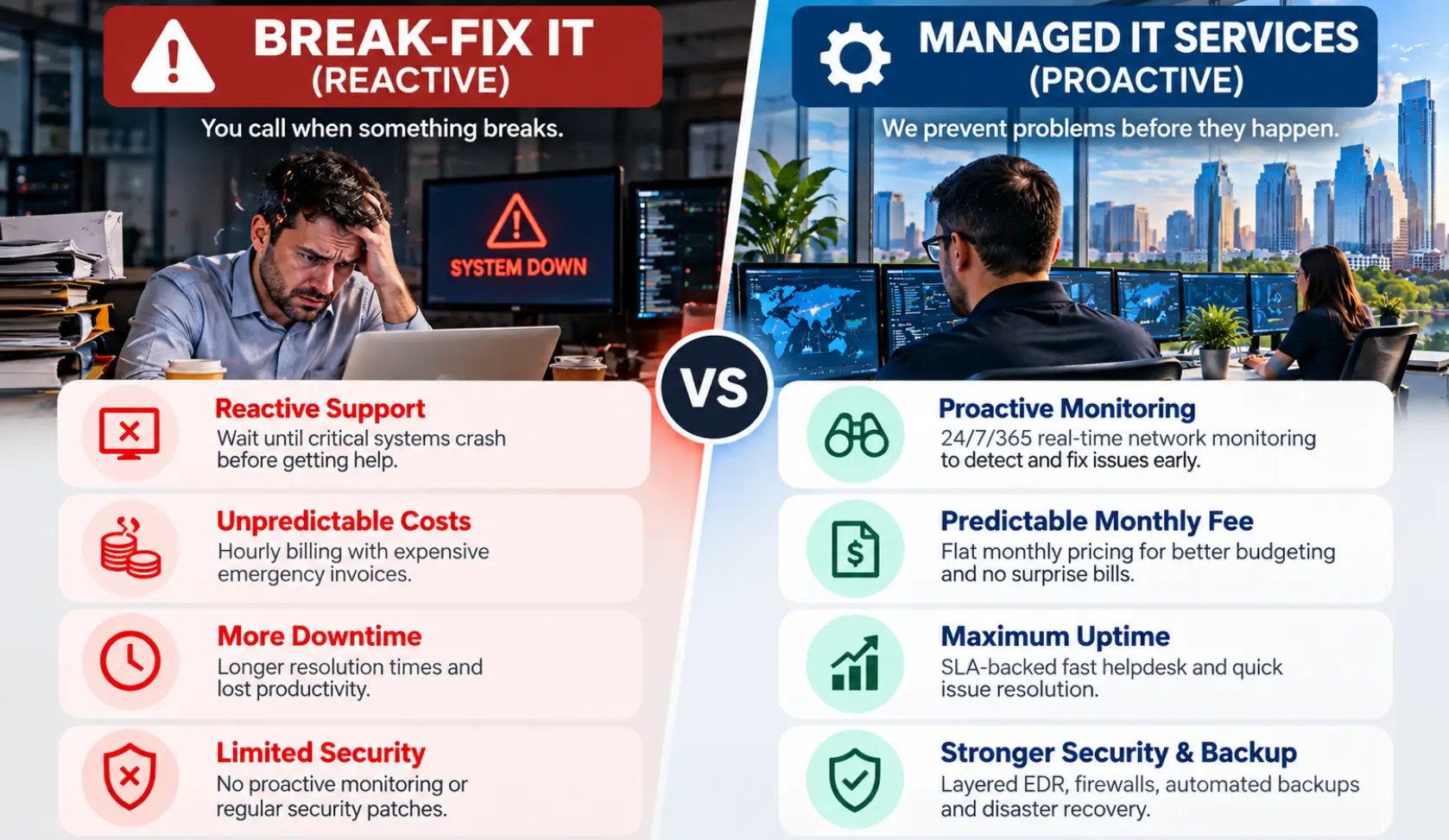
Before comparing specific providers, it is essential to understand the structural difference between hourly “break-fix” support and a dedicated Managed Services model.
In a break-fix relationship, your provider only makes money when your business experiences a failure. They have no financial incentive to engineer permanent solutions, harden network security, or prevent recurring bottlenecks.
In a Managed IT relationship, your provider operates on a predictable, fixed monthly fee. Because their profitability depends on keeping your infrastructure stable and secure, their financial incentives are completely aligned with yours: preventing downtime before it ever affects your staff.
Break-Fix vs. Fully Managed IT: Operational Comparison
| Feature / Metric | Hourly Break-Fix Support | Proactive Managed IT Services (MSP) |
|---|---|---|
| Operating Model | Reactive (Call when broken) | Proactive (Continuous monitoring & maintenance) |
| Billing Structure | Unpredictable hourly bills + emergency fees | Predictable flat-rate monthly investment |
| Response Time | Best-effort (often 4 to 24+ hours) | Contractual SLA (e.g., 15–30 minutes) |
| Cybersecurity | Basic, unmanaged antivirus | Multi-layered EDR, MDR, SIEM & 24/7 SOC |
| Data Protection | Local external drives (rarely tested) | Automated cloud backups with verified recovery |
| Strategic Planning | None (Tactical fixes only) | Dedicated vCIO & annual IT budgeting |
| Impact on Business | Extended downtime & surprise expenses | Maximum uptime, compliance & steady productivity |
When evaluating the true investment, consider the hidden drain of neglected systems. As detailed in our breakdown of the cost of underfunded IT in Austin businesses, even two hours of unbudgeted downtime can cost an Austin company thousands of dollars in lost billable hours, stalled client deliverables, and emergency remediation fees.
2. In-House IT vs. Outsourced IT: The Central Texas Hiring Reality
One of the most frequent debates executive teams face is whether to hire a dedicated internal IT technician or partner with an established MSP.
In Austin’s hyper-competitive tech labor market, hiring an internal IT generalist carries significant financial overhead:
- Salary Expectations: In Central Texas, a competent mid-level Systems Administrator commands a base salary between $85,000 and $115,000 per year.
- Loaded Employee Costs: When you add payroll taxes, health benefits, 401(k) matching, ongoing certifications, and enterprise software toolkits, the total cost easily exceeds $120,000 to $145,000 annually.
- The “Single Point of Failure” Risk: An in-house technician takes sick leave, takes vacations, and eventually resigns. When that sole employee is unavailable, your business is left completely unmonitored. Furthermore, no single individual possesses deep expertise across network architecture, cloud migration, compliance, telephony, and incident response simultaneously.
Partnering with an established MSP gives your company access to an entire team of certified network engineers, cybersecurity analysts, and helpdesk technicians for a fraction of the cost of a single full-time hire.
3. The 10-Point Checklist: How to Evaluate Austin Managed IT Providers
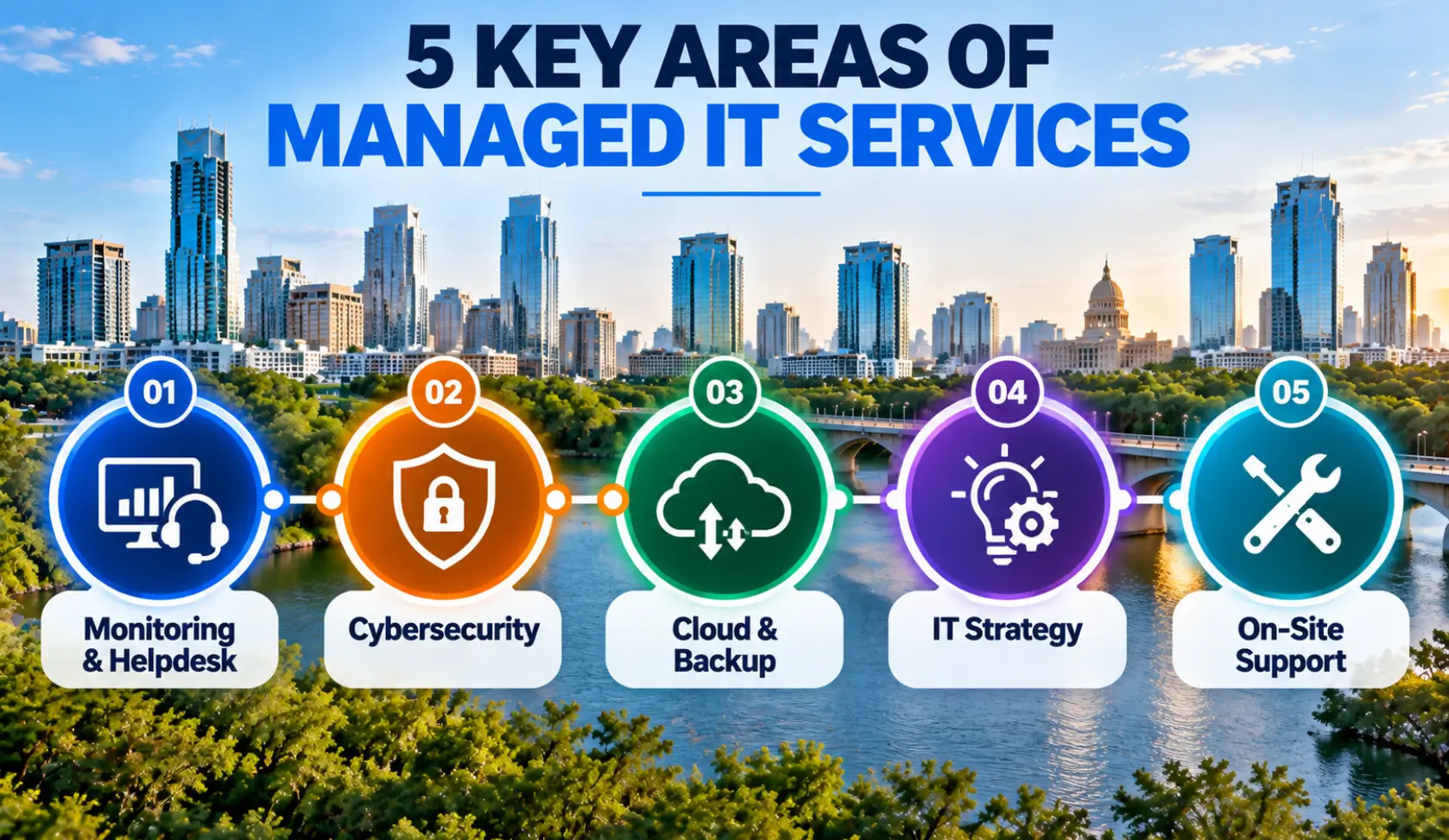
When reviewing proposals from local IT firms, use this 10-point checklist to benchmark their capabilities.
1. Contractual Service Level Agreements (SLAs) with Real Teeth
Any provider can state that they “respond quickly.” The best providers put guaranteed response times in writing within a Service Level Agreement (SLA).
- What to look for: A critical-issue response SLA of 15 to 30 minutes, backed by fee credits if they fail to meet their commitments.
- Red flag: Vague language such as “best-effort response” or 4-to-8-hour triage windows for critical server-down emergencies.
2. True Local On-Site Dispatch vs. Remote-Only Helpdesks
While over 85% of software and user tickets can be resolved remotely, catastrophic failures—such as a fried core switch, a severed fiber drop, or flooded hardware—require physical boots on the ground.
- The Austin reality: Austin traffic along the I-35 and MoPac corridors can make dispatch challenging. If an out-of-state or Dallas-based firm claims to serve Austin, their field technician may take 24 to 48 hours to arrive.
- Ensure your provider has dedicated field technicians based locally in Central Texas (Austin, Cedar Park, or Round Rock) who can arrive at your site within hours. For a deeper look at this dynamic, review our analysis of remote IT support vs. local IT support in Austin, TX.
3. An Enterprise Security Stack (Beyond Basic Antivirus)
Traditional signature-based antivirus cannot stop modern ransomware, zero-day exploits, or credential harvesting attacks.
- The modern baseline: The best MSPs bundle Endpoint Detection and Response (EDR), Managed Detection and Response (MDR), and 24/7 Security Operations Center (SOC) monitoring directly into their foundational stack.
- Verify whether their security services include automated phishing simulations, employee awareness training, and DNS-layer filtering to prevent malicious intrusions before they hit your endpoints. Explore dedicated cybersecurity services for comprehensive endpoint protection.
4. Verified Backup Restoration Testing (RTO & RPO)
Taking daily backups is only half the battle; knowing whether those backups can be successfully restored under pressure is what matters.
- Ask prospective vendors: “How often do you test spin-ups of our virtual machines, and what are our contractual RTO (Recovery Time Objective) and RPO (Recovery Point Objective) metrics?”
- Your provider should manage automated cloud storage alongside local immutable snapshots, verified through documented quarterly restore drills. Explore how enterprise data protection works through online backup solutions in Austin.
5. Contract Flexibility: Beware the 3-Year Lock-In
Many large national MSPs require clients to sign rigid 36-month contracts with aggressive auto-renewal clauses and steep termination penalties.
- If a provider is confident in their service quality, they should not need legal handcuffs to keep your business.
- Prioritize providers offering month-to-month agreements or structured 60-day risk-free onboarding trials. When a provider must earn your business every month, ticket resolution and client communication remain consistently high.
6. Transparent Per-User vs. Per-Device Billing
Ensure you receive an itemized scope of work defining what is covered under your agreement.
- Does your monthly per-user rate include routine adds, moves, and changes? Is remote and on-site support fully covered, or are on-site visits billed at an emergency hourly rate?
- Avoid providers who bill low initial retainers only to issue unexpected invoices for after-hours work, basic software patching, or routine device onboarding.
7. Strategic vCIO & Annual Technology Roadmapping
An exceptional MSP does not simply fix broken printers; they act as your fractional Chief Information Officer (vCIO).
- Your provider should conduct formal quarterly reviews (QBRs) to review ticket trends, analyze hardware lifecycles, identify aging infrastructure before it causes outages, and build predictable IT capital expense budgets for the coming fiscal year.
8. Compliance & Regulatory Understanding
If your organization handles healthcare records, credit card transactions, or defense supply contracts, generic IT management is insufficient.
- Verify whether the provider understands regulatory frameworks relevant to Central Texas businesses, such as:
- HIPAA / HITECH for medical, dental, and biotechnology practices.
- CMMC 2.0 & NIST 800-171 for defense subcontractors partnering with the Army Futures Command or Texas military installations.
- Texas Data Privacy and Security Act (TDPSA) compliance for commercial enterprise data.
9. Multi-Disciplinary Infrastructure Capabilities
Many IT companies only understand cloud dashboards and operating systems. If your facility experiences a structured cabling issue, a PoE failure, or wireless interference, they shrug and tell you to call a low-voltage contractor.
- The best partners handle both the logical network and the physical layer. Having unified expertise across Voice and Data Cabling Services, commercial fiber splicing, and high-density wired and wireless network installation ensures finger-pointing between different vendors is completely eliminated.
10. Access to Senior Tier-2/Tier-3 Engineers
There is nothing more frustrating than calling your IT support desk in the middle of a business interruption only to be routed to an outsourced call center reading from a script.
- Inquire about the vendor’s internal tier structure. When your employees call, do they reach local, knowledgeable technicians who can resolve tickets on the first call, or does every minor issue require escalation to a remote tier that takes hours to respond?
4. Austin Managed IT Services Pricing Guide (What to Expect in 2026)
Pricing for managed IT services across Austin and Central Texas typically falls into three main tiers based on support scope, compliance requirements, and security sophistication:
| Service Tier | Typical Cost (Per User/Month) | Included Capabilities |
|---|---|---|
| Tier 1: Monitoring & Patching (Basic Co-Managed) | $50 – $90 / user | Remote RMM agent, automated OS updates, basic endpoint antivirus. Helpdesk billed hourly. |
| Tier 2: Fully Managed IT (Most Popular for SMBs) | $125 – $185 / user | Unlimited remote & on-site helpdesk, EDR, spam filtering, patch management, cloud backup, quarterly vCIO reviews. |
| Tier 3: Advanced Security & Compliance (SOC / SIEM) | $190 – $275+ / user | All Tier 2 inclusions + 24/7/365 active SOC threat hunting, CMMC/HIPAA/TDPSA audit readiness, immutable air-gapped backups. |
Critical Pricing Questions to Ask Every Vendor:
- Is on-site emergency dispatch included, or is it billed at an additional hourly rate?
- Are project implementations (such as office relocations or major cloud migrations) included, or quoted as separate statements of work?
- What are your onboarding fees, and what specific assessments are performed during the first 30 days?
5. Five Major Red Flags When Interviewing an MSP
If you encounter any of the following warning signs during your vendor search, proceed with extreme caution:
- They Refuse to Grant You Master Administrative Credentials: Some IT companies deliberately withhold your domain registry logins, firewall administrator accounts, or Microsoft 365 global admin rights to prevent you from ever leaving. You legally own your data and infrastructure. A professional MSP always documents credentials in a secure, shared client vault.
- One-Size-Fits-All Proposals Without an On-Site Audit: Never sign an agreement with an IT company that quotes your network over the phone without conducting a comprehensive physical and network assessment of your cabling, switches, firewalls, and server closets.
- Absence of a Tiered Security Stack: If an IT firm claims that standard Microsoft Defender or basic off-the-shelf antivirus is sufficient protection for a commercial business in 2026, they are dangerously behind modern threat realities. Reliable providers integrate dedicated network security, firewalls, and routers with proactive endpoint monitoring.
- Vague, Unenforceable SLAs: If their contract says “we make every effort to respond quickly” rather than defining clear, contractual response tiers (e.g., Priority 1: <15 mins; Priority 2: <1 hour), you will inevitably experience delayed support during peak business hours.
- High Technician Churn: Ask prospective providers about their staff turnover rate. If their technicians leave every six months, your team will constantly deal with unfamiliar engineers who have no context regarding your network architecture.
6. The 12-Question Vendor Interview Script
Copy and paste these exact questions into your discovery meetings when vetting Austin IT firms:
Operational Accountability
- What is your contractual response time for a complete business outage, and what penalty occurs if you miss it?
- Where is your physical helpdesk located, and where are your field technicians dispatched from when on-site work is required?
- What percentage of your incoming support tickets are resolved on the first call without escalation?
Security & Data Protection
- Do you provide 24/7 Security Operations Center (SOC) monitoring, or does alerting stop when your helpdesk closes at 5:00 PM?
- How do you secure our remote and mobile workforce outside the corporate network?
- Can you show us a sample documentation report detailing how our passwords, assets, and network topologies will be mapped?
Commercial Terms & Culture
- Do you require a multi-year contract commitment, or do you offer month-to-month terms with a trial period?
- What specific services or circumstances trigger additional out-of-scope hourly charges?
- Can you provide three contact references from current Central Texas commercial clients of similar size and industry?
9. The BCS Difference: Comprehensive IT & Communications in Central Texas7. The 4-Phase Transition Blueprint: How to Switch IT Providers Without Downtime
One of the greatest fears Austin business owners express is the potential disruption of transitioning from an incumbent provider or an in-house employee to a new Managed Service Provider. A mature MSP executes onboarding through a structured, phased methodology:
- Phase 1: Silent Discovery & Network Audit (Days 1–7): The incoming engineering team maps all network endpoints, firewall rules, server architectures, cloud tenants, and active user licenses in the background without disturbing staff.
- Phase 2: Administrative Credential Transfer & Documentation (Days 8–14): Secure, professional custody transfer of domain registrars, global admin accounts, and vendor service accounts.
- Phase 3: Agent Deployment & Security Baseline (Days 15–21): Deployment of the proactive RMM agent, EDR security software, and automated backup routines across all workstations and servers.
- Phase 4: Go-Live & Staff Introduction (Days 22–30): Full transition of helpdesk ticketing, employee onboarding orientation, and initial executive vCIO roadmap presentation.
8. Frequently Asked Questions About Managed IT in Austin
Q1: How quickly can an Austin MSP take over support if our previous IT company quits?
In emergency situations—such as a sudden IT administrator resignation or an active cybersecurity breach—a rapid-response provider can deploy emergency monitoring agents and secure admin credentials within 24 to 48 hours, followed by full system remediation.
Q2: What is the standard contract length for managed IT services in Austin?
While many large national providers enforce 24 to 36-month locked contracts, top-tier local providers offer month-to-month agreements or structured 60-day risk-free trials to ensure continuous accountability.
Q3: Does an Austin MSP support our remote or out-of-state employees?
Yes. Modern cloud and hybrid infrastructure allows certified engineers to provide identical helpdesk support, security monitoring, and patch management for employees whether they work in downtown Austin, from home in Round Rock, or across the country.
Q4: What happens if our building loses power or fiber internet connectivity?
A comprehensive MSP engineers automated failover solutions, including dual WAN redundant internet circuits (fiber + wireless backup) and battery backup (UPS) systems, paired with off-site cloud replication to ensure your team can work remotely without losing critical data.
Selecting an IT provider is not simply an administrative purchase; it is one of the most critical operational partnerships your business will establish. When your technology partner is responsive, transparent, and proactive, your staff remains productive, your client data remains secure, and your leadership team can focus entirely on driving revenue.
At Business Communication Solutions (BCS), we have spent over 20 years engineering, securing, and supporting commercial technology environments across Austin, Cedar Park, Round Rock, and Central Texas.
- No-Contract Flexibility: We believe our work should speak for itself. We offer flexible service models backed by a 60-Day Free Trial, completely eliminating the risk of being locked into a rigid multi-year commitment.
- Complete Single-Source Infrastructure: From certified structured cabling and cloud VoIP telephony to enterprise cybersecurity and round-the-clock helpdesk support, we eliminate vendor finger-pointing by managing both the physical and digital layers of your infrastructure.
- Local Central Texas Engineers: When you call our team, you reach experienced, dedicated professionals who live and work right here in the Greater Austin area.
Ready to Upgrade Your Business Technology?
If your current IT company is unresponsive, your systems are suffering from recurring downtime, or you want an objective second opinion on your cybersecurity readiness:
- Explore our full suite of proactive Managed IT Services in Austin.
- Learn more about our philosophy and why local businesses trust BCS for proactive IT support.
- Call our Austin office directly at (512) 257-1433 to schedule your free, comprehensive IT risk and infrastructure assessment.