

SOAR – It’s 2 a.m. A firewall flags a suspicious login, an endpoint tool spots a strange file, and an email filter catches a phishing attempt, all within minutes of each other. Nobody is watching a dashboard at that hour, and by the time someone checks in the morning, the trail could be hours old. That gap is exactly what SOAR is built to close.
What Does SOAR Stand For?
SOAR stands for Security Orchestration, Automation, and Response. It is technology that connects your different security tools, firewalls, email security, endpoint protection, and more, so they can share information and act together instead of operating as separate, disconnected systems.
How SOAR Works?
When one tool flags something suspicious, SOAR can automatically pull in related information from your other systems, follow a predefined playbook, and take initial action, like isolating a device or blocking an address, in seconds rather than hours. A person still reviews and makes the final call on anything serious, but SOAR handles the repetitive first steps automatically, so your team spends its time on judgment calls instead of manual busywork.
When malicious behavior is flagged on a laptop, SOAR coordinates with endpoint security and EDR tools to isolate the machine from the corporate network immediately.
How Does SOAR Work Step by Step?
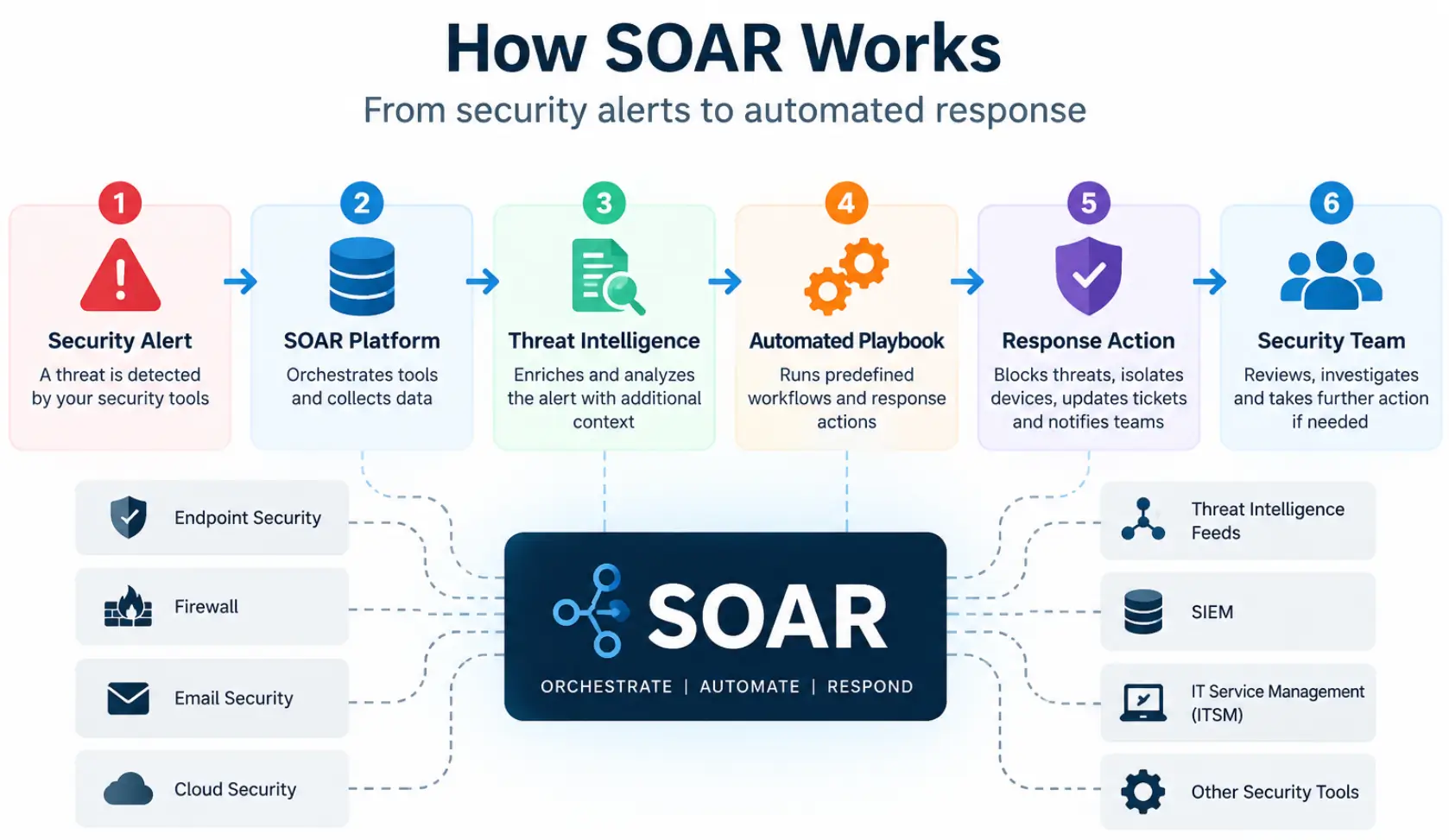
SOAR works by connecting security tools and using predefined workflows to help security teams investigate and respond to security alerts. A typical SOAR process includes the following steps:
- Security alert is detected: A firewall, endpoint security tool, email security system, or another security product identifies suspicious activity.
- Information is collected: SOAR gathers relevant information from connected security tools and threat intelligence sources.
- The alert is analyzed: The platform applies predefined rules or workflows to determine what actions should be taken.
- Automated response begins: Depending on the playbook, SOAR may perform actions such as blocking a suspicious IP address, isolating an endpoint, or creating an incident ticket.
- Security team reviews the incident: More serious or uncertain incidents can be escalated to a security professional for investigation and final decision-making.
This approach helps reduce repetitive manual work while allowing security teams to maintain control over important security decisions.
What Can SOAR Automate?
SOAR can automate many repetitive tasks involved in security monitoring and incident response. Instead of requiring a security professional to perform every initial step manually, predefined workflows can handle routine actions and provide relevant information to the team.
Depending on the security tools and workflows in place, SOAR can help automate tasks such as:
- Collecting information about suspicious alerts
- Checking IP addresses, domains, and files against threat intelligence sources
- Creating and updating security incident tickets
- Sending alerts and notifications to security teams
- Blocking suspicious IP addresses or domains
- Isolating potentially compromised devices
- Gathering information from multiple security tools
- Escalating incidents that require human investigation
The exact actions depend on the organization’s security environment and the playbooks configured within the SOAR platform. Human review can still be required for serious or complex security incidents.
What Are SOAR Playbooks?
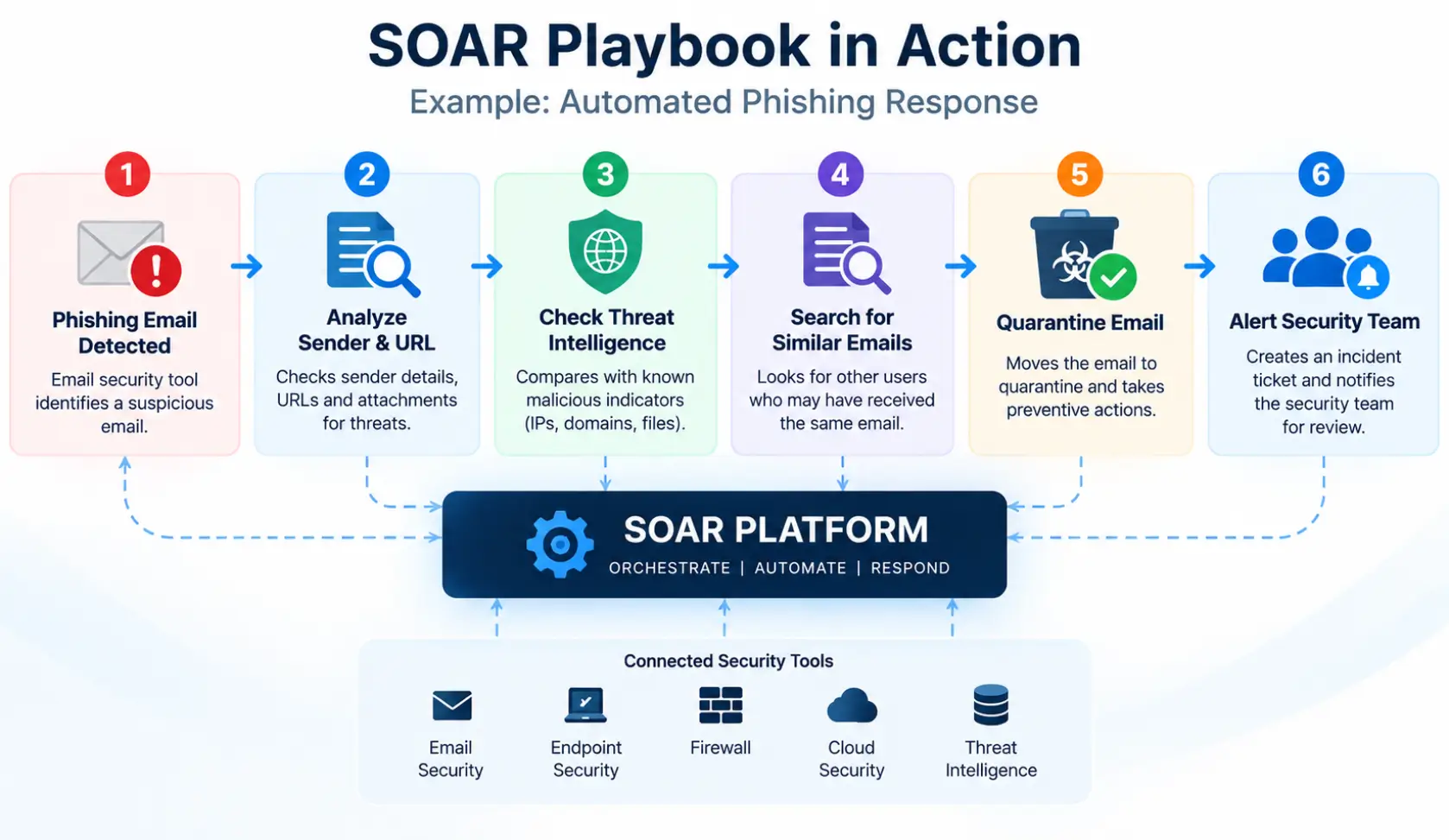
SOAR playbooks are predefined workflows that determine how a security system should respond to a specific type of alert or incident. They help security teams follow consistent procedures instead of manually repeating the same steps for every event.
For example, if a phishing email is detected, a playbook could check the sender and URL, gather threat intelligence, search for similar messages, quarantine the email, create an incident, and notify the security team.
Playbooks can be customized according to a business’s security tools, response policies, and risk requirements. This allows routine actions to be automated while leaving important decisions to security professionals.
Why Austin Small Businesses Need SOAR
Most small businesses do not have a security team sitting at a screen around the clock. Threats do not wait for business hours, and the time between an alert firing and someone responding to it is often where the real damage happens. SOAR shrinks that window automatically, so a threat that arrives at 2 a.m. gets an initial response at 2 a.m., not at 9 the next morning.
Automating response playbooks allows small teams to drastically reduce their business attack surface before stolen credentials can be monetized.
Does a Small Business Need SOAR?
Not every small business needs a dedicated SOAR platform. The value of SOAR depends on the size of the security environment, the number of security tools being used, the volume of alerts, and how much incident response work needs to be automated.
SOAR may be useful for a business that:
- Uses multiple security tools that need to work together
- Receives frequent security alerts
- Has repetitive incident-response tasks
- Needs more consistent security workflows
- Works with an MDR or security operations team
- Wants to reduce the time spent on routine security response
Businesses with simpler environments may have different security priorities. A cybersecurity assessment can help determine whether SOAR is appropriate or whether other security controls should be addressed first.
SOAR vs. SIEM: What Is the Difference?
SIEM (Security Information and Event Management) collects and analyzes security data to detect that something is wrong. SOAR picks up from there, automating the response once a threat is detected. Most effective security programs use them together: SIEM to see the full picture, and SOAR to act on it quickly.
While SOAR handles automated containment, it relies completely on SIEM log aggregation and threat detection to discover anomalies in the first place.
SOAR vs. MDR: What’s the Difference?
SOAR and Managed Detection and Response (MDR) are different parts of a cybersecurity strategy.
SOAR is a technology that connects security tools and automates predefined security workflows. MDR is a managed cybersecurity service that provides security monitoring, threat detection, investigation, and response with the involvement of security professionals.
In simple terms, SOAR focuses on automating and coordinating security actions, while MDR provides ongoing security monitoring and human expertise. An MDR team can also use SOAR technology to automate repetitive response tasks and improve its security workflows.
How Business Communication Solutions Can Help
BCS sets up and manages SOAR for Austin small businesses so your security tools work together instead of in isolation, cutting response time from hours to minutes without requiring you to staff a 24/7 security desk. SOAR is one part of a complete cybersecurity plan alongside SIEM, EDR, and monitoring through our Security Operations Center (SOC).
We integrate automated playbooks into our 24/7 managed detection and response (MDR) services to protect your organization around the clock.
Want to see how SOAR fits into a complete cybersecurity plan for your business? Visit our cybersecurity services page to learn more, or contact us today.
Call us now at 512-257-1433 or visit us at bcs-ip.com to schedule a free cybersecurity risk assessment.
Frequently Asked Questions About SOAR
What is SOAR in cybersecurity?
SOAR stands for Security Orchestration, Automation, and Response. It connects security tools and helps automate predefined workflows for investigating and responding to security incidents.
What does SOAR stand for?
SOAR stands for Security Orchestration, Automation, and Response.
How does SOAR work?
SOAR connects security tools, gathers information about security alerts, follows predefined playbooks, and can perform approved response actions automatically.
What can SOAR automate?
SOAR can automate tasks such as threat intelligence checks, incident ticket creation, notifications, security alert enrichment, and certain response actions such as blocking suspicious addresses or isolating devices.
What is a SOAR playbook?
A SOAR playbook is a predefined workflow that specifies the actions to take when a particular security alert or incident occurs.
What is the difference between SOAR and SIEM?
SIEM primarily collects and analyzes security data to help identify suspicious activity, while SOAR focuses on coordinating security tools and automating response workflows. The two technologies can work together.
Can small businesses use SOAR?
Yes. Small businesses can use SOAR when their security environment has enough tools, alerts, or repetitive response tasks to benefit from automation. Whether it is appropriate depends on the business’s specific security requirements.
Related Cybersecurity Articles: