

Antivirus software tells you when it catches a known virus. But what about everything else: the failed login attempts at 3 AM, the unusual file transfer, the login from a country your business has never worked with? That is where SIEM comes in.
What Does SIEM Stand For?
SIEM stands for Security Information and Event Management. It is a system that continuously collects and analyzes security data from across your business, your computers, servers, firewalls, Microsoft 365, and other cloud services, and looks for patterns that suggest something is wrong.
How SIEM Works
Think of SIEM as a digital alarm system. Instead of one camera watching one door, SIEM pulls information from every entry point into your business at once: network traffic, email activity, user logins, and file access, and correlates it. When it spots something that looks suspicious, like a login from an unfamiliar location or a sudden spike in failed password attempts, it generates an alert so someone can investigate before it turns into a bigger problem.
What Data Does SIEM Collect?
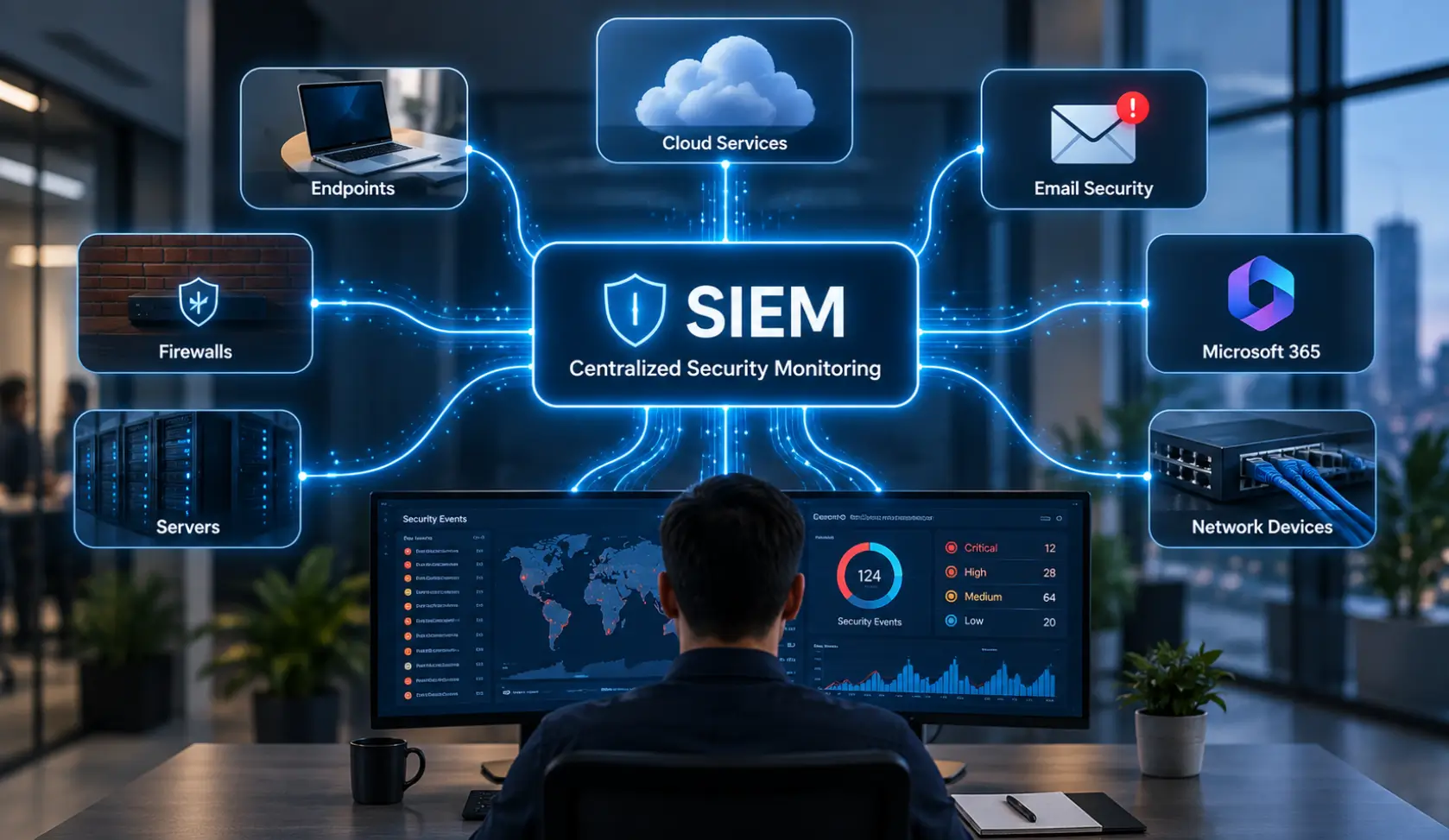
A SIEM platform can bring security-related information from multiple parts of a business’s technology environment into a centralized system. The exact sources depend on the organization’s infrastructure and the integrations supported by its SIEM platform.
Common data sources can include:
- Authentication and login events from user accounts and identity systems
- Firewall and network logs showing connections and network activity
- Endpoint activity from computers and other managed devices
- Server logs recording system and application events
- Cloud and SaaS activity from services used by the business
- Email security events related to suspicious messages or account activity
- Security tools such as intrusion detection and endpoint protection systems
Collecting information from multiple sources gives security teams broader visibility than examining each system separately. SIEM platforms can also normalize and correlate data from different sources to help identify events that may be related.
What Can SIEM Help Detect?
One of the main purposes of centralized security monitoring is to identify patterns that may be difficult to recognize when information is spread across different systems.
Depending on the data sources and detection rules configured, SIEM can help security teams investigate events such as:
- Repeated failed login attempts
- Unusual login activity
- Unexpected privilege changes
- Suspicious activity across multiple devices
- Unusual network connections
- Possible malware-related events
- Activity involving compromised accounts
- Security events that occur across several systems
For example, a single failed login may not indicate a serious problem. However, repeated failed attempts followed by a successful login and unusual activity from the same account may deserve further investigation.
The value comes from bringing related security events together so that analysts can investigate them in context.
Why Small Businesses in Austin Need SIEM
SIEM used to be a tool only large corporations and government agencies could afford, requiring dedicated security teams and expensive infrastructure. Cloud technology and managed services have changed that. Today, a small or mid-sized Austin business can get the same kind of visibility a large enterprise has, without building an internal security operations center from scratch.
SIEM vs. Antivirus: What Is the Difference?
Antivirus software looks for known threats on a single device. SIEM looks across your entire environment for patterns and behavior that indicate a threat, even one that has never been seen before. Most businesses need both: antivirus and endpoint detection and response (EDR) on individual devices, and SIEM tying the bigger picture together.
SIEM vs. EDR: What’s the Difference?
SIEM and Endpoint Detection and Response (EDR) address different parts of cybersecurity monitoring.
EDR focuses primarily on endpoints such as laptops, desktops, and workstations. It monitors endpoint activity and can help security teams investigate and respond to suspicious behavior on those devices.
SIEM provides broader visibility by collecting security information from multiple sources such as endpoints, firewalls, servers, applications, and cloud environments.
In practice, the two technologies can complement each other. EDR can provide detailed information about activity on an individual device, while SIEM can bring that information together with events from other systems for broader analysis.
The right combination depends on the organization’s infrastructure, security requirements, and monitoring capabilities.
SIEM vs. SOAR: What’s the Difference?
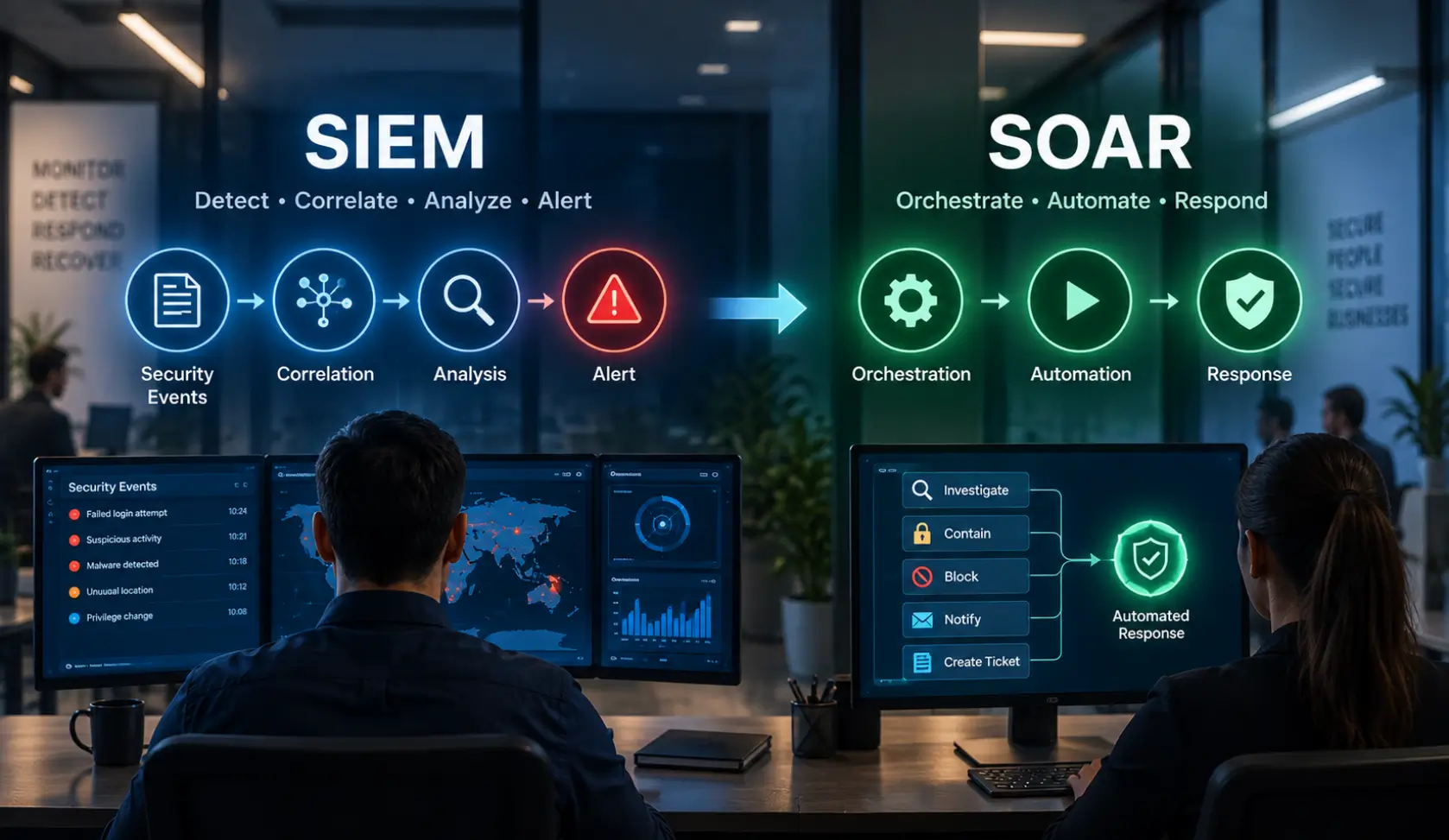
SIEM and Security Orchestration, Automation, and Response (SOAR) can work together, but they have different primary roles.
SIEM focuses on collecting, correlating, and analyzing security information from multiple sources. It helps security teams gain centralized visibility into security events.
SOAR focuses on coordinating tools and automating predefined response workflows. When an alert requires a specific response, a SOAR platform can use a playbook to perform approved actions or route the incident to the appropriate team.
A simple way to understand the relationship is:
SIEM → Collects and analyzes security events
SOAR → Helps automate and coordinate response
Using both can help organizations connect detection and investigation with repeatable response processes.
When Should a Small Business Consider SIEM?
Not every small business needs a dedicated SIEM platform. The need depends on the organization’s technology environment, security requirements, available security resources, and the amount of data that needs to be monitored.
A business may benefit from centralized security monitoring when it:
- Uses multiple security technologies and wants their events in one place
- Has a growing number of endpoints, servers, or cloud services
- Needs better visibility across its IT environment
- Handles a large volume of security events
- Has compliance or log-retention requirements
- Works with an MDR or security operations team
- Needs more structured investigation and reporting
For smaller or simpler environments, other security controls may be a higher priority. SIEM should be considered as part of the organization’s broader security strategy rather than as a standalone solution.
FAQs
Q: What does SIEM stand for in cybersecurity?
A: SIEM stands for Security Information and Event Management. It is an architecture that aggregates, normalizes, and correlates log data from across an entire organization to identify potential security threats in real time.
Q: How is SIEM different from traditional antivirus?
A: Antivirus software operates on a single device, scanning for known malware signatures. SIEM looks across your entire network (servers, cloud apps, firewalls, and PCs) to spot suspicious behavior and multi-stage attack patterns that traditional antivirus cannot see.
Q: What kind of logs does a SIEM system collect?
A: SIEM collects authentication logs, firewall traffic, VPN connections, domain controller events, DNS queries, email gateway activity, and Microsoft 365 audit logs.
Q: Can a small business manage a SIEM internally?
A: It is difficult for small teams. SIEM generates thousands of security events per day. Without a 24/7 Security Operations Center (SOC) to filter noise and investigate real threats, internal IT teams often experience alert fatigue and overlook critical warnings.
Q: What is log correlation?
A: Correlation is the process where a SIEM links seemingly unrelated events across different systems. For example, it might connect an employee login in Austin with a simultaneous login using the same credentials in another country, flagging an active compromise.
Q: Does SIEM help with regulatory compliance?
A: Yes. Major compliance frameworks (including HIPAA, PCI-DSS, CMMC, and ISO 27001) mandate centralized logging, retention of audit trails, and regular review of security events—all core functions of a SIEM.
Q: How long should security logs be retained in a SIEM?
A: Most regulatory standards and cyber insurance carriers require organizations to retain searchable audit logs for at least one year, with at least 90 days immediately accessible for active forensic queries.
Q: What is SIEM as a Service (Managed SIEM)?
A: Managed SIEM is an outsourced model where an MSSP deploys, configures, and monitors the SIEM platform 24/7, providing real-time threat detection and incident response without requiring the customer to hire internal security analysts.
How Business Communication Solutions Can Help
BCS designs and manages SIEM solutions sized to your business, your risk level, and your budget, so you get enterprise-level visibility without the enterprise-level cost. SIEM is one part of a layered cybersecurity approach that also includes MFA, email security, EDR, and 24/7 monitoring through our Security Operations Center (SOC).
Want to see how SIEM fits into a complete cybersecurity plan for your business? Visit our cybersecurity services page to learn more, or contact us today.
Call us now at 512-257-1433 or visit us at bcs-ip.com to schedule a free cybersecurity risk assessment.
Related Cybersecurity Articles: