

A company laptop has antivirus installed. Is that enough to call it secure? What if encryption is off, updates are overdue, the user has unrestricted administrator access, or the device stopped reporting last month?
A secure configuration baseline defines how devices should be configured. Monitoring checks what is actually happening. Access controls determine whether a device should be allowed to reach particular resources.
These practices can support SOC 2 and CMMC readiness. The work begins with a clear standard, appropriate implementation, and evidence—not a green status icon alone.
Watch: Is a Windows Hello PIN safer than your password?
Watch this short introduction, then use the baseline guidance below to review device configuration and access controls.
What is a secure device baseline?
A baseline is an approved set of configuration requirements for a type of device and its role. Workstations, servers, phones, and specialized equipment may need different standards.
Use recognized guidance and platform recommendations as starting points, then evaluate the settings against your risks, applications, hardware, and obligations. CIS Control 4 emphasizes establishing and maintaining secure configurations for enterprise assets and software.
Record the baseline version, scope, owner, implementation method, verification method, and approved exceptions.
Configure, verify, and control access are separate jobs
| Job | Purpose | Example |
|---|---|---|
| Configure | Apply the settings the organization selected. | Enable disk encryption and the host firewall. |
| Verify | Check supported settings and actual device status. | Review encryption state, patch status, and reporting freshness. |
| Control access | Use identity and device signals in resource-access decisions. | Require an approved device meeting defined conditions before permitting access to a supported application. |
A configuration profile can fail to apply. A compliance policy may check only selected conditions. An access policy may cover some applications and leave other paths unaffected.
Do not assume every baseline setting is continuously evaluated by the device’s compliance engine. Match each important requirement to a verification method and follow up on errors, missing data, and conflicts.
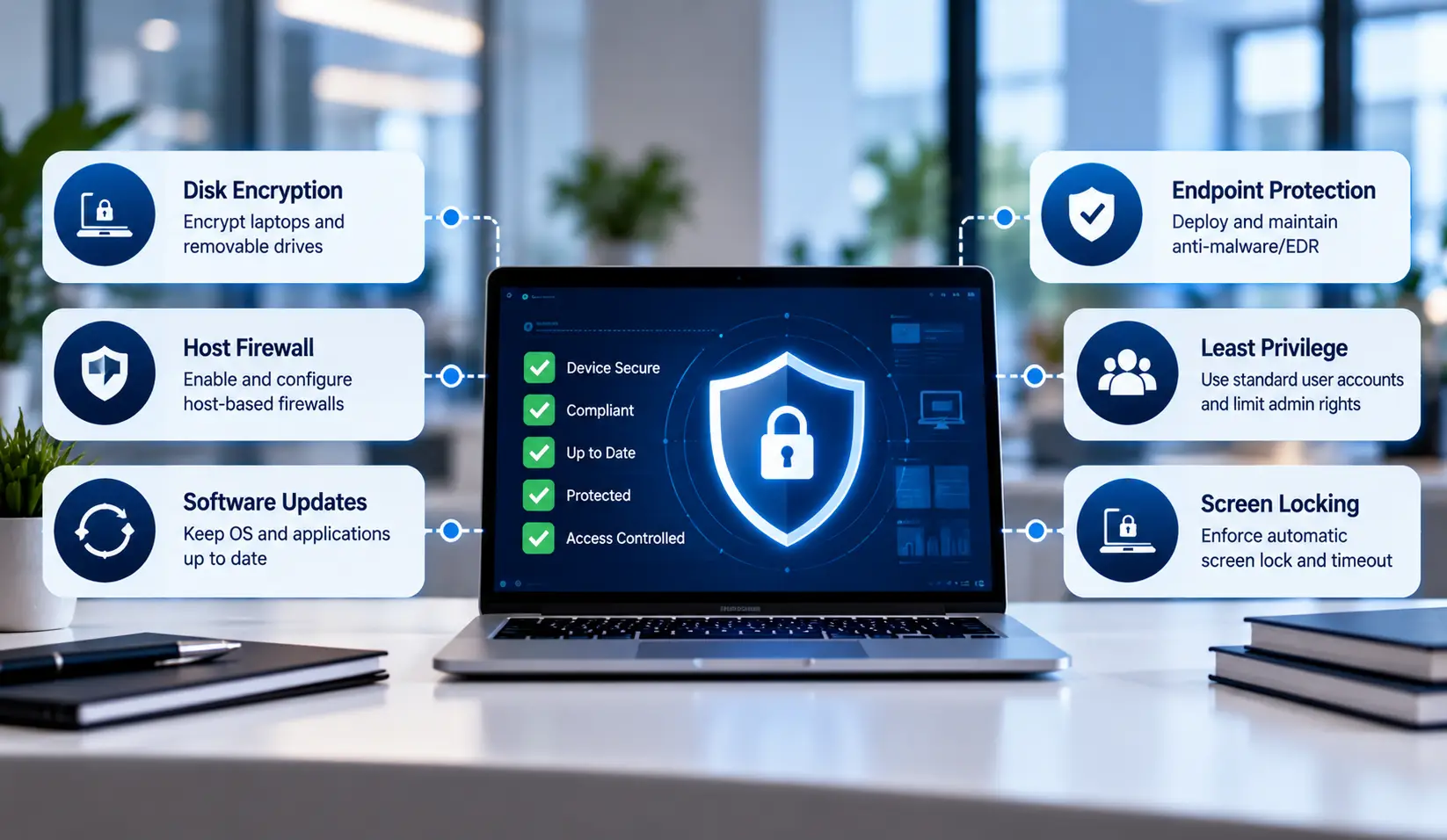
Hardening areas to evaluate
The following are practical review areas, rather than a universal checklist that guarantees compliance:
| Area | What to define and verify |
|---|---|
| Supported software | Supported operating systems and applications, update deadlines, and handling of end-of-life systems. |
| Encryption | Where encryption is required, its configuration, recovery-key protection, and recovery procedures. |
| Host firewall | Applicable profiles, approved rules, exceptions, and the actual running state. |
| Screen locking | An inactivity limit appropriate to the device, environment, and applicable requirements. |
| Privileges | Standard-user access, separate administrative access, and controlled elevation for approved tasks. |
| Local administrator credentials | Unique managed credentials where applicable, rotation, authorized retrieval, and logging. |
| Endpoint protection | Supported security software, active protection, policy health, updates, and response ownership. |
| Browsers and applications | Approved software, extension controls, protective settings, and unnecessary features. |
| Removable media | Permitted devices, restrictions, encryption, and approved exceptions. |
| Firmware and boot protection | Applicable hardware capabilities, secure boot settings, firmware maintenance, and verification. |
A management tool may report a hardware condition without being able to enable it remotely on every device. Define a remediation process for equipment that cannot meet the standard.
Implementing Secure Device Baselines with Microsoft Intune
Small and mid-sized businesses can use a mobile device management (MDM) platform such as Microsoft Intune to deploy and monitor approved endpoint configurations. The exact settings depend on the operating system, device capabilities, business applications, and applicable security requirements.
A practical implementation process includes:
- Disk encryption: Configure BitLocker policies for supported Windows devices. Verify encryption status and recovery-key backup instead of assuming that policy assignment means encryption succeeded.
- Screen locking: Set an inactivity timeout based on the organization’s security policy and the risks associated with each device.
- Endpoint protection: Configure the appropriate Microsoft Defender protections or other approved endpoint security tools. Monitor protection status, update health, and reporting failures.
- Firewall and application controls: Define host firewall rules and restrict unapproved applications where required. Consider Windows Defender Application Control when application execution needs tighter control.
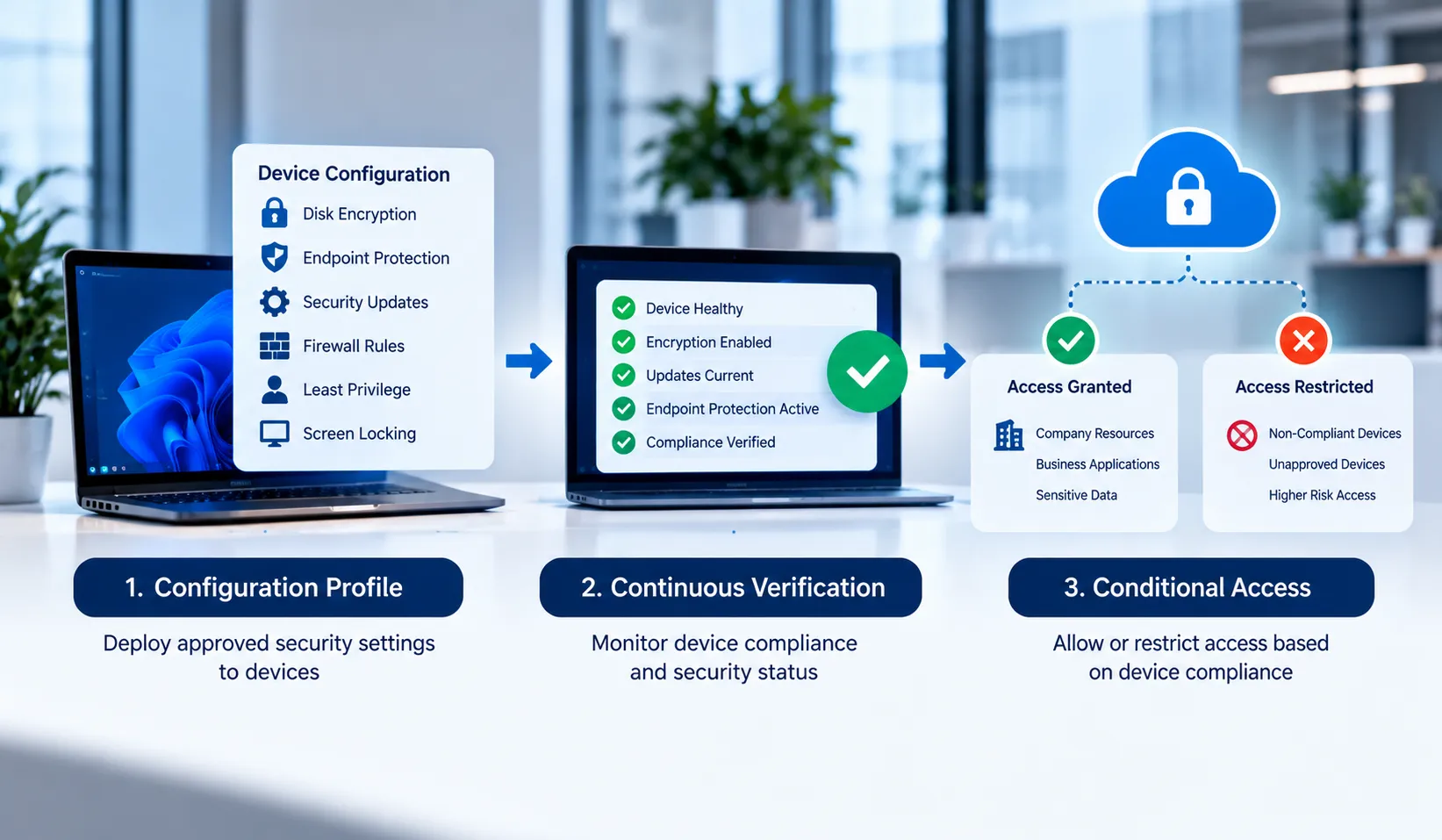
- Access enforcement: Where supported, combine device compliance policies with Conditional Access to restrict access to selected company resources from devices that fail defined checks.
- Verification and remediation: Review policy deployment errors, device check-in freshness, configuration conflicts, and failed compliance checks. Assign owners to resolve problems and verify the result.
Microsoft Intune and Microsoft 365 licensing capabilities vary by plan. Before implementation, verify the required licenses, hardware prerequisites, policy compatibility, and recovery procedures.
A successful deployment should produce evidence of the settings applied, devices covered, failures identified, and corrective actions completed—not merely a list of assigned policies.
Require approved, compliant devices—where supported
A practical objective is: require approved, compliant devices before allowing access to company applications and data, where supported.
Specify what “approved” and “compliant” mean. Define covered users, devices, applications, access methods, exclusions, stale-status handling, and remediation timing. Test the access decision from the clients your employees actually use.
Device-based controls require compatible management, identity, applications, and authentication paths. They do not automatically protect every legacy application, local file share, or Ethernet jack.
NIST’s Zero Trust Architecture explains why network location or company ownership alone should not establish trust.
Read our related article on asset inventory, BYOD, and network admission.
How does this support SOC 2?
SOC 2 evaluates controls against the relevant Trust Services Criteria. It does not prescribe a universal device-hardening settings list or require one particular management product.
CC7.1 concerns detecting configuration changes that introduce vulnerabilities and susceptibility to newly identified vulnerabilities. Its points of focus include defined configuration standards and monitoring for deviations. Depending on the control design, related access and protection controls can also support CC6.1, CC6.3, CC6.6, and CC6.8.
These are illustrative relationships, not a claim that enabling one setting satisfies an entire criterion. Management should define the control and preserve evidence of implementation and operation. Reference: AICPA Trust Services Criteria.
Explore BCS SOC 2 readiness and gap assessment support.
Can this also support CMMC Level 1 and Level 2?
Yes, but the two levels have different requirements. Under 32 CFR 170.14, Level 1 uses the FAR basic safeguards, while Level 2 uses NIST SP 800-171 Revision 2.
CMMC Level 1
Device controls can contribute to limiting access to authorized users and devices, restricting external connections, correcting flaws, and maintaining malicious-code protection. The applicable safeguards are in FAR 52.204-21.
The Level 1 baseline does not explicitly require every hardening measure listed in this article. Do not present a particular encryption product, screen-lock duration, or management platform as a universal Level 1 requirement.
CMMC Level 2
Level 2 has more explicit configuration-management requirements. Examples in NIST SP 800-171 Revision 2 include baseline configurations and inventories (3.4.1), secure configuration settings (3.4.2), and tracking and reviewing changes (3.4.3). Other requirements address least privilege, session locking, malware protection, and protection of CUI.
Map each implemented control to the relevant requirements and assessment objectives. Where cryptography protects CUI confidentiality, evaluate the applicable FIPS-validation requirement; a generic “encryption enabled” result is not enough to establish it.
Understand CMMC Level 2 Asset Scoping
Secure device baselines should be applied in the context of the organization’s documented CMMC assessment scope. Not every asset has the same role or assessment treatment.
- CUI Assets: Devices that process, store, or transmit Controlled Unclassified Information (CUI). These assets are assessed against the applicable Level 2 security requirements.
- Security Protection Assets: Assets that provide security functions or capabilities to the assessed environment. Their assessment treatment depends on the security capabilities they provide and the applicable scoping rules.
- Contractor Risk Managed Assets (CRMAs): Assets that could handle CUI but are not intended to do so under the organization’s documented security policies and practices. Their treatment and supporting documentation must follow the applicable scoping rules.
Organizations should identify and document the relevant assets, their treatment in the System Security Plan (SSP), and their inclusion in the assessment-scope network diagram, as applicable.
Do not assume that a device is out of scope simply because it is not intended to handle CUI. Asset classification depends on its capabilities, use, security role, and the applicable scoping requirements.
Review the official CMMC Level 2 Scoping Guide when defining the assessment boundary.
A device marked compliant by a management platform is not a CMMC compliance determination. Scoping, documentation, personnel, physical safeguards, provider responsibilities, and other requirements still need evaluation.
Explore our CMMC gap assessment and implementation services.
Least Functionality: Disable What Your Business Doesn’t Need
A secure baseline should define what a device needs to do—and restrict capabilities that have no approved purpose. Antivirus and patching remain important, but unnecessary software, listening services, and transfer features can leave avoidable exposure.
| Requirement | Focus | Illustrative application |
|---|---|---|
| CM.L2-3.4.6 — Least Functionality | Configure systems to provide only essential capabilities. | Define a server’s approved role before selecting its features and services. |
| CM.L2-3.4.7 — Nonessential Functionality | Restrict, disable, or prevent unnecessary programs, functions, ports, protocols, and services. | Disable an unused remote-access service and remove its unnecessary firewall allowance. |
NIST SP 800-171 Revision 2 discusses limiting simultaneous program instances as one example of restricting software execution under 3.4.7. It does not prescribe one instance for every application. Select restrictions based on security needs and document the decision. Source: NIST SP 800-171 Revision 2, sections 3.4.6–3.4.7.
What does limiting simultaneous program instances mean?
An instance is a running copy of a program. The software may be approved, while extra concurrent executions serve no business purpose. Application windows, tabs, worker processes, and program instances are not always equivalent; define exactly what the restriction counts.
Example: A scheduled backup utility is still working when the next run is due. If overlapping execution is unnecessary, configure the scheduler to queue or skip the next run until the active job finishes. Test the behavior and monitor delayed or missed jobs so the restriction does not undermine recovery objectives.
Another example is a privileged maintenance utility that should perform only one change operation at a time. A supported application setting or controlled execution mechanism may reject a second launch. Define whether the limit applies per user, session, machine, or across the service.
These are illustrative design choices. Some applications legitimately require multiple workers or parallel jobs. Limiting them without checking dependencies can interrupt operations. A concurrency limit also does not make an unauthorized program safe or replace application authorization.
Other practical ways to reduce unnecessary functionality
- Server roles: remove unused components after checking application and management dependencies.
- Remote access: disable unapproved remote-control tools and restrict authorized management services to approved paths and personnel.
- Ports and protocols: identify necessary listeners and connections, then restrict those without an approved purpose. A firewall block and disabling the underlying service are distinct actions.
- Workstation software: remove unauthorized applications and enforce the organization’s application-execution policy where appropriate.
- Device features: evaluate Bluetooth, removable storage, file sharing, and automatic execution by role. A feature needed by one team may be unnecessary on another team’s devices.
These examples are not a universal list of features every business must disable. Identify the business purpose, security impact, and supported enforcement method before making changes.
Least functionality versus least privilege
Least functionality asks what the system should be able to do. Least privilege asks which users and processes should have which permissions. Disabling an unused service reduces functionality; restricting who may administer an approved service limits privilege. An environment often needs both.
How do you enforce and verify the restrictions?
- Define: record approved capabilities by device role and identify what is unnecessary, restricted, or prohibited.
- Approve and pilot: review dependencies, test representative workflows, and prepare a rollback plan.
- Enforce: use suitable operating-system configuration, service settings, application controls, firewall rules, or scheduler settings. A general application allowlist does not automatically enforce instance counts.
- Validate: attempt an authorized second launch, check service states, test relevant network connections, and confirm essential business tasks still work.
- Maintain evidence: retain approved baselines, configuration results, dated test records, exceptions, and remediation records. Recheck after relevant changes.
A written instruction can explain the rule, but evidence should show how the chosen restriction operates. An installed management agent or a green dashboard alone does not demonstrate every setting is enforced.
These practices also support a defined SOC 2 configuration-management program; SOC 2 does not prescribe a universal program-instance limit. BCS helps Austin and Houston businesses review necessary capabilities, implement agreed restrictions, and organize evidence through our CMMC readiness services and SOC 2 readiness support.
Monitor drift and resolve exceptions

Configuration drift occurs when actual settings move away from the approved standard. A user changes a setting, an application introduces an exception, or a device misses a policy update.
For each finding, identify the affected asset, expected setting, observed state, severity, owner, and corrective action. Recheck after remediation. Approved exceptions should have a business reason, appropriate authorization, review date, and compensating measures where appropriate.
Also monitor the management system itself. An offline device with a month-old green result should not be treated as current proof of protection.
Plan product interactions and recovery
Define which tool owns each setting. Multiple platforms may coexist, but overlapping patch, antivirus, firewall, or configuration policies need coordination to avoid conflicting instructions.
Endpoint detection and response is not synonymous with antivirus. Determine the active protection components and product prerequisites before enabling dependent features. Pilot changes on representative devices and test business applications, peripherals, sign-in, and recovery.
Cloud folder synchronization can support file protection, but it does not by itself establish a complete recovery plan. Define recovery objectives, retention, backup coverage, administrative protections, and restoration testing separately.
Who approves the standard?
IT or a qualified provider can propose and implement a baseline. Business management retains accountability for approving the standard, delegated authority, risk decisions, and exceptions.
An example policy statement to adapt is:
Company devices are configured according to approved secure configuration standards appropriate to their role and applicable requirements. Assigned personnel implement the standards, verify relevant settings, investigate deviations, and document corrective actions and approved exceptions. Supported access controls restrict company-resource access using defined identity and device conditions. Management approves the standards and delegates implementation responsibilities.
Document the actual tools, scope, review intervals, and responsibilities in supporting procedures. Avoid promising controls that have not been implemented.
What evidence helps?
- Approved baseline versions and records of review and changes.
- Device inventory reconciled with management and endpoint-protection coverage.
- Policy assignments, deployment results, errors, and configuration reports.
- Compliance checks showing what was evaluated and when.
- Access-policy scope, exclusions, and authorized test results.
- Patch, encryption, firewall, and privilege records relevant to the control.
- Remediation tickets, verification, and approved exceptions.
Screenshots can support evidence, but a single green dashboard should not replace coverage checks or records over time. Protect credential and recovery-key information when preparing evidence.
Frequently Asked Questions
1. What is a secure device baseline for SOC 2?
A secure device baseline is an approved set of configuration requirements for a device type or role. It may cover supported software, encryption, firewall settings, administrative privileges, security updates, and endpoint protection. For SOC 2, the organization should define how these settings support its relevant controls, verify implementation, and retain appropriate evidence.
2. Does CMMC Level 1 require disk encryption on every workstation?
CMMC Level 1 does not establish a blanket requirement to enable disk encryption on every workstation. Its requirements align with the applicable basic safeguarding requirements in FAR 52.204-21. Organizations should still evaluate encryption based on their risks, policies, contracts, and other applicable obligations.
3. What is the difference between a compliant device and a secure device?
A device marked compliant has passed the specific checks evaluated by the management platform at the time of assessment. That status does not necessarily establish that every security setting is correct or that protection remains current. Organizations should also verify monitoring coverage, reporting freshness, remediation, and relevant security controls.
4. How can businesses reduce configuration drift on remote laptops?
Businesses can use device-management policies, automated compliance checks, endpoint protection, and controlled administrative privileges to reduce configuration drift. They should monitor failed deployments and stale device reports, investigate deviations, and verify that corrective actions restore the approved configuration.
5. Can BYOD devices be included in a CMMC Level 2 environment?
Potentially, but the answer depends on how the devices are used, whether they can process, store, or transmit CUI, and how the assessment scope is defined. Organizations must evaluate applicable security requirements, access restrictions, and cryptographic protections. A virtual desktop arrangement may reduce local CUI exposure, but it does not automatically make a device out of scope.
6. How does Conditional Access enforce device baselines?
Where supported, Conditional Access evaluates configured identity and device conditions before allowing access to selected resources. Policies can require a device to meet specified compliance conditions, but the outcome depends on the platform, policy scope, exclusions, and available device signals. Organizations should test actual access paths rather than assume every application is protected.
Secure configuration support in Austin and Houston
Business Communication Solutions helps businesses define device standards, implement agreed safeguards, review coverage, and organize readiness evidence. We can work alongside internal IT and existing providers.
Related resources: security monitoring tools, security awareness training, and BCS cybersecurity services.
Austin: 512-257-1433 Houston: 281-815-8784
Discuss your device baseline and readiness needs with BCS.
What do you think?
Could your business explain its device security standard—and demonstrate which devices meet it today? Are you relying on a policy, a dashboard, or a verified process for keeping the standard in place?