

Choosing the right business phone headset is not just about comfort or sound quality. The headset must also work with your desk phone, computer, softphone application, or VoIP system.
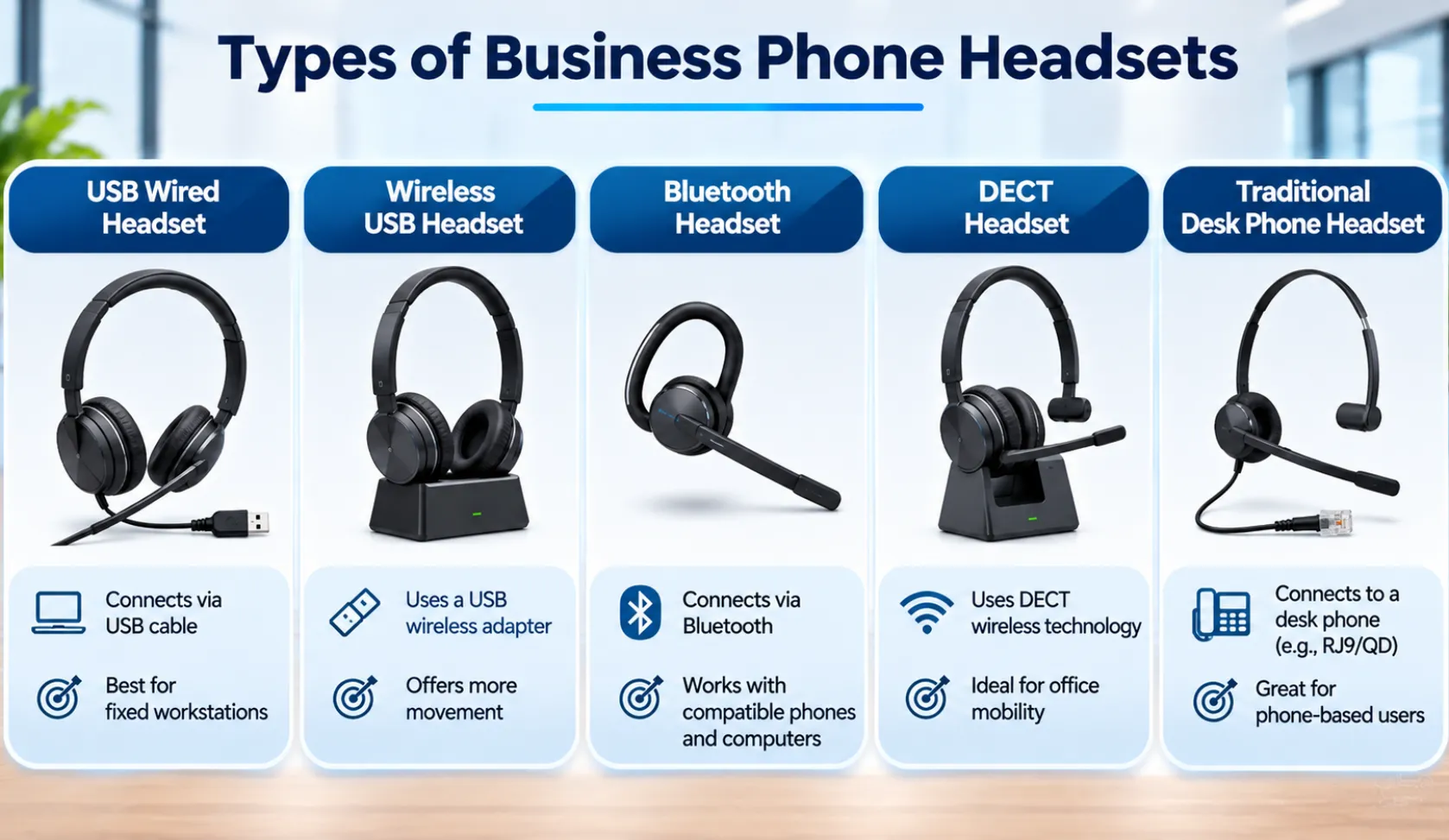
Businesses can choose from several options, including USB wired headsets, wireless USB headsets, Bluetooth headsets, DECT headsets, and traditional desk phone headsets. Each option has different connection requirements and use cases.
If your team uses a business phone system, review the available Business Telephone Systems before selecting headsets. The phone model and its supported connections will help determine which headset options are suitable.
1. USB Wired Headsets
USB wired headsets connect directly to a computer, laptop, or supported desk phone through a USB port.
They are commonly used by employees who handle calls through softphones, desktop communication applications, or compatible VoIP phones.
Key considerations:
- Direct wired connection without a separate wireless base.
- No headset battery charging is required.
- Suitable for employees who work primarily at a fixed desk.
- Compatibility depends on the connected device and communication application.
USB wired headsets can be a practical choice for reception teams, office employees, and customer support staff who spend much of their working day at a computer.
However, having a USB port does not automatically mean that every phone supports every USB headset. Check the phone manufacturer’s compatibility information before purchasing.
2. Wireless USB Headsets
Wireless USB headsets typically connect to a computer or supported phone through a USB wireless adapter or base station.
They allow employees to move away from their desks while remaining connected to their communication device. The actual wireless range depends on the headset model, connection technology, and working environment.
Key considerations:
- Greater freedom of movement than wired headsets.
- Useful for employees who need to move around their workstations.
- Requires battery charging.
- May use a USB dongle or dedicated base station.
- Must be compatible with the connected phone or computer.
Wireless USB headsets can be useful for office employees who regularly switch between computer work and phone conversations.
Before choosing one, confirm whether the headset supports the intended device and whether call answering, ending, and other call controls work with that setup.
3. Bluetooth Headsets
Bluetooth headsets connect wirelessly to compatible devices using Bluetooth technology.
They are commonly used with laptops, smartphones, and some business IP phones. Depending on the phone model, Bluetooth may be built in or require a supported Bluetooth USB adapter.
Key considerations:
- Wireless connection to compatible devices.
- Useful for employees who switch between supported devices.
- Available in different wearing styles, including single-ear and dual-ear models.
- Requires battery charging.
- Connection and call-control features depend on device compatibility.
Bluetooth can be a convenient option for employees who use both a computer and a compatible phone. However, do not assume that a Bluetooth headset will connect directly to every desk phone.
For example, Yealink publishes model-specific headset compatibility information that identifies supported Bluetooth headsets and whether an additional adapter is required. Check the relevant Yealink headset compatibility documentation before selecting a device.
4. DECT Wireless Headsets
DECT stands for Digital Enhanced Cordless Telecommunications. It is a wireless technology used by cordless phones and compatible wireless headset systems.
DECT headsets generally work with a dedicated base station that connects to a supported phone or communication device.
They can be useful in offices where employees need to move around while remaining connected to their desk phone.
Key considerations:
- Designed for cordless communication.
- Typically uses a dedicated base station.
- Provides mobility without requiring a direct Bluetooth connection.
- Requires compatible equipment and charging.
- Wireless coverage depends on the headset system and workplace environment.
DECT can be worth considering for receptionists, office managers, and employees who handle frequent calls but also need to move around their workplace.
BCS lists W-AIR DECT handsets and headsets among its Wildix communication options. You can review the Wildix VoIP Phones and Headsets page for more information.
5. Traditional Desk Phone Headsets
Traditional desk phone headsets connect directly to compatible business phones through supported headset interfaces and cables.
Depending on the phone and headset, connections may include RJ9, USB, or other manufacturer-supported interfaces. Some headset setups also use a Quick Disconnect (QD) connection with a compatible phone cable.
These headsets are useful for employees who primarily handle calls through physical desk phones.
Key considerations:
- Check the phone’s headset port and connection type.
- Confirm that the headset cable or adapter is suitable.
- Check whether the phone supports electronic call control.
- Verify compatibility with the exact phone model.
A headset that physically fits a connection does not necessarily support all phone functions. Audio, microphone operation, call answering, and call ending should be checked before deployment.
6. What Is an Electronic Hook Switch (EHS)?
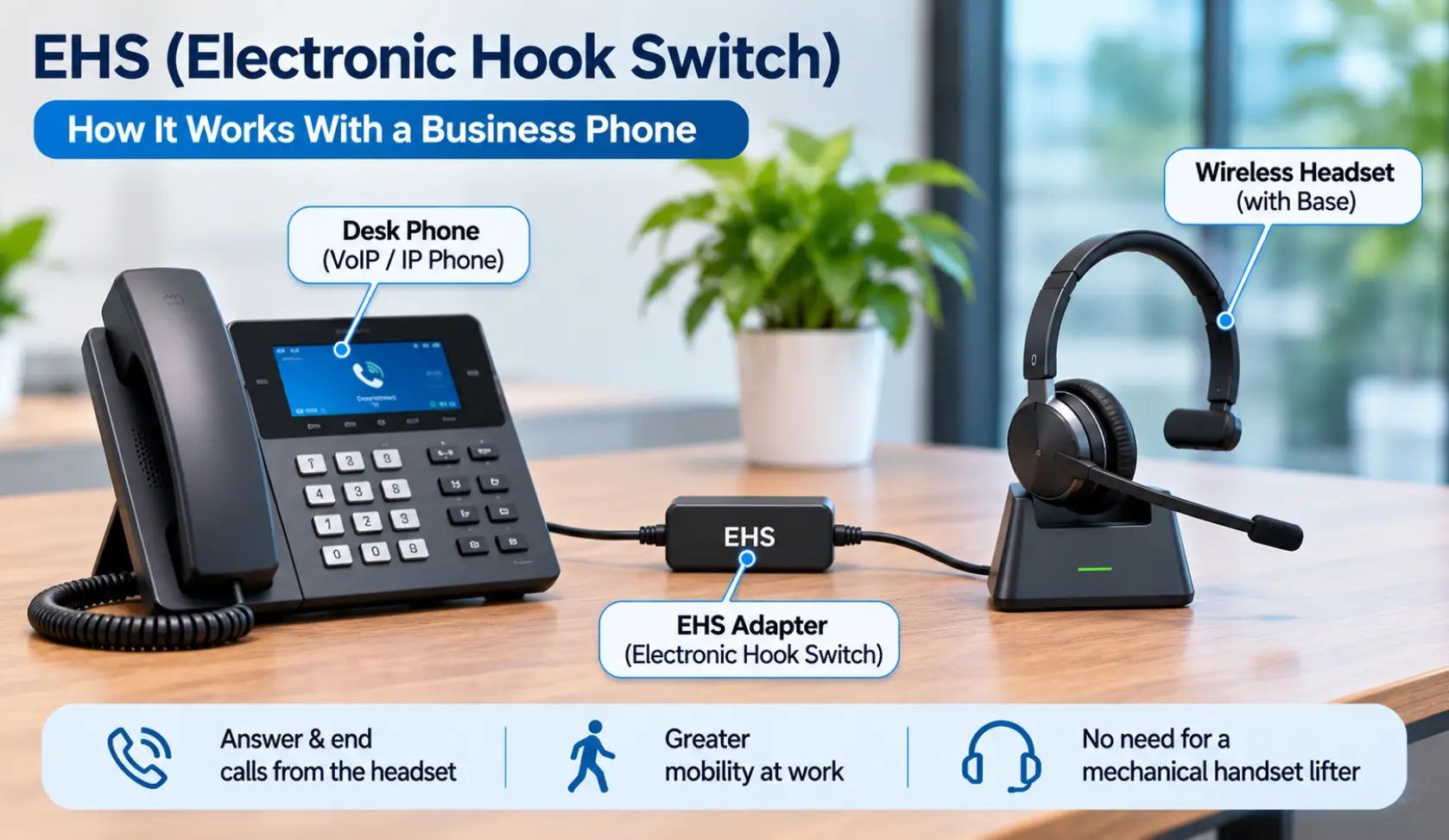
An Electronic Hook Switch (EHS) allows a compatible wireless headset to control certain call functions on a supported desk phone.
For example, an employee may be able to answer or end a call using the headset controls without physically lifting the phone handset.
Some older or different headset setups use a mechanical handset lifter. This device physically lifts and replaces the handset to answer or end calls remotely.
EHS can remove the need for a mechanical lifter, but it is not a universal replacement for every headset and phone combination.
The correct EHS adapter or cable depends on the desk phone and headset models. Some configurations also require specific phone settings or firmware support.
Before purchasing an EHS cable, verify the manufacturer’s compatibility documentation. The original Yealink headset compatibility information provides examples of compatible headset and phone combinations.
7. How to Choose the Right Business Phone Headset
The right headset depends on how employees communicate and which devices they use. Consider the following factors before making a decision.
Identify the Communication Device
First, determine whether employees use:
- Physical desk phones
- Computers with softphone applications
- Mobile phones
- A combination of these devices
This will help narrow down the available connection options.
Check Compatibility
Confirm the exact phone model, headset model, connection type, and any required adapters.
Do not rely only on a product description that says a headset is suitable for business use. Check the manufacturer’s tested compatibility list wherever available.
Consider Employee Mobility
Employees who remain at their desks may prefer wired USB or traditional desk phone headsets.
Employees who regularly move around the office may benefit from compatible Bluetooth or DECT wireless options.
Choose the Right Wearing Style
Headsets are available in different designs:
- Mono: Covers one ear and allows the employee to remain more aware of surrounding conversations.
- Stereo: Covers both ears and can help reduce surrounding distractions.
- Over-ear or on-ear: Different designs offer different comfort and fit preferences.
The right choice depends on the employee’s working environment and personal comfort.
Review Call Controls and Microphone Requirements
Check whether employees need headset-based call answering, call ending, volume adjustment, and mute controls.
For busy offices, microphone performance and background-noise handling should also be considered. Actual performance varies by headset model and environment.
8. Common Mistakes When Selecting Business Headsets
Avoid these mistakes when choosing headsets for your office:
- Assuming all Bluetooth headsets work with desk phones: Bluetooth support varies by phone model.
- Ignoring adapter requirements: Some headsets require a specific USB dongle, EHS cable, or base station.
- Confusing USB compatibility with universal support: A USB connection alone does not guarantee that every headset feature will work.
- Overlooking employee requirements: A headset suitable for a fixed workstation may not suit an employee who moves around frequently.
- Skipping compatibility testing: Test the headset’s audio, microphone, and call controls before purchasing equipment for an entire team.
Checking these details beforehand can help prevent unnecessary purchases and setup problems.
Frequently Asked Questions
1. What are the different types of business phone headsets?
Common options include USB wired, wireless USB, Bluetooth, DECT wireless, and traditional desk phone headsets. The suitable type depends on the phone system and connection requirements.
2. What is the difference between Bluetooth and DECT headsets?
Bluetooth headsets connect to compatible devices using Bluetooth technology. DECT headsets generally use a dedicated base station and are designed for cordless communication with compatible phone systems.
3. Can I use a USB headset with a VoIP phone?
Yes, if the VoIP phone supports the headset and its connection type. Check the manufacturer’s compatibility documentation before purchasing.
4. What is an EHS cable used for?
An Electronic Hook Switch cable allows a compatible headset to control supported call functions on a compatible desk phone. The required cable depends on the phone and headset models.
5. Do wireless business headsets require charging?
Yes. Bluetooth and most other wireless headsets use rechargeable batteries. Charging requirements and battery life vary by model.
6. Are wired headsets better than wireless headsets?
Neither option is universally better. Wired headsets avoid battery charging, while wireless headsets provide greater freedom of movement. The right choice depends on employee requirements and device compatibility.
7. How do I check whether a headset is compatible with my desk phone?
Check the exact phone model, headset model, connection type, and any required adapter. Manufacturer compatibility lists are the most reliable starting point.
Choose a Headset That Works With Your Business Phone System
Selecting a business phone headset requires more than comparing prices and features. The connection type, phone compatibility, employee requirements, and call-control functions all matter.
Businesses using desk phones, VoIP platforms, and softphone applications should confirm compatibility before purchasing equipment.
Business Communication Solutions (BCS) helps Austin-area businesses with business phone systems, VoIP solutions, installation, and technical support. If you are reviewing headset options for your office, explore our Business Telephone Systems or contact BCS to discuss your phone system requirements.
Related Guides
- Selecting the Right VoIP Phone Service for Your Business
- How to Choose the Right Business Phone System
- Web-Based VoIP Phone System with Video, Chat & CRM Integration
- Benefits of Call Recording for Business Phone Systems
- VoIP Quality of Service (QoS) Improvements
- Troubleshooting Your NEC Phone System
- Phone Service in California
- How Business Communication Solutions Enhance Your Projects with Cost Savings