

When a business telephone system does not route incoming calls correctly, the problem is not always the handset or physical phone line. In some cases, the issue may involve how incoming calls are configured and distributed by the telephone service provider.
For businesses that depend on phone calls to communicate with customers, suppliers and employees, incorrect call routing can interrupt everyday operations. Identifying whether the issue comes from the phone equipment, telephone system or provider configuration is an important part of troubleshooting.
A business landline troubleshooting visit by Business Communication Solutions (BCS) provides a practical example of why checking call-routing configuration matters. During an onsite visit, the BCS team determined that the provider needed to program the customer’s hunt group correctly. The issue was resolved, and the customer received an explanation of the problem within approximately one hour.
This guide explains what hunt groups do, how incorrect programming can affect business calls and what information to prepare when reporting a telephone routing problem.
What Is a Hunt Group in a Business Phone System?
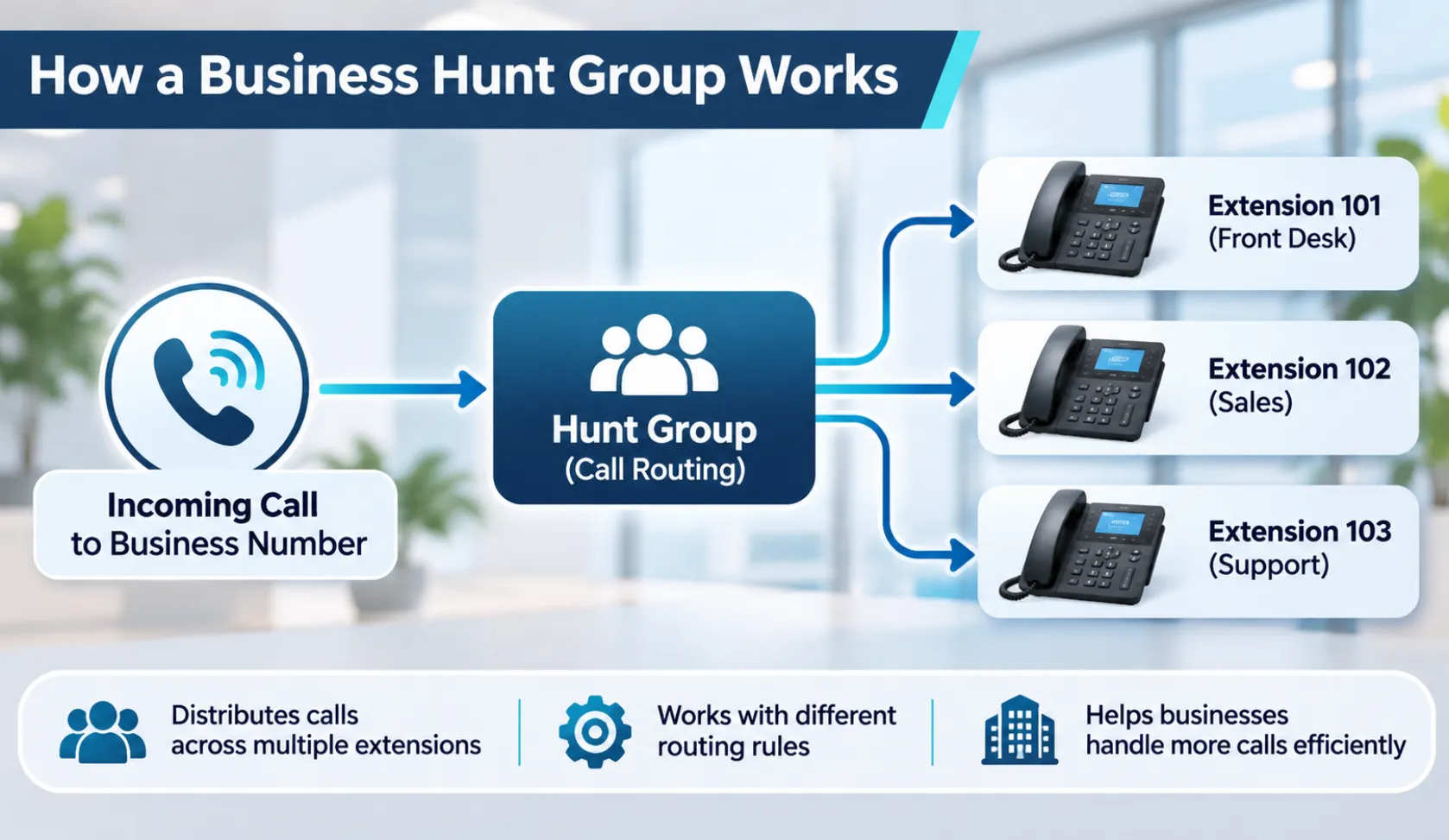
A hunt group is a call-routing feature that distributes incoming calls across a group of telephone lines or extensions.
Businesses may use hunt groups when several employees need to answer calls made to one main business number. Instead of requiring customers to know individual extension numbers, the system can direct incoming calls to designated phones according to configured rules.
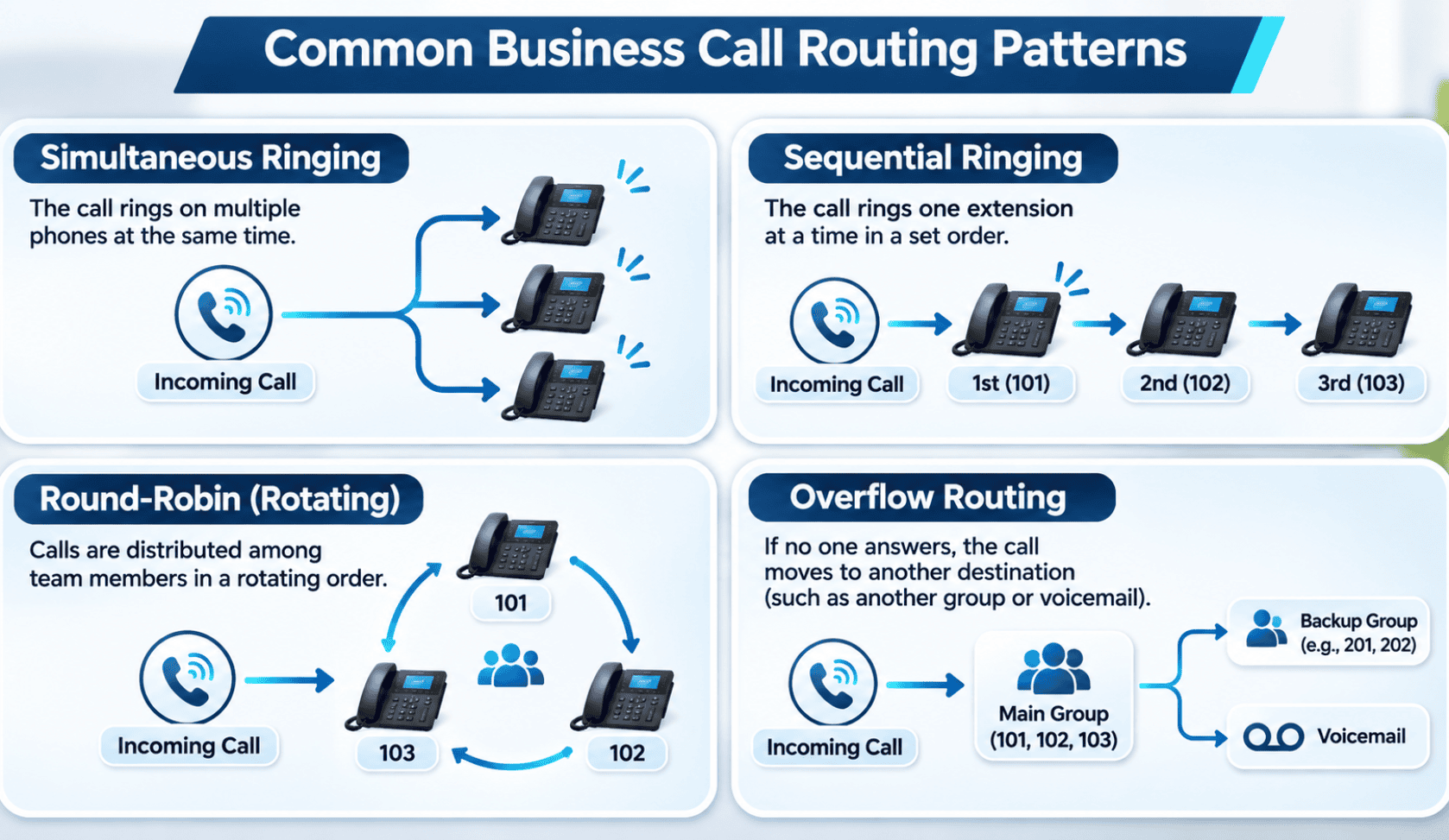
Depending on the phone system and provider, a hunt group may use different ringing patterns.
Simultaneous ringing: Multiple phones ring at the same time. The first available employee can answer the call.
Sequential ringing: The system tries one extension first and then moves to another if the call is not answered.
Rotating or round-robin routing: Calls are distributed among group members according to an assigned order or rotation.
Overflow routing: Calls may move to another extension, group or destination when the initial group cannot answer them. The available options depend on the system.
These configurations help businesses organize incoming calls, but they must be programmed according to the company’s actual call-handling requirements.
What Happens When a Hunt Group Is Not Programmed Correctly?
A hunt group depends on its configuration to determine where incoming calls should go. If the settings do not match the intended call flow, employees and customers may experience call-routing problems.
Possible symptoms include:
- Incoming calls not reaching the intended extensions.
- Some phones ringing while other expected phones remain inactive.
- Calls following an unexpected ringing sequence.
- Calls moving to an incorrect destination.
- Calls not following the intended overflow or forwarding rules.
These are examples of possible hunt group problems, not a list of symptoms confirmed in the BCS customer case.
It is also important to understand that similar symptoms can have different causes. A phone that does not ring may have an extension, device, network, system or provider-related issue. The actual cause needs to be identified before changing the configuration.
A Real BCS Troubleshooting Example: Incorrect Hunt Group Programming
Business Communication Solutions received a request to investigate a business landline issue.
During the onsite visit, the team determined that the telephone service provider needed to program the customer’s hunt group correctly.
The issue was therefore related to provider-side call-routing configuration rather than simply replacing a telephone handset.
BCS helped identify the problem, coordinate the necessary resolution and explain the issue to the customer. The customer was pleased that the problem was resolved and understood what had caused it within approximately one hour.
What can businesses learn from this situation?
The main lesson is that a business phone problem should not automatically be treated as a hardware failure.
If the telephone equipment appears operational but incoming calls are not reaching the correct destinations, call-routing settings may need to be reviewed.
The phone provider may control certain settings, while other configurations may be managed through an onsite PBX or business phone system. Understanding which party manages the relevant configuration can help avoid unnecessary equipment replacements or repeated troubleshooting.
How to Troubleshoot a Business Landline Call-Routing Problem
Before changing telephone settings, collect information about the issue. A few basic checks can help the technical support team understand where to investigate.
1. Identify which phone numbers or extensions are affected
Determine whether the issue affects the main business number, a particular extension or several phones.
If only certain extensions are affected, record their numbers and locations. This can help narrow down the problem.
2. Check what happens when someone calls the business
Use another phone to make a test call to the affected business number.
Observe whether the call:
- Rings on the expected phones.
- Rings on an unexpected extension.
- Moves to voicemail or another destination.
- Fails to connect.
- Continues ringing without reaching the intended group.
Record the actual result rather than assuming what the phone system should be doing.
3. Review the intended call flow
If the business uses a hunt group, document how incoming calls are supposed to be distributed.
For example:
- Should all phones ring together?
- Should one extension ring before another?
- Should unanswered calls move to another group?
- Should calls eventually reach voicemail?
Comparing the expected call flow with the actual behavior makes it easier to identify configuration differences.
4. Contact the telephone service provider
If the hunt group or incoming number routing is managed by the provider, request a review of the relevant configuration.
Provide examples of affected calls, the expected destinations and the behavior observed during testing.
Do not assume that the provider has made a configuration error until the relevant settings have been checked.
5. Test the call flow after changes
Once the responsible provider or technician has made an adjustment, place another test call.
Check whether the intended extensions ring and whether the call follows the expected routing sequence. Test any relevant overflow or forwarding behavior as well.
A successful test should confirm the specific call flow that was causing the problem.
Is the Problem With the Phone, PBX or Service Provider?
Not every business telephone problem has the same cause. Understanding the difference between the main components can help determine who needs to investigate.
| Component | What it handles | Example of a possible issue |
|---|---|---|
| Telephone handset | Allows employees to make and receive calls | A damaged handset or faulty connection |
| PBX or phone system | Manages extensions and call-handling rules | An incorrect extension or routing configuration |
| Service provider | Supplies telephone service and may manage number routing or hunt groups | Provider-side configuration requiring correction |
| Network infrastructure | Supports network-connected VoIP equipment | Connectivity problems affecting IP phones |
Traditional landline services, hosted telephone systems and on-premise PBX systems do not all work in the same way. The equipment and responsible service provider determine where specific settings are managed.
For businesses using a PBX or modern VoIP platform, a technician may need to examine the phone system configuration, while provider-controlled settings may require the telephone carrier’s involvement.
BCS provides support for business phone systems and can help investigate issues affecting business communications. Learn more about business telephone systems in Austin.
What Information Should You Prepare Before Requesting Phone Support?
Providing clear information can make troubleshooting more efficient.
Before contacting your provider or technical support team, prepare the following:
- Affected phone number: Identify the business number receiving the calls.
- Affected extensions: List the phones or extensions experiencing the issue.
- Call examples: Record what happens when someone calls the business.
- Expected call behavior: Explain which employees or phones should receive incoming calls.
- Time of the problem: Note when the issue started and whether it happens consistently.
- Recent changes: Mention any recent changes to phone equipment, extensions, providers or call-routing settings.
- Error messages: Record any messages heard by callers or displayed on the phone.
This information helps the support team understand the problem before making configuration changes.
When Should a Business Consider Professional Phone System Troubleshooting?
Some phone problems are straightforward, but repeated call-routing issues can require a closer examination of the telephone system and provider configuration.
Consider requesting technical support when:
- Incoming calls repeatedly reach the wrong extensions.
- Multiple employees report problems receiving calls.
- Call forwarding or group ringing does not behave as expected.
- The provider and internal IT team cannot identify the source of the issue.
- Changes to the phone system have affected the existing call flow.
If the problem involves a VoIP phone, PBX or connected network equipment, the investigation may require additional checks beyond traditional telephone line troubleshooting.
BCS offers VoIP phone troubleshooting and support for business phone issues, including call-quality problems, phone registration and system-related issues.
Businesses operating older telephone equipment can also review BCS’s legacy business phone system support to understand available support options.
Frequently Asked Questions
What is a hunt group on a business landline?
A hunt group is a telephone feature that distributes incoming calls among a group of phone lines or extensions. Depending on its configuration, multiple phones may ring together or calls may move between extensions in a defined order.
Why are incoming business calls not reaching the correct phones?
Possible causes include incorrect call-routing settings, hunt group programming, forwarding rules, extension configuration or provider-side issues. The actual cause depends on the telephone system and should be investigated before changing settings.
Can a telephone service provider configure a hunt group?
Yes, some telephone providers manage hunt group programming and incoming number routing. Other configurations may be controlled through a PBX or business phone platform. The responsible party depends on the service and system arrangement.
Does a hunt group require multiple phone extensions?
A hunt group is generally used to distribute calls across multiple destinations, such as extensions or phone lines. The exact number and type of destinations supported depend on the telephone platform.
Is a hunt group the same as call forwarding?
No. Call forwarding redirects calls from one number or extension to another destination according to configured rules. A hunt group distributes calls among a group of destinations using a defined ringing or routing pattern. Some systems can use both features together.
Can incorrect hunt group programming cause missed business calls?
It can. If incoming calls are not distributed according to the intended configuration, employees may not receive calls as expected. However, missed calls can have other causes, so the system should be checked before identifying the source.
When should a business contact a phone technician?
Contact a qualified technician when phone problems continue after basic checks, multiple extensions are affected, or the source of a call-routing issue is unclear. The technician can help determine whether the issue involves the phone equipment, PBX, network or service provider.
Get Help With Business Phone Troubleshooting
A business telephone problem does not always require replacing the phone or installing a new system. Sometimes, the issue involves a configuration that needs to be reviewed by the responsible provider or technical team.
The BCS hunt group troubleshooting example demonstrates why identifying the actual cause matters before recommending a solution.
If your business is experiencing incoming call-routing problems, extension issues or other telephone system difficulties, Business Communication Solutions can help investigate the issue and identify the appropriate next step.
Explore business phone troubleshooting and support in Austin or learn more about BCS business telephone systems.
Related Guides
- Selecting the Right VoIP Phone Service for Your Business
- How to Choose the Right Business Phone System
- Phone Service in California
- Web-Based VoIP Phone System with Video, Chat & CRM Integration
- Benefits of Call Recording for Business Phone Systems
- VoIP Quality of Service (QoS) Improvements
- How Business Communication Solutions Enhance Your Projects with Cost Savings
- Desk Phones Are Slowly Going Away