

Cloud services help businesses store information, manage applications, communicate with employees and access important systems from different locations. However, moving business operations to the cloud also creates security responsibilities that organizations cannot ignore.
Weak access controls, exposed data, misconfigured cloud settings and compromised user accounts can put sensitive business information at risk.
Cloud security involves protecting cloud-based applications, data, accounts, networks and infrastructure from unauthorized access and cyber threats. It requires the right security controls, regular monitoring and a clear understanding of who is responsible for protecting each part of the environment.
Businesses looking to strengthen their overall protection can also explore BCS cybersecurity services to understand how different security measures support business IT environments.
What Is Cloud Security?
Cloud security refers to the policies, technologies and practices used to protect data, applications and infrastructure hosted in cloud environments.
Unlike traditional on-premises IT systems, cloud environments rely on services provided by cloud platforms. Businesses may use cloud-based email, file storage, business applications, virtual servers and collaboration tools.
Cloud security helps protect these resources through several security measures, including:
- Identity and access management
- Multi-factor authentication (MFA)
- Data encryption
- Network security controls
- Endpoint protection
- Security monitoring
- Backup and recovery
- Security configuration management
The exact controls depend on the cloud services being used, the type of information stored and the organization’s security requirements.
Why Is Cloud Security Important for Businesses?
Businesses increasingly depend on cloud applications and services to manage daily operations. A security problem involving one cloud account or application can potentially expose sensitive information or interrupt important business activities.
Cloud security helps organizations address these risks before they develop into larger incidents.
1. Protect Sensitive Business Information
Businesses may store financial records, employee information, customer details, contracts and internal documents in cloud applications.
Appropriate access controls, encryption and data protection policies help reduce the risk of unauthorized access or exposure.
2. Reduce Unauthorized Account Access
Compromised passwords and stolen login credentials are common ways attackers attempt to access business systems.
Multi-factor authentication and identity management add additional protection to user accounts.
3. Support Business Continuity
Cloud security also involves preparing for data loss, service disruptions and security incidents.
Backup planning and recovery procedures help businesses restore important information and resume operations when problems occur.
4. Improve Visibility Across Cloud Environments
Businesses may use multiple cloud applications and services across different departments.
Security monitoring and activity logging help identify unusual account activity, configuration changes and potential security incidents.
5. Support Security and Compliance Requirements
Organizations may need to follow contractual, industry or regulatory requirements when storing and processing sensitive information.
Cloud security controls can help support these requirements, but using a cloud service does not automatically make an organization compliant. Businesses must understand the requirements that apply to their own data and operations.
Common Cloud Security Risks Businesses Should Understand
Cloud environments can introduce security risks when accounts, applications and infrastructure are not configured or managed properly.
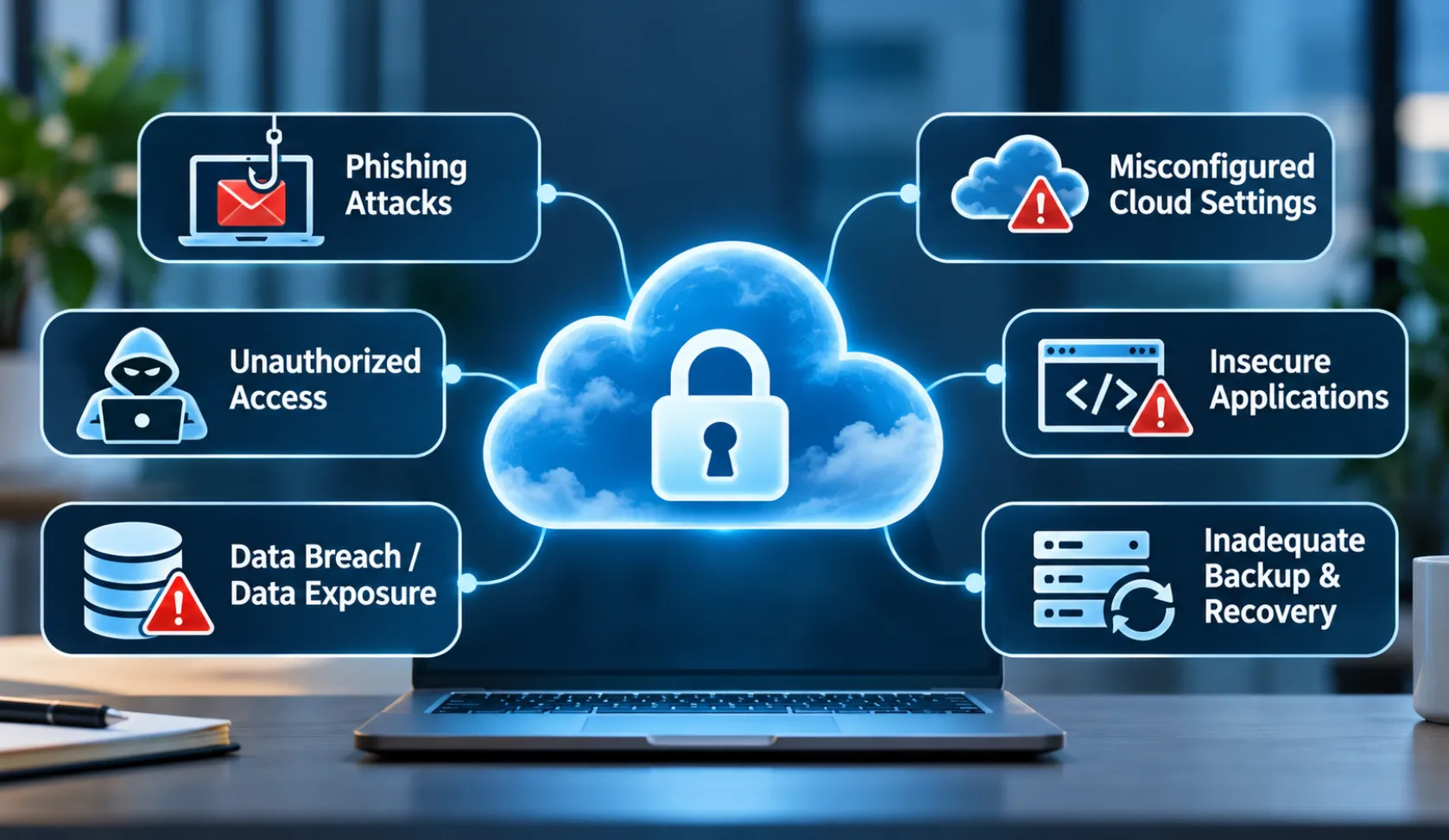
Understanding these risks helps businesses identify where additional protection may be necessary.
1. Unauthorized Access
Unauthorized access occurs when someone gains access to a cloud account, application or resource without permission.
This may happen through stolen credentials, weak passwords, compromised devices or excessive user permissions.
Businesses should review account access regularly and remove permissions that are no longer required.
2. Misconfigured Cloud Settings
Cloud platforms provide many configuration options for managing storage, applications, networks and user permissions.
Incorrect settings can unintentionally expose information or make cloud resources accessible to unauthorized users.
For example, a storage resource with overly broad access permissions may expose business files beyond their intended audience.
Regular configuration reviews help identify these weaknesses.
3. Data Breaches and Data Exposure
A data breach can occur when sensitive information is accessed, disclosed or transferred without authorization.
Possible causes include compromised accounts, excessive permissions, insecure applications and improperly configured storage.
Businesses should identify sensitive information, restrict access and apply suitable data protection controls.
4. Phishing and Account Compromise
Phishing emails attempt to trick employees into sharing passwords, approving fraudulent sign-ins or opening malicious links.
If an attacker gains access to a business cloud account, they may be able to access email, documents, shared files or other connected services.
Employee awareness, MFA and suspicious sign-in monitoring can help reduce this risk.
5. Insecure Applications and Integrations
Cloud applications often connect with other business tools through integrations and application programming interfaces (APIs).
If these connections use excessive permissions, exposed credentials or weak authentication, they can create additional entry points for attackers.
Organizations should review connected applications and restrict their permissions to what is actually required.
6. Inadequate Backup and Recovery Planning
Cloud storage does not automatically eliminate the risk of accidental deletion, ransomware, account compromise or data loss.
Businesses should understand what their cloud provider protects, what backup options are available and how information can be restored.
A tested recovery process is important because having a backup is not the same as knowing it can be restored successfully.
Essential Cloud Security Best Practices
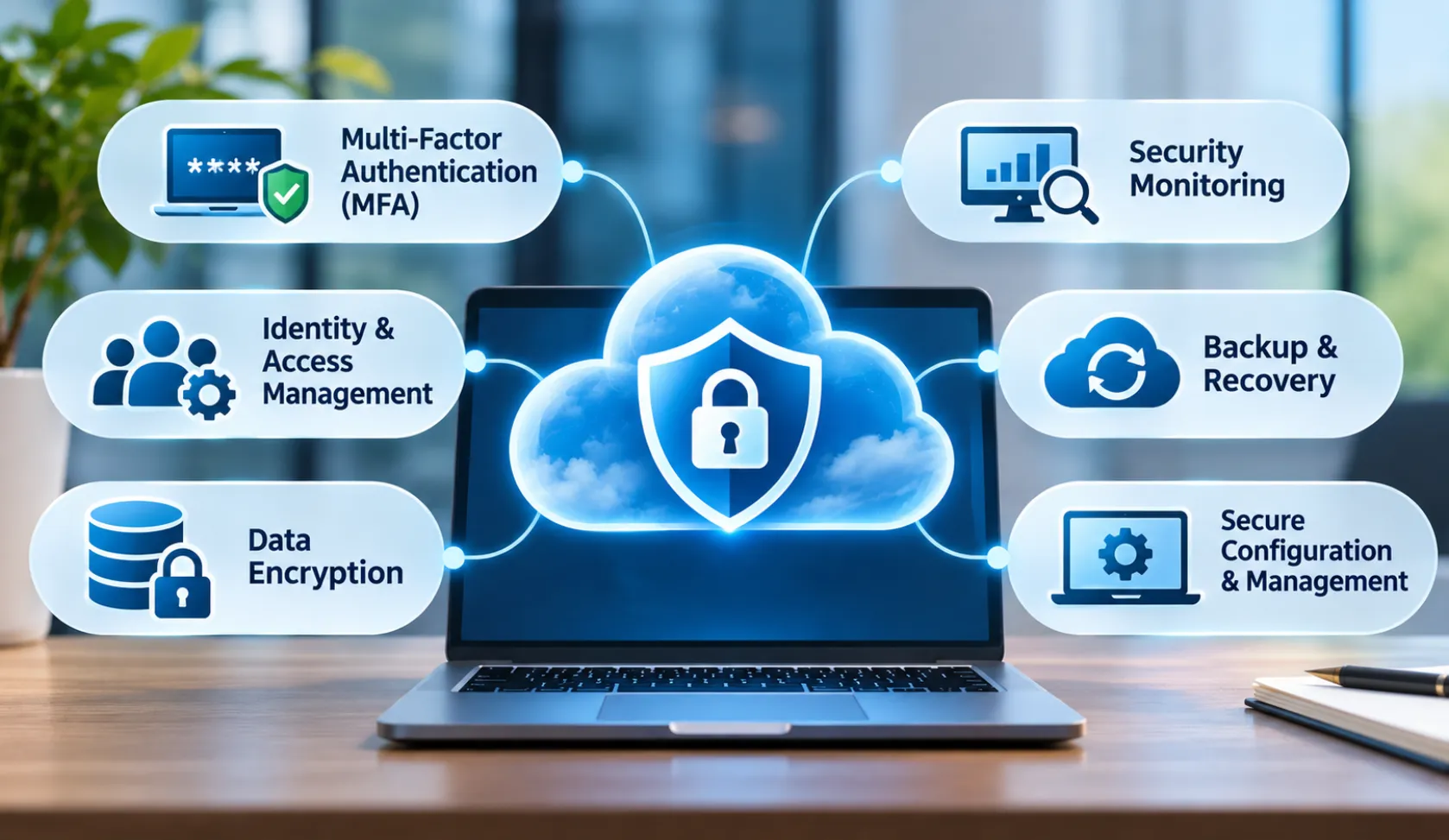
Protecting a cloud environment requires multiple security controls working together. No single tool or setting can address every possible threat.
The following practices provide a useful starting point.
1. Enable Multi-Factor Authentication
Multi-factor authentication requires users to verify their identity through an additional authentication method beyond their password.
For example, a user may need to approve a sign-in through an authentication application or use another supported verification method.
Businesses should prioritize MFA for:
- Administrator accounts
- Email accounts
- Remote access
- Cloud management portals
- Accounts accessing sensitive business information
Microsoft 365 organizations can use available MFA options through Microsoft Entra ID. The appropriate configuration depends on the organization’s licensing and identity setup.
2. Apply Identity and Access Management
Identity and access management controls who can access cloud resources and what actions they can perform.
Businesses should follow the principle of least privilege. This means giving users only the permissions required to perform their assigned responsibilities.
Useful practices include:
- Reviewing user permissions regularly.
- Removing inactive accounts.
- Restricting administrative privileges.
- Using separate administrator accounts where appropriate.
- Reviewing access granted to third-party applications.
- Updating access when employees change roles or leave.
Limiting unnecessary permissions reduces the potential impact of compromised accounts.
3. Encrypt Sensitive Business Data
Encryption helps protect information by making it unreadable without the appropriate decryption keys.
Businesses should understand how their cloud services protect data both during transmission and while stored.
Important considerations include:
- Encryption in transit.
- Encryption at rest.
- Secure key management.
- Access to encryption keys.
- Data retention and deletion policies.
Encryption should be combined with access controls and monitoring. It does not prevent every type of data exposure, particularly when an authorized account is compromised.
4. Review Cloud Security Configurations
Misconfigured cloud resources can expose applications, files and infrastructure.
Organizations should periodically review:
- Storage access permissions.
- Network exposure.
- User and administrator privileges.
- Application security settings.
- Public access configurations.
- Logging and monitoring settings.
Configuration reviews should also take place after major changes, migrations or new cloud deployments.
5. Protect Business Devices and Endpoints
Employees access cloud applications through laptops, desktops, mobile devices and other endpoints.
A compromised device can provide attackers with access to cloud accounts and business information.
Endpoint security measures may include:
- Updated operating systems and applications.
- Endpoint protection software.
- Device access controls.
- Disk encryption.
- Secure remote access.
- Restrictions on unmanaged devices where appropriate.
Cloud security and endpoint security should work together rather than being treated as separate concerns.
6. Monitor Cloud Activity
Monitoring helps organizations identify unusual activity and investigate potential security incidents.
Relevant events may include:
- Unusual login locations or patterns.
- Repeated failed authentication attempts.
- Unexpected privilege changes.
- Unusual file downloads or sharing.
- Changes to security settings.
- Suspicious application activity.
Logging should be configured appropriately, and alerts should be reviewed by someone responsible for responding to them.
For organizations that need broader security event visibility, SIEM services can help centralize and analyze security-related events from supported systems.
7. Maintain Reliable Backup and Recovery Procedures
Businesses should establish backup and recovery requirements for important cloud data and applications.
A suitable backup strategy should consider:
- Which information needs protection.
- How frequently backups should run.
- How long backup copies should be retained.
- Who can access or delete backups.
- How recovery will be performed.
- How frequently restoration procedures will be tested.
Backup arrangements should be reviewed against the organization’s recovery time and recovery point requirements.
Cloud Security for Microsoft 365
Microsoft 365 is widely used for business email, file storage, document collaboration and communication.
Because these applications contain business information, securing user identities and access permissions is an important part of cloud security.
Businesses should consider the following measures:
Secure user sign-ins: Enable appropriate MFA methods and review authentication settings.
Protect administrator accounts: Limit privileged access and use administrative permissions only when required.
Review file-sharing permissions: Check who can access shared documents and whether external sharing is appropriate.
Protect business email: Use available email security controls to reduce phishing, malicious attachments and suspicious messages.
Monitor account activity: Review sign-in records, audit logs and unusual account behavior.
Manage connected applications: Review third-party integrations and the permissions they receive.
Microsoft 365 security features depend on the subscription, configuration and available Microsoft Entra capabilities. Organizations should verify their licensing before planning specific controls.
Businesses that need help managing their Microsoft environment can also review BCS Managed IT Services, which includes Microsoft 365 support among its listed IT capabilities.
Single-Cloud vs. Multi-Cloud Security
Businesses may use one cloud provider or combine services from multiple providers. Both approaches require security planning, but managing several environments can introduce additional complexity.
Single-Cloud Environment
A single-cloud environment relies primarily on one cloud provider for its cloud infrastructure or applications.
Security management may be more centralized, but organizations still need to configure access controls, protect data, monitor activity and understand their responsibilities.
Multi-Cloud Environment
A multi-cloud environment uses services from more than one cloud provider.
For example, a business may use one provider for cloud infrastructure, another for business applications and a separate platform for data storage.
This approach can introduce additional management challenges:
- Different identity and access management systems.
- Separate security configuration requirements.
- Multiple monitoring tools.
- Different data protection policies.
- More complex incident response procedures.
Businesses using multiple cloud platforms should establish consistent security policies while accounting for the technical differences between providers.
Common Cloud Security Mistakes to Avoid
Even businesses using established cloud platforms can create security weaknesses through poor configuration and management.
Avoid these common mistakes:
- Relying only on passwords: Password protection alone may not be sufficient for important business accounts.
- Giving excessive permissions: Users should not receive administrative access when their roles do not require it.
- Ignoring cloud configuration changes: New applications, integrations and settings should be reviewed before deployment.
- Leaving inactive accounts enabled: Unused accounts can create unnecessary access risks.
- Assuming cloud providers handle everything: Customers retain security responsibilities that vary according to the service model.
- Ignoring backup testing: A backup should be tested to confirm that the required information can be restored.
- Overlooking security monitoring: Unusual account activity and configuration changes should not go unnoticed.
- Skipping employee security awareness: Employees should understand phishing, suspicious sign-ins and safe data-sharing practices.
Understanding the Shared Responsibility Model
Cloud security is not the responsibility of the cloud provider alone. It follows a shared responsibility model in which the provider and customer have different security obligations.
The exact division depends on the cloud service being used.
Infrastructure as a Service (IaaS)
In IaaS environments, the cloud provider manages the underlying physical infrastructure, while customers generally have responsibility for areas such as operating systems, applications, data and access configurations.
Platform as a Service (PaaS)
In PaaS environments, the provider manages more of the underlying platform. Customers remain responsible for their applications, data, identities and configurations within the service.
Software as a Service (SaaS)
In SaaS environments, the provider manages the application infrastructure and platform. Customers still need to manage user access, data sharing, account security and other settings available to them.
For example, using a cloud-based email service does not remove the business’s responsibility to secure user accounts and control access to company information.
Understanding these responsibilities helps organizations avoid security gaps between their own IT teams and cloud providers.
How Businesses Can Improve Their Cloud Security
Improving cloud security starts with understanding the existing environment rather than purchasing security tools without a clear plan.
Businesses can follow a practical process:
- Identify cloud services: Make a list of the cloud platforms, applications and storage services used by employees.
- Identify sensitive information: Determine where important business and customer information is stored.
- Review user access: Check administrator privileges, inactive accounts and unnecessary permissions.
- Assess security configurations: Review authentication, sharing, network exposure and application settings.
- Evaluate backup arrangements: Confirm what is protected and whether recovery procedures have been tested.
- Review monitoring capabilities: Determine whether important security events are logged, monitored and investigated.
- Document responsibilities: Establish which security tasks belong to the business, its IT provider and its cloud service providers.
- Review regularly: Reassess security controls as applications, users and business requirements change.
This process helps organizations identify weaknesses and prioritize improvements based on their actual security needs.
When Should You Seek Professional Cloud Security Support?
Professional support may be useful when a business is moving sensitive information to the cloud, managing multiple cloud applications, responding to suspicious account activity or reviewing its existing security controls.
An IT or cybersecurity professional can help assess the environment, identify configuration weaknesses and determine which improvements should be prioritized.
Business Communication Solutions (BCS) lists cybersecurity capabilities including endpoint detection and response, managed detection and response, SIEM, SOAR, email security and security monitoring.
Businesses can explore BCS Cybersecurity Services to review its broader security offerings and determine whether they align with their requirements.
Frequently Asked Questions
1. What is cloud security in simple terms?
Cloud security is the process of protecting data, applications, accounts and infrastructure hosted in cloud environments. It uses security controls such as MFA, access management, encryption, monitoring and backup procedures.
2. What are the most common cloud security risks?
Common risks include unauthorized access, compromised accounts, misconfigured storage, data exposure, insecure integrations, phishing and inadequate backup planning.
3. Is cloud storage automatically secure?
No. Cloud providers maintain security controls for their platforms, but businesses must also configure services correctly, manage user permissions and protect their information.
4. What is the shared responsibility model in cloud security?
It describes how security responsibilities are divided between a cloud provider and its customer. The division depends on whether the organization uses IaaS, PaaS or SaaS services.
5. How does multi-factor authentication improve cloud security?
MFA requires an additional verification method during sign-in. This makes it harder for someone to access an account using only a stolen or guessed password.
6. How can businesses protect Microsoft 365 accounts?
Businesses should use appropriate MFA settings, restrict administrator privileges, review file-sharing permissions, protect email accounts, monitor sign-in activity and manage connected applications.
7. Does cloud security include data backup?
Backup and recovery are important parts of a broader cloud security and resilience strategy. However, backup availability and responsibility depend on the cloud service and the organization’s chosen arrangements.
8. What is the difference between cloud security and network security?
Cloud security protects cloud-hosted applications, data, accounts and infrastructure. Network security focuses on protecting network connections, traffic and connected systems. Both areas work together to protect business IT environments.
Related Guides
- Protecting Your Business: The Vital Role of Cybersecurity in Managed IT
- Endpoint Security: Protect Every Device on Your Network
- Is Your Business Network Secure? 12 Warning Signs You Need Professional Network Security Services
- Managed IT Services: The Complete Austin Guide
- Supporting All 7 OSI Layers with Managed IT Services
- Why Professional Data Cabling Boosts Business Efficiency
- Elevate Your Connectivity with Wireless Networking Services
- BCS Smart Hands Services