

Ordinary calls working does not prove emergency calling is ready. On supported VoIP or SIP services, 933 provides an automated readback of the registered emergency address and phone number without reaching a 911 dispatcher. Confirm availability with your provider and check the information from each relevant device and location.
BCS recommends reviewing and retesting after installation, phone moves, number ports, and configuration changes. Also review direct 911 dialing, callback handling, emergency notifications, and power or internet backup separately: a successful 933 test does not verify every emergency function or establish compliance.
933 is for testing; call 911 for an emergency. Arrange any actual 911 test in advance through your local 911 center’s non-emergency number.
Read our 933 VoIP emergency-calling test checklist →
The Allworx Verge 9308 is a business IP telephone designed for office users who need convenient access to calling features and frequently used phone functions. Business Communication Solutions (BCS) helps Austin businesses evaluate Allworx telephone options, review compatibility with their existing phone systems, and plan installation and configuration.
Color display: View phone information and available functions through the phone’s display.
Programmable function keys: Configure supported phone functions and shortcuts according to user and system requirements.
Business calling features: Use supported calling functions to help manage everyday conversations and office communication.
Mobile integration: Explore supported Allworx Reach features for compatible mobile devices and phone systems.
Network connectivity: Review Ethernet connectivity and power requirements when planning deployment.
User configuration: Arrange supported phone functions to suit employee roles and calling needs.
If you are comparing business phone models, explore the Allworx Verge 9312 IP Phone and Allworx Verge 9304 IP Phone to review other handset options for your office.
Before installing the Verge 9308, businesses should confirm compatibility with their existing Allworx system, software version, network infrastructure, and power requirements. Configuration may include supported phone features, programmable keys, extension settings, and user setup.
For offices that need new or upgraded network cabling, explore our Cat6 Voice and Data Cabling services to support your telephone installation.
BCS can discuss your current telephone environment and help determine the appropriate next steps for your Austin office. Contact the team to review the phone model, deployment requirements, and installation options.
You can also explore the Allworx Business Telephone Lineup to compare additional business phone options for your office.
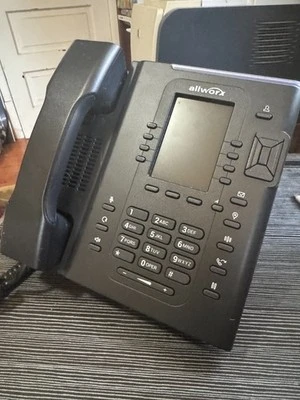
The Allworx Verge 9308 is a business IP telephone designed for use with a compatible Allworx phone system. Confirm the exact model specifications and compatibility before purchasing.
The supplied product brief lists eight physical programmable function keys. Verify the supported functions and any additional on-screen options against official model documentation.
Headset compatibility depends on the phone’s supported connections and the headset or adapter being used. Confirm compatibility before ordering.
Confirm the supported PoE standard for the exact model and whether your network switch provides compatible power. An external power adapter may be needed depending on the equipment.
Mobile integration features depend on the compatible Allworx system, software, app version and configuration. Verify the supported call-handling features for your setup.
Compatibility depends on the phone system model and software version. Confirm the supported configuration with official Allworx documentation or a qualified provider.
Contact BCS at (512) 257-1433 or austin@bcs-ip.com to discuss system compatibility, configuration and installation requirements.
Need help with your Allworx Verge 9308 VoIP Business Telephone? BCS can troubleshoot the existing system and discuss repair or migration options in Austin and surrounding cities. Call 512-257-1433, explore phone troubleshooting, or review our migration guide.