

Computer networks allow businesses to connect computers, servers, printers, phones and other devices so employees can share information and access essential resources. The right network helps organizations communicate, manage data and support daily operations.
Businesses use different types of computer networks depending on their size, location and connectivity requirements. The three commonly discussed network types are Local Area Network (LAN), Metropolitan Area Network (MAN) and Wide Area Network (WAN).
Understanding how these networks work can help business owners choose suitable connectivity for their offices, branches and remote teams. For organizations planning a new network or improving an existing one, professional managed IT services can help address network design, installation and ongoing management requirements.
What Is a Computer Network?
A computer network is a group of two or more connected devices that communicate and exchange information. These devices can include desktop computers, laptops, servers, printers, smartphones, security cameras and other network-enabled equipment.
A network allows employees to share files, access business applications, communicate with colleagues and use shared resources.
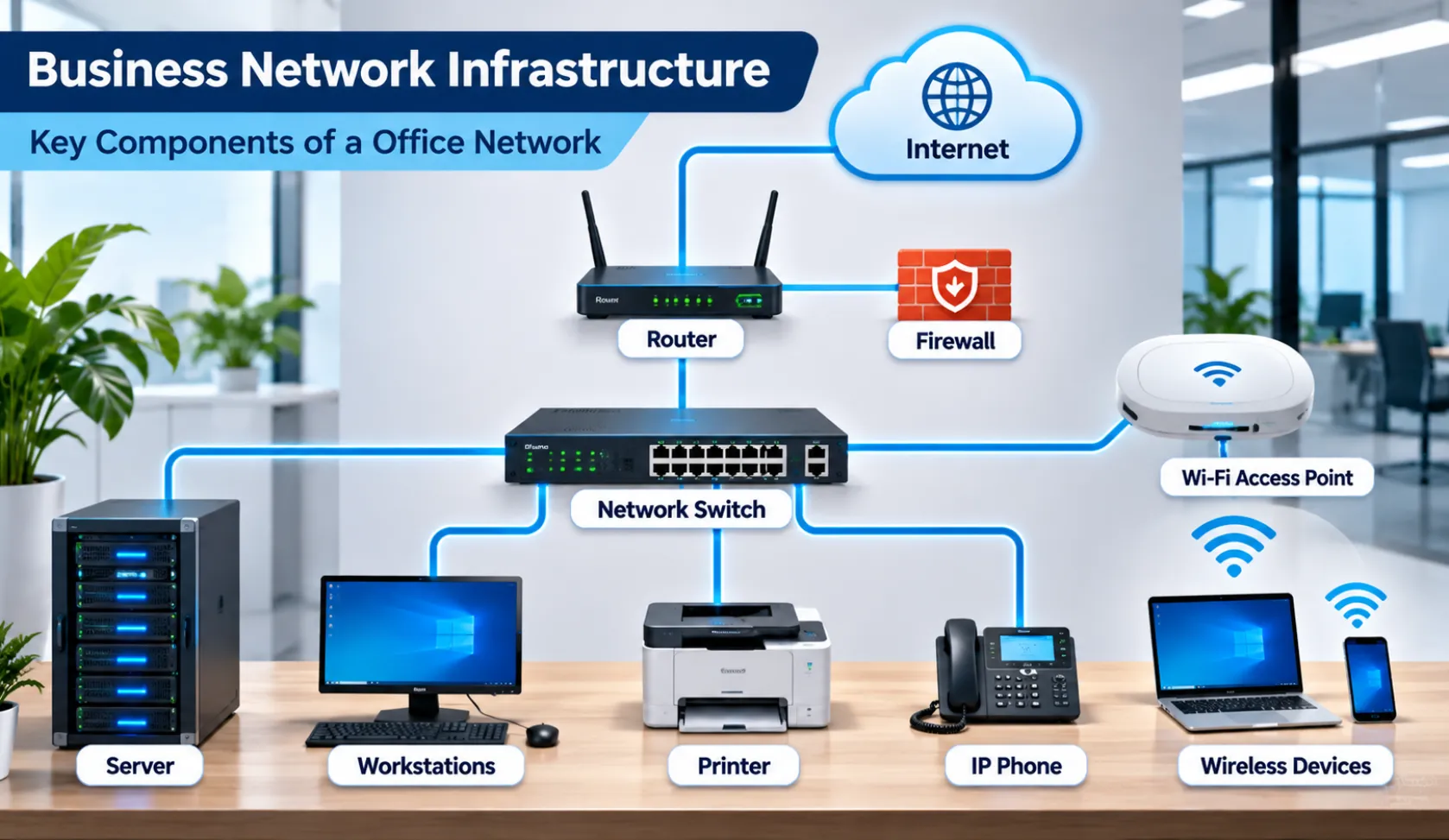
Most business networks use a combination of networking equipment, including:
- Routers: Connect different networks and direct data between them.
- Switches: Connect devices within a local network and forward data to the appropriate devices.
- Wireless access points: Allow devices to connect to a network over Wi-Fi.
- Network cables: Provide wired connections between computers, switches, routers and other equipment.
- Firewalls: Help control network traffic according to configured security rules.
The size and geographical coverage of a network help determine which network type is appropriate.
1. What Is a LAN (Local Area Network)?
A Local Area Network, commonly called a LAN, connects computers and other devices within a limited geographical area. This could be a single room, office, commercial building or group of buildings within a campus.
LANs are commonly used by businesses to connect employee workstations, printers, servers and other shared resources.
How Does a LAN Work?
A typical business LAN connects devices through Ethernet cables, network switches and wireless access points.
For example, employees working in an office may use the same local network to access shared folders, print documents, communicate with internal servers and use business applications.
A router can also connect the local network to the internet or other networks.
Examples of LAN Networks
Common examples include:
- An office network connecting employee computers and printers.
- A school network connecting classrooms and computer laboratories.
- A retail store network connecting point-of-sale systems and business computers.
- A warehouse network connecting computers, scanners and other operational devices.
Advantages of a LAN
Resource sharing: Employees can access shared printers, files, servers and applications.
Centralized management: IT administrators can manage network devices, permissions and access policies from a more organized environment.
Local communication: Devices within the same network can exchange information without requiring communication across geographically distant networks.
Scalability: Businesses can expand their LAN by adding network connections, switches and wireless access points as requirements grow.
Limitations of a LAN
- Its coverage is generally limited to a specific location.
- Poor network design can create congestion or connectivity problems.
- Equipment failures can affect connected users and services.
- Security controls and regular maintenance are necessary to protect connected devices.
Businesses planning a reliable LAN should consider structured cabling, switch placement, wireless coverage and future expansion requirements.
2. What Is a MAN (Metropolitan Area Network)?
A Metropolitan Area Network, or MAN, connects multiple local networks across a city or metropolitan region. It covers a larger geographical area than a typical LAN but generally a smaller area than a WAN.
Organizations may use a MAN when they need to connect facilities, campuses or offices distributed across a metropolitan area.
How Does a MAN Work?
A MAN links separate networks using high-capacity communication infrastructure. Depending on the design, this may involve fiber-optic connections, carrier-provided services or other metropolitan networking technologies.
For example, an organization with multiple facilities across a city may use a metropolitan network connection to support communication and data access between locations.
The exact network design depends on distance, bandwidth requirements, service availability and security considerations.
Examples of MAN Networks
Common examples include:
- A university connecting multiple campuses across a city.
- A government organization connecting departments in different locations.
- A business connecting several offices within a metropolitan region.
- A service provider delivering network connectivity across a city.
Advantages of a MAN
Broader coverage: A MAN can connect multiple local networks across a metropolitan area.
Location connectivity: Employees at different facilities can access shared business resources when the network is configured to support them.
Centralized services: Organizations can connect distributed locations to shared systems and infrastructure.
Fiber connectivity options: Fiber-optic infrastructure can provide high-capacity links between suitable locations.
Limitations of a MAN
- Infrastructure and installation can be more complex than a single-site LAN.
- Depending on the service and design, deployment may involve telecommunications providers.
- Equipment, connectivity and maintenance costs can increase with the number of locations.
- Network security and performance need to be managed across connected sites.
A MAN may be suitable for organizations with several locations within the same metropolitan area, but it is not necessary for every business with more than one office.
3. What Is a WAN (Wide Area Network)?
A Wide Area Network, or WAN, connects networks across large geographical areas. It can link offices, data centers and remote locations across different cities, states or countries.
The internet is the largest example of a WAN. Businesses also use private and provider-managed WAN connections to connect their distributed locations.
How Does a WAN Work?
A WAN connects separate networks through communication links that may use public internet connections, leased lines, carrier networks, cellular connections or other technologies.
For example, a company with offices in Austin, Houston and Dallas may need employees at each location to access shared business applications and resources.
A WAN can connect these office networks so they can communicate with one another.
Depending on the organization’s requirements, WAN connectivity may use:
- Dedicated leased lines
- Site-to-site VPN connections
- Multiprotocol Label Switching (MPLS)
- Software-Defined Wide Area Networking (SD-WAN)
- Cellular or satellite connectivity
The appropriate option depends on cost, reliability, security, application requirements and available connectivity.
Examples of WAN Networks
Common examples include:
- A company connecting offices in different states.
- A business connecting its headquarters with regional branches.
- An organization linking remote employees to central business resources.
- A company connecting on-premises infrastructure with cloud-based services.
Advantages of a WAN
Long-distance connectivity: WANs allow organizations to connect networks across large geographical areas.
Branch communication: Employees at different locations can access shared applications and business resources.
Remote access: Properly configured WAN solutions can support remote employees and distributed teams.
Business expansion: Organizations can connect additional offices without limiting their network to one physical location.
Limitations of a WAN
- Connectivity may depend on external service providers.
- Performance can be affected by distance, latency, bandwidth and network congestion.
- Security requires careful configuration and monitoring.
- Installation and ongoing connectivity costs vary depending on the technology and service provider.
Businesses using WAN connections should plan for reliable connectivity, appropriate security controls and backup communication options.
LAN vs MAN vs WAN: Key Differences
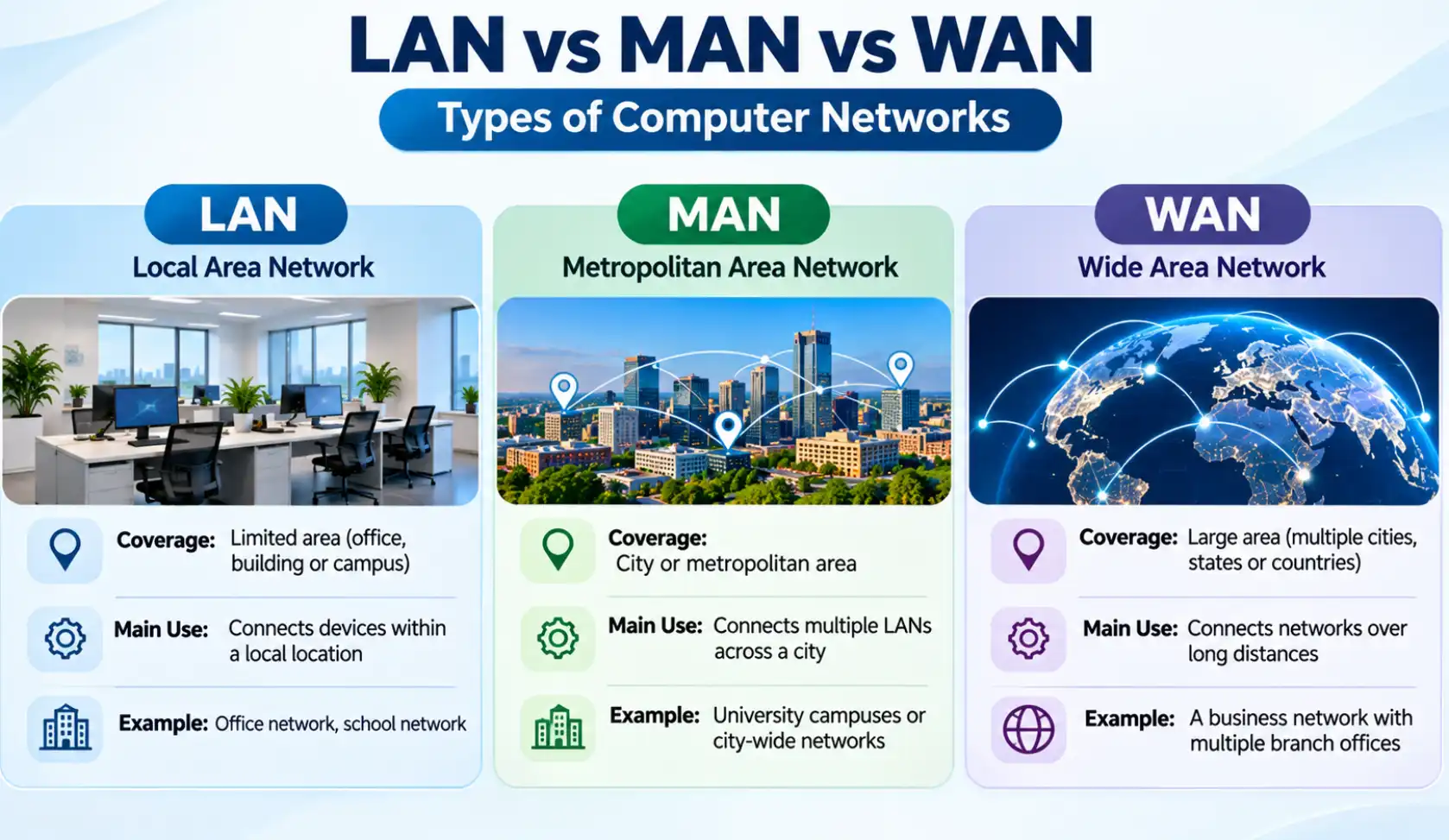
LAN, MAN and WAN serve different networking requirements. The main distinction is the geographical area they cover and how they connect devices or separate networks.
| Comparison | LAN | MAN | WAN |
|---|---|---|---|
| Full form | Local Area Network | Metropolitan Area Network | Wide Area Network |
| Coverage | Room, office or building | City or metropolitan region | Multiple cities, states or countries |
| Main purpose | Connect devices within a local area | Connect networks across a metropolitan area | Connect networks over large distances |
| Common example | Office network | City-wide organizational network | Multi-state business network |
| Connectivity | Ethernet and Wi-Fi | Fiber and metropolitan connectivity services | Internet, leased lines, VPN and carrier networks |
| Management | Usually managed locally | May involve an organization or service provider | Often involves multiple network operators and providers |
The table provides a general comparison. Actual performance, cost and ownership depend on the network’s architecture and service arrangements.
Which Type of Network Does Your Business Need?
Choosing a network depends on the number of locations, geographical coverage, applications and connectivity requirements of your organization.
Here are some practical examples.
Small Businesses With One Office
A LAN is generally sufficient for a business operating from one office or building.
It can connect employee computers, printers, phones, servers and wireless devices. A properly designed wired and wireless network can support everyday business operations.
Organizations With Multiple Locations in One City
A business with several offices across a metropolitan area may consider MAN-style connectivity or other provider-managed connections.
The right option depends on the distance between locations, available fiber infrastructure, application requirements and budget.
Businesses Operating Across Different Cities or States
A WAN is generally appropriate when an organization needs to connect geographically separated offices.
It can support communication between branches, access to centralized business applications and connectivity to cloud services.
Businesses With Remote Employees
Remote employees may connect to company resources through secure remote-access solutions or VPN connections.
The organization’s network and security policies should determine which access method is appropriate.
Important Factors to Consider When Setting Up a Business Network
Selecting LAN, MAN or WAN is only one part of network planning. Businesses should also consider the infrastructure required to keep the network reliable and secure.
1. Network Size and Future Growth
Estimate the number of employees, devices, offices and network connections required. Leave room for additional workstations, wireless access points, printers and other equipment.
2. Wired and Wireless Connectivity
Determine which devices need wired Ethernet connections and where Wi-Fi coverage is required.
Businesses should plan access point locations and network cable routes according to the building layout and expected usage.
3. Structured Cabling
A well-organized cabling infrastructure supports reliable connections between workstations, network switches and other equipment.
Businesses planning new installations or office expansions can explore voice and data cabling services for information about structured cabling, Ethernet connections and fiber-optic infrastructure.
4. Network Security
Protect business networks with appropriate firewall configurations, access permissions, secure Wi-Fi settings, software updates and monitoring.
Employees should only receive access to the systems and information required for their roles.
5. Network Maintenance
Regular maintenance helps identify connectivity issues, outdated equipment, configuration problems and potential security weaknesses.
Businesses should have a process for monitoring network performance and resolving technical problems.
How Professional Network Support Helps Businesses
A business network requires proper planning, installation and ongoing maintenance. Poor cable management, incorrect equipment configuration or inadequate wireless coverage can affect daily operations.
Professional network support can help businesses with:
- Wired and wireless network installation.
- Network equipment configuration.
- Data cabling and fiber-optic connectivity.
- Network troubleshooting and maintenance.
- Infrastructure upgrades and expansion.
- Network performance and connectivity assessments.
Business Communication Solutions (BCS) provides computer and network support, wired and wireless network services, and voice and data cabling services for Austin-area businesses.
Organizations looking for assistance with their network infrastructure can learn more about Computer and Network Services.
Frequently Asked Questions
1. What are the three main types of computer networks?
The three commonly discussed types are LAN (Local Area Network), MAN (Metropolitan Area Network) and WAN (Wide Area Network). They differ mainly in geographical coverage and the networks or devices they connect.
2. What is the main difference between LAN and WAN?
A LAN connects devices within a limited geographical area, such as an office or building. A WAN connects networks across larger geographical areas, such as different cities or countries.
3. Is the internet a WAN?
Yes. The internet is the world’s largest example of a WAN because it connects networks and devices across the globe.
4. What is an example of a MAN?
A university connecting multiple campuses across a city or an organization connecting several facilities within a metropolitan region can use MAN-style connectivity.
5. Which network is suitable for a small business?
A LAN is generally suitable for a small business operating from one office. It can connect computers, printers, servers and wireless devices within the premises.
6. Can a business use LAN and WAN together?
Yes. A business can use a LAN within each office and a WAN to connect those office networks across different geographical locations.
Conclusion
LAN, MAN and WAN are three important types of computer networks used to connect devices and support communication across different geographical areas.
A LAN is generally suitable for connecting devices within an office or building. A MAN can connect networks across a metropolitan area, while a WAN supports communication between geographically separated locations.
The right network depends on your organization’s size, locations, applications, security requirements and future growth plans. With proper network planning, suitable equipment and regular maintenance, businesses can build connectivity that supports their daily operations.
If your business needs help with network installation, troubleshooting or infrastructure planning in Austin, explore BCS Computer and Network Services to learn more about its support offerings.
Related Guides
- Managed IT Services: The Complete Austin Guide
- Supporting All 7 OSI Layers with Managed IT Services
- Elevate Your Connectivity with Wireless Networking Services
- Why Your Network Is Only as Fast as Its Slowest Device
- Bandwidth Planning: How Many Users Can Your Network Support?
- Why Professional Data Cabling Boosts Business Efficiency
- How Fiber Optic Installation Can Transform Your Business Connectivity
- Importance of Network Security for Modern Businesses