

Allworx phones are the most feature-rich, flexible, and easy-to-use phones on the market.
Explore our Allworx VoIP Business Telephones to learn more about compatible business phone system options.
The Allworx PX 6/2 Expander provides additional analog connectivity for compatible Allworx telephone systems. Businesses can use compatible analog ports for devices such as fax machines, analog telephones, and paging equipment, depending on the connected equipment and system configuration.
Related systems: “Businesses reviewing their telephone platform can also explore Allworx Connect 536/530 Systems, subject to model compatibility.
Business Communication Solutions (BCS) helps businesses in Austin assess their existing Allworx phone system, determine whether additional port capacity is suitable, and plan installation and configuration.
Analog device connectivity: Check whether your fax machines, analog telephones, or paging equipment require compatible FXS connectivity.
For paging applications, see our Paging Horn Installation Services to review installation options.
Outside telephone lines: Confirm whether the installation requires FXO connectivity for analog outside lines.
System compatibility: Verify the existing Allworx server model, firmware, and supported expansion configuration before purchasing hardware.
Network connectivity: Review the network connection and installation location requirements for the specific expander model.
For network infrastructure requirements, explore our Voice and Data Structured Cabling services.
Configuration and testing: Confirm that connected devices work correctly after installation and that the system is configured for the intended use.
Contact BCS to discuss your Allworx hardware expansion requirements in Austin and confirm compatibility with your existing telephone system.
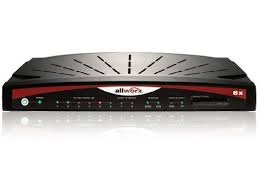
The Allworx PX 6/2 Expander is designed to provide additional analog connectivity for compatible Allworx telephone systems. The available connections and supported uses should be confirmed against the product documentation and existing system configuration.
It may support compatible analog fax equipment through the appropriate analog station interface. Confirm fax compatibility and configuration requirements before installation.
It may be suitable for paging equipment when the required interface and configuration are supported. The paging amplifier or adapter requirements should be checked before connecting the equipment.
The installation location depends on the model’s network and deployment requirements. Confirm supported connectivity, network configuration, and distance limitations in the official product documentation.
Compatibility depends on the Allworx server model, firmware, and supported expansion configuration. Verify the exact model before purchasing or scheduling installation.
Contact Business Communication Solutions (BCS) to discuss your current Allworx setup, installation requirements, and configuration needs in Austin.
Contact BCS at (512) 257-1433 or email austin@bcs-ip.com to discuss your hardware, compatibility, and installation requirements.
Need help with your Allworx PX 6/2 Expander? BCS can troubleshoot the existing system and discuss repair or migration options in Austin and surrounding cities. Call 512-257-1433, explore phone troubleshooting, or review our migration guide.