

Selecting the Right VoIP Phone Service for Your Business

In today’s digital-first world, businesses need a communication system that is not only reliable and efficient but also future-forward. Traditional landline systems are quickly becoming outdated as more companies adopt VoIP (Voice over Internet Protocol) technology. VoIP uses the internet to make voice calls, offering many major advantages over traditional phone lines, such as lower costs and greater flexibility. However, with so many VoIP service providers available, it can be tough to choose the right one for your business. This guide, therefore, will help you figure out the options and select the best VoIP phone service by covering: ✅ What VoIP phone service is and how it works ✅ Key factors to consider when choosing a VoIP provider ✅ The role of a VoIP contractor in system installation ✅ How VoIP improves business communication and efficiency Ready to find the perfect VoIP service for your business? Let’s get started! 1. What Is VoIP Phone Service and How Does It Work? What Does VoIP Mean? VoIP stands for Voice over Internet Protocol, which is a technology that allows you to make voice calls over the internet rather than through traditional landline phone systems. By using the internet to transmit calls, VoIP eliminates the need for separate phone lines. That not only drastically reduces costs but also increases flexibility. Instead of relying on copper wires, VoIP sends your voice as data packets over the same infrastructure that supports your internet connection, making it a more modern and efficient way to communicate. How Does VoIP Work? The process begins when you speak into a VoIP phone or app. Your voice is converted into digital signals, which are then transmitted over the internet to the person you’re calling. Once the data reaches the recipient, it is then turned back into audio so they can hear your voice clearly. All in all, it is like sending an email or instant message, but instead of text, you’re sending audio signals. The benefit of this digital communication is that it’s faster, clearer, and more versatile compared to traditional voice communication methods. Why Is VoIP Better Than Landlines? With VoIP, you get many advantages over traditional landline phones: Lower Costs, as VoIP is generally more affordable, because there is no need for expensive phone lines or maintenance costs. More Features mean VoIP providers offer a range of additional features like video calls, voicemail-to-email, call forwarding, and more, many of which come at no extra charge. Works Anywhere! Since VoIP relies on the internet, as long as you have a stable internet connection, you can make and receive calls from virtually anywhere in the world, making it ideal for businesses with remote workers or multiple locations. 2. Key Factors to Consider When Choosing a VoIP Phone Service Choosing the right VoIP service is how you can make sure that your business’s communication needs are met. Here’s what you should think about when you are evaluating different providers: A. Call Quality & Reliability A VoIP system is only as good as the quality of the calls it supports. It is important to choose a provider that guarantees clear, uninterrupted calls. Check for uptime guarantees. Look for providers that offer at least 99.9% uptime to minimize downtime and service disruptions. If you frequently conduct business via phone, ensuring high-quality calls is non-negotiable. B. Features Your Business Needs Not all VoIP services offer the same features, so it’s important to choose one that fits your business’s requirements. Some main features to look for include: Auto-Attendant: Automatically greets callers and routes them to the appropriate department or person. Call Forwarding & Voicemail: You can make sure that calls are never missed, and messages are sent directly to your email if needed. Conference Calling & Video Meetings: Look for integrated solutions that allow easy collaboration with clients and team members. Mobile App: If your team works remotely, a VoIP mobile app allows employees to receive calls on the go, even when they’re outside the office. C. Pricing & Plans VoIP pricing can vary significantly depending on your service provider and the features you choose. When comparing plans, consider the monthly cost per user, as well as any additional charges for extra services or features. Be on the lookout for hidden fees, such as setup costs, contract terms, or cancellation fees that could increase your total costs. Transparency in pricing should be the norm from the start, as it is going to avoid any unexpected costs down the road. D. Customer Support Since VoIP is a technology-driven service, it is so crucial to have solid customer support available when you come across any queries or issues. Make sure your VoIP provider offers 24/7 support to assist with any questions or problems. Check if they offer live chat, phone, or email support, and consider reading reviews to make sure that their support team is responsive and helpful. E. Security & Scalability Don’t waste your time unless the VoIP service provider offers encryption for calls and data to maintain the confidentiality and privacy of your communications. Additionally, consider whether the system can scale with your business as it grows. Look for providers that allow you to add more lines, users, and features as your needs also change. 3. The Role of a VoIP Phone Contractor in System Installation Setting up a VoIP system isn’t as simple as plugging in a few phones; it requires careful planning, installation, and configuration. A VoIP contractor is a skilled professional who specializes in setting up VoIP systems for businesses. Here’s how they help make sure of a smooth transition to VoIP: Network Assessment Before installing any equipment, a VoIP contractor will evaluate your existing network to ensure it can handle VoIP calls. VoIP relies on a stable and robust internet connection, and the contractor will check your network’s bandwidth, speed, and reliability to prevent any issues with call quality. Hardware Setup The contractor will install the necessary hardware, such as IP phones, routers, and switches. Proper placement and setup of
WHEN OUR CUSTOMER GROW, WE GROW!

We had a customer that call us last week. They were a small start up company that we had did a very small cable job for about 4 years ago. Initially we ran 4 data cables, installed 4 data jack, and use router/modem provided by their ISP (Internet Service Provider). About a year ago, they call us again, and ask us to help them expand their office. We ended up running about 24 data cables for them, set them up with a firewall with unified threat management, antivirus on all pc, and a Wildix VOIP phone system, which is also a hosted cloud based pbx. Last week we were very excited to get a call from them. They wanted us to run over 100 data cables for them, help them setup a dual internet router as they needed more bandwidth and wanted to avoid any internet outages. We are so blessed to have customer that does well. When our customer do well, we do well. Related Guides Managed IT Services: The Complete Austin Guide Best Managed IT Services in Austin Protecting Your Business: The Vital Role of Cybersecurity in Managed IT Supporting All 7 OSI Layers with Managed IT Services Cloud Security for Modern Businesses BCS Smart Hands Services Why Professional Data Cabling Boosts Business Efficiency
Cast Studies: Scenarios

Problems : The first problem this company is experiencing is the phone service and lines are being handled by 2 different vendors, resulting in poor communication and integration between the 2 separate companies. The voicemail is only at one end and provided by 1 of the vendors. This causes voicemails to be left in the wrong mailbox and calls to “fall between the cracks”. The integration voicemail service is limited and poor. They are also experiencing poor quality and frequent “cracking” noises in the background of calls. The company is in the process of expanding and hiring people to work remotely from their homes in other cities, but have no way to keep them connected to the phone system ran from a corporate office. They have used softphones in the past, but found this to be difficult and cumbersome as compared to hardphones. Their main concerns are missing calls or having them routed incorrectly due to the current system and various voicemail issues. The secondary concerns are incorporating remote users, sound quality and appropriate training on how to use the new phone system. Scenario Solutions : The main phone system is located in San Antonio with 1 remote user in Austin and 1 remote user in Houston. They need to be connected and have designated lines and voicemail accounts, while giving full access to the remote users in other cities. Therefore, this scenario calls for a VoIP solution to give equal access to all users. This system will also allow for proper routing and voicemail accounts to avoid missed calls and lost voicemail messages. The sound quality will also greatly improve thanks to QOS that will be provided. By merging their 2 separate vendors and system into one unified system, they can expect better integration and results. Hardphones will replace the softphones, and training will be provided for all users at the time of installation. Pros : It allows flexibility for remote users to work from home and also allows the company to expand beyond San Antonio. All users can be tied in to the same phone system despite their different geographical locations. By switching to this type of VoIP set up, phone use is seamless and easy which allows uniformity between office numbers, lines and locations. A user in the corporate office can answer the phone and transfer to a remote user, or customers can dial a direct line for an employee. Voicemail is assigned to specific users and their numbers so there is no confusion, roll over or messages left in the wrong person’s mailbox. Cons : Remote users are dependent upon their home internet connection, as the phones rely on internet to function. Voicemail and other components must be set up properly from the beginning and users must be trained (due to the fact that this system may be more elaborate and in-depth than previous systems they have used). Related Guides Managed IT Services: The Complete Austin Guide Best Managed IT Services in Austin Protecting Your Business: The Vital Role of Cybersecurity in Managed IT Supporting All 7 OSI Layers with Managed IT Services Cloud Security for Modern Businesses BCS Smart Hands Services When Our Customers Grow, We Grow
Outdoor Rated Fiber
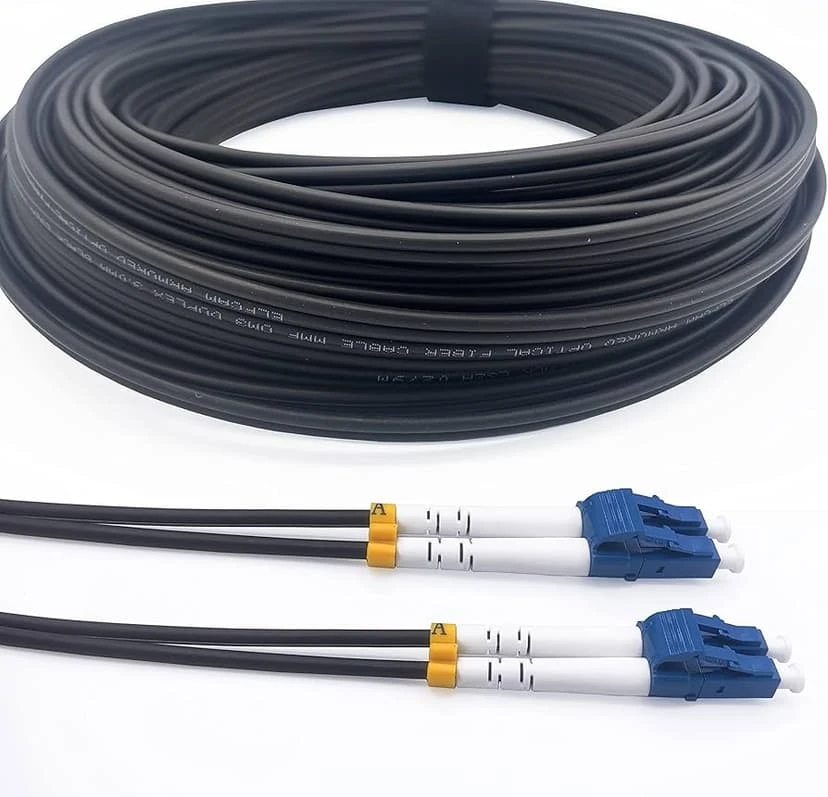
Fiber has many different types of cables to choose from when planning an installation. The two major question to gather is: How many fibers is required from point to point? The locations of where the fiber is going to be placed. Cables that contain one of these components gel, powder, or absorbent tape are commonly used for outdoor situation. Those components play a role of defending off water from entering the cable and affecting the fiber. Loose tube and Ribbon will be your commonly use fiber for most outdoor installation. Then you’ll have your armored cable for direct burial and aerial cable that has it own steel messenger to be strung overhead. Related Guides How Fiber Optic Installation Can Transform Your Business Connectivity Google Fiber Is Coming to Round Rock Professional Voice and Data Cabling Services Why Professional Data Cabling Boosts Business Efficiency Low Voltage Wiring Solutions for Businesses New Underground Pipe for Network Infrastructure Elevate Your Connectivity with Wireless Networking Services Managed IT Services: The Complete Austin Guide
AVAYA PARTNER ACS PHONE SYSTEM SERVICES

We use to sell the Avaya Partner ACS Phone System. This is an old digital / analog phone system that was very popular for small business. It was very dominate for small business that needed a simple reliable phone system. This system was great for customer that had simple analog phone lines, digital phones, analog phones, door phones, voicemail, and auto attendant. This system has been install in many business throughout the world. I don’t know whether or not it has been harder to find technician or telecom dealer that can service this system or not, we had quite a bit of end user calling us for support. If your business still have this phone system and needed services such has moving your phone system to a new location, adding a phone, changing the voicemail or auto attendant menu, give us a call, we can help. Related Guides How to Choose the Right Business Phone System Selecting the Right VoIP Phone Service for Your Business Affordable VoIP Phone Systems in Austin NEC SL2100 Business Phone System NEC SV9100 Business Phone System Benefits of Call Recording for Business Communications Voice Cabling Services for Business Phone Systems Professional Voice and Data Cabling Services
The Truth About “Wireless” Cameras for Austin Homes and Businesses

If you’re shopping for wireless security cameras in Austin, you’ve probably noticed one thing: Most of them still need wires. Yes — they connect to Wi-Fi. But they still require power. And that’s where many homeowners and business owners run into problems. Let’s break down what “wireless” actually means — and whether it’s the right solution for your Austin property. What Does “Wireless Security Camera” Really Mean? In most cases, “wireless” only refers to how the camera connects to the internet. It does not mean: No power cable No battery charging No infrastructure Most wireless cameras fall into two categories: 1️⃣ Battery-Powered Wireless Cameras These connect to Wi-Fi but run on rechargeable batteries. The reality: Batteries die — often at the worst time Cameras go offline without warning You must recharge or replace batteries regularly High-traffic areas drain batteries faster In Austin’s summer heat, battery performance can degrade even faster. 2️⃣ Plug-In “Wireless” Cameras These connect to Wi-Fi but require a power outlet. That means: Running power cables Installing outlets near camera locations Dealing with visible wires Limited placement options So while they’re “wireless” for data — they’re not wire-free. The Real Problem with Wireless Cameras Convenience sounds great. But reliability is what matters. We often see Austin homeowners dealing with: Dead batteries Cameras dropping offline Weak Wi-Fi signals at exterior walls Missed footage during critical moments Constant troubleshooting Security systems are not something you want to “mostly” work. They need to work every time. Why Wired Security Systems Are More Reliable in Austin For long-term reliability, most professional installers recommend PoE (Power over Ethernet) systems. PoE cameras use a single Ethernet cable for: Power Data Stable connection Benefits include: ✔ No battery maintenance ✔ No Wi-Fi interference issues ✔ Stronger, consistent connection ✔ Cleaner installation ✔ Better performance in Texas heat ✔ Higher video quality For businesses in Austin — retail stores, warehouses, offices — wired systems are typically the standard because downtime isn’t acceptable. Wi-Fi Interference in Austin Neighborhoods Austin neighborhoods — especially dense areas like Downtown, South Congress, The Domain, and Round Rock — often have: Dozens of competing Wi-Fi networks Signal congestion Overlapping channels Wireless cameras depend entirely on signal strength. When your Wi-Fi struggles, your cameras struggle. A wired system avoids that completely. When Wireless Cameras Do Make Sense Wireless cameras can be a good option for: Renters Temporary installations Small apartments Quick DIY setups Areas where running cable isn’t possible But for: Full home coverage Business security Large properties Long-term reliability Wired systems are usually the smarter investment. What Most Marketing Doesn’t Tell You “Wireless” sounds modern. But real security isn’t about fewer wires. It’s about: Proper power Proper networking Professional design Reliable recording Consistent uptime The goal isn’t wire-free. The goal is protection that works when you actually need it. Choosing the Right Security Camera System in Austin If you’re considering security cameras in Austin, ask: How is the camera powered? What happens if Wi-Fi drops? How often do batteries need replacing? Will this system scale if I add more cameras? Is it built for long-term reliability? A professionally designed system may cost more upfront — but it prevents long-term frustration. Frequently Asked Questions Are wireless security cameras reliable? They can be for small setups, but they depend on battery life and Wi-Fi stability. Wired systems are generally more reliable. Do wireless cameras work during internet outages? Most Wi-Fi cameras stop recording if they rely on cloud storage. Wired systems with local NVR storage continue recording. Are wired cameras better for Austin businesses? Yes. Businesses typically require stable, always-on surveillance that wired systems provide. Do wireless cameras handle Austin heat well? Battery performance can decline in high temperatures. Wired cameras tend to handle heat more consistently. Final Thoughts Wireless cameras aren’t truly wireless. They’re wireless for internet — not for power. And when it comes to security, reliability matters more than convenience. If you’re installing security cameras for your Austin home or business, make sure the system is built for performance — not just marketing. Related Guides How to Choose the Best Security Camera System for Your Home or Business The Complete Guide to Business Security Camera Systems Understanding the Different Types of Security Camera Systems for Home and Business Professional Surveillance System Installation Guide The Most Common Mistakes When Setting Up Security Cameras Step-by-Step Guide to Installing Security Camera Cabling Ring Doorbell: The Perfect Complement to Your Security Camera System Residential vs. Commercial Security Camera Installation: What’s the Difference?
Fiber Optic Termination
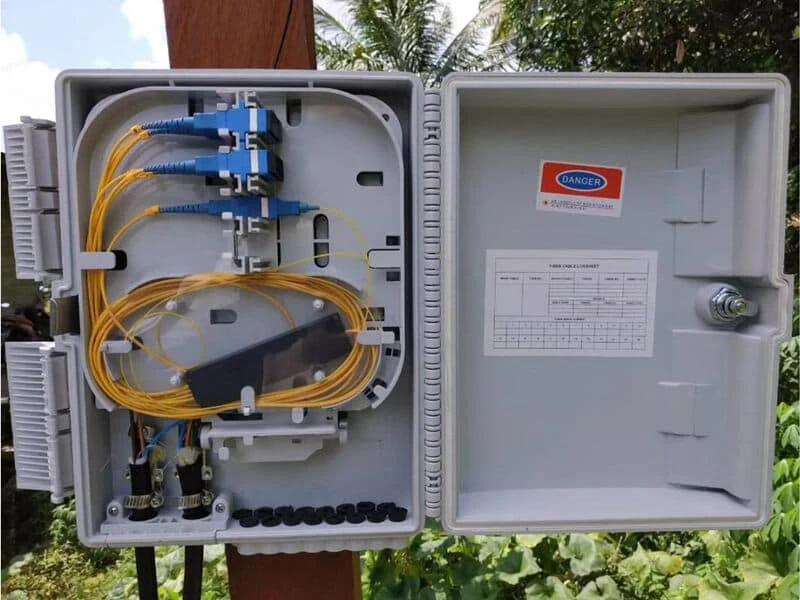
There is only two ways to terminate fiber optic using either a connector or splicing. Each method has its own pros and cons. Depending on your situation one method might be more beneficial than the other. Here are a list of pros and cons of each method. Connectors Termination Pro This method doesn’t require expensive equipment. Multiple personnel can terminate simultaneously due to the inexpensive tools and parts. All handheld tools make it easy work in any space. Terminating a connector in some case can be faster than splicing. Easy to coil up the slack once termination is completed. Con The insertion loss is higher than splicing. Some connectors termination methods are more time consuming. Splicing Termination Pro The insertion loss is less than terminating a connector. Splicing is typically faster than terminating connect depending on your work area and how much room you have. Can re-bond a broken fiber vs re-running a new cable. Con Expensive equipment. Requires a little bit of space in the work area. Operating a splicer without a surface for the equipment to sit on will be a difficult task. Not an appealing look when coiling up the remaining slack once termination is completed. Related Guides How Fiber Optic Installation Can Transform Your Business Connectivity Outdoor-Rated Fiber for Commercial Installations Google Fiber Is Coming to Round Rock Professional Voice and Data Cabling Services Why Professional Data Cabling Boosts Business Efficiency How to Select the Best Voice and Data Cable Installer New Underground Pipe for Network Infrastructure Managed IT Services: The Complete Austin Guide
Desk phones slowly going away

I’ve been in the telecom industry since 1999. The digital phone system have slowly been replaced by voip or voice over internet protocol phones. Telecom and computers are now migrating into 1 seamless category. I remember the days when customer would call us, just to move phones around. We still get those, but it is becoming less frequent. With voip, customer can simply unplug their phone, find another network jack, plug it in, and they are up and running. Those ports be POE (power over ethernet) or in most case, customer can simply plug in a power supply to power the phone. With that being said, in the last 5 years, we have seen a major move from desk phone to a simple inexpensive usb headset or bluetooth headset. It’s simply cheaper and sometimes better, it’s a matter of preferences. Me, personally, I still prefer to have a desk phone with the option for bluetooth usb headset and a softphone when I’m roaming. When I’m really lazy, I can simply use a softphone apps on the smart phone. With so many options, I can see why most customer is wanting to go with VOIP solutions. If you are in the market for a voip solutions, give us a call, we can help. Related Guides How to Choose the Right Business Phone System Selecting the Right VoIP Phone Service for Your Business Affordable VoIP Phone Systems in Austin VoIP Quality of Service (QoS) Improvements NEC SL2100 Business Phone System Benefits of Call Recording for Business Communications Voice Cabling Services for Business Phone Systems Allworx Interact Integration with Google Chrome and Firefox
Why Wi-Fi Feels Slow in Some Rooms (And Why Reconnecting Often Fixes It)
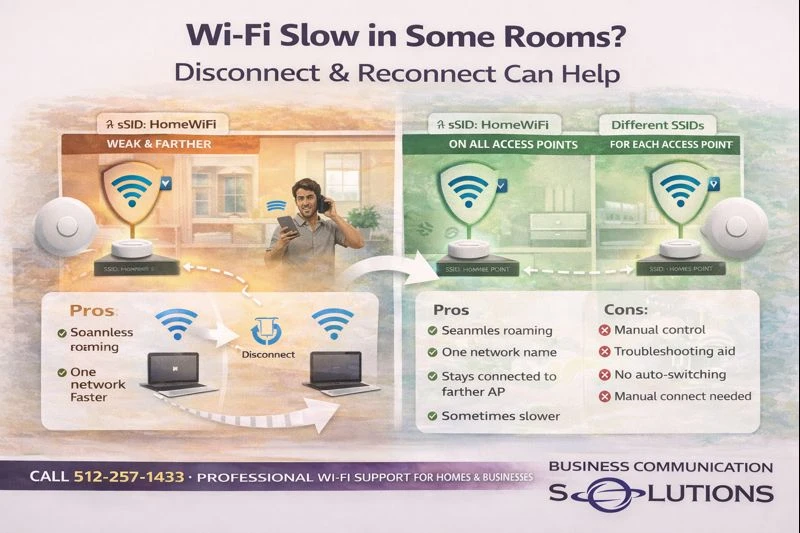
Today, Business Communication Solutions visited a customer in Austin, Texas who was frustrated with slow internet speeds inside their home. The internet service itself was fine—but the experience changed depending on where he stood. In some areas, Wi-Fi was fast. In others, the signal looked strong—but performance was slow. This is a very common Wi-Fi issue, and the fix helped explain why reconnecting to Wi-Fi or rebooting often makes things better. What We Observed On Site While troubleshooting, we asked the customer to: Stand still in the problem area Disconnect from Wi-Fi Reconnect to the same network As soon as the device reconnected, speeds jumped back to normal. Nothing about the internet connection changed. The device simply connected to a closer wireless access point. Why Wi-Fi Devices Don’t Always Choose the Best Access Point Wi-Fi roaming decisions are made by the device, not the access points. That means: Your phone or laptop decides when to switch Devices tend to “hang on” to weaker signals A strong-looking signal doesn’t always mean fast speeds Devices often stay connected to a farther access point even when a closer one is available—until something forces them to reconnect. Why Disconnecting and Reconnecting Helps When you disconnect and reconnect to Wi-Fi: The device scans all available access points It chooses the strongest and fastest option The connection is refreshed This is why: Turning Wi-Fi off and on helps Rebooting a device improves performance Restarting routers temporarily fixes slow speeds It forces a new access point selection. Using the Same SSID on Every Access Point Most modern Wi-Fi systems use the same network name (SSID) across all access points. Pros of Same SSID Seamless roaming One network name for the entire home or business No manual switching required Cleaner user experience Cons of Same SSID Devices may stay connected to a farther AP Slower speeds in some areas Roaming behavior depends on device quality Can feel inconsistent without proper tuning This setup works best when: Access points are properly placed Power levels are tuned correctly The network is professionally configured Using Different SSIDs for Each Access Point Some people use different Wi-Fi names for each access point. Pros of Different SSIDs Manual control over which AP you connect to Helpful for troubleshooting Predictable performance per AP Cons of Different SSIDs Not user-friendly Manual switching required Devices don’t roam automatically Not ideal for larger homes or businesses This approach is sometimes useful in: Problematic environments Special-use areas Temporary troubleshooting scenarios Why Rebooting Routers and Access Points Helps Rebooting works because it: Clears stuck connections Forces devices to reconnect Refreshes network tables Resets roaming decisions It’s not a “fix”—it’s a reset of conditions. If rebooting helps often, it usually means: AP placement needs improvement Roaming behavior isn’t optimized The network design needs adjustment The Real Fix: Proper Wi-Fi Design The best long-term solution isn’t constant reconnecting—it’s: Proper access point placement Correct transmit power levels Roaming optimization Professional configuration At Business Communication Solutions, we design Wi-Fi so devices naturally connect to the best access point—without user intervention. Wi-Fi Slow in Certain Rooms in Austin? If your internet is fast but Wi-Fi performance changes depending on where you stand, the issue is almost always Wi-Fi design, not your internet provider. 📞 Call Business Communication Solutions at 512-257-1433 We provide professional Wi-Fi troubleshooting and optimization for homes and businesses in Austin and surrounding areas. Related Guides Enhancing Wi-Fi Performance: Bringing Access Points Closer to Users Elevate Your Connectivity with Wireless Networking Services Why Your Network Is Only as Fast as Its Slowest Device Bandwidth Planning: How Many Users Can Your Network Support? Replacing an Access Point with a Router: What You Need to Know How Fiber Optic Installation Can Transform Your Business Connectivity Managed IT Services: The Complete Austin Guide Supporting All 7 OSI Layers with Managed IT Services
3 Types of Networks

Small to Larges scale business computer network will assist in the interconnect of a group of computer systems for business purposes. This will allow employees to share files over the network with other employees. A network will help in efficiency and productivity. A network can consist of two or more computers, phone systems and other security devices need to run a small to large business. It is important to have a network admin to ensure that your network, computers and security devices are optimized and secure. Related Guides Managed IT Services: The Complete Austin Guide Supporting All 7 OSI Layers with Managed IT Services Elevate Your Connectivity with Wireless Networking Services Why Your Network Is Only as Fast as Its Slowest Device Bandwidth Planning: How Many Users Can Your Network Support? Why Professional Data Cabling Boosts Business Efficiency How Fiber Optic Installation Can Transform Your Business Connectivity Importance of Network Security for Modern Businesses