

Why Professional Camera & Network Installation Is More Than Just Running Cable

When customers compare quotes for security camera installation or Wi-Fi setup in Austin, TX, the first question is often: “Why isn’t this cheaper?” The truth is — real installation is not just pulling cable and terminating a jack. At Business Communication Solutions, we provide complete, professional installation and configuration services. That includes the parts most companies skip. Camera Installation Is More Than Mounting Hardware A proper security camera system requires: Strategic camera placement (not just “where it fits”) Proper mounting for weather, height, and angle Adjusting focus and field of view Securing cabling and power Protecting connections from moisture and tampering Programming the NVR or cloud system Configuring motion zones and smart detection Setting recording schedules Adjusting resolution and storage settings Then we: Install and configure your mobile app Set up remote viewing securely Walk you through how to use it Train you on playback, exporting footage, and alerts Anyone can mount a camera. Not everyone configures it properly. Wireless Access Points (AP) Installation Done Right Installing a Wi-Fi access point is not just plugging it into a PoE port. We: Determine optimal placement for coverage and roaming Mount it properly (ceiling, wall, indoor/outdoor rated) Configure SSIDs properly Set VLANs when needed Optimize 2.4GHz, 5GHz, and 6GHz settings Adjust channel width and power levels Configure roaming behavior Set up guest networks Secure your Wi-Fi with proper encryption Test performance in multiple areas Bad placement or poor configuration causes: Dead zones Slow speeds Devices not roaming properly Random disconnects That’s not acceptable for a home or business that depends on stable internet. Router & Network Setup: The Foundation Matters Your router and network are the backbone of everything: Cameras VoIP phones POS systems Streaming devices Smart home systems Work-from-home setups We don’t just plug in a router. We: Change default credentials Secure admin access Update firmware Configure firewall rules Set up VLAN segmentation when needed Create secure remote access Configure port forwarding properly (if required) Optimize DNS settings Set up network monitoring Security and performance go hand in hand. We Train You — We Don’t Just Leave After installation, we: Show you how to use your camera system Help you understand your network layout Document passwords and access (securely) Help you change passwords later if needed Provide post-install troubleshooting support Return to fix issues when necessary That support is part of real service. Why We’re Not the Cheapest If someone is quoting significantly cheaper, ask: Are they mounting and sealing properly? Are they configuring the system? Are they optimizing the network? Are they securing your router? Are they training you? Will they answer when something stops working? Cheap installs often mean: Default passwords left unchanged Poor camera angles Weak Wi-Fi coverage No VLAN separation No documentation No follow-up support You don’t notice the difference until something fails. Professional Installation = Long-Term Reliability When installed correctly: Cameras record consistently Remote viewing works reliably Wi-Fi is stable Devices roam properly Your network is secure You’re not constantly rebooting equipment You’re investing in reliability — not just hardware. Serving Austin & Surrounding Areas Business Communication Solutions provides: Security camera installation Network setup & configuration Wi-Fi access point installation Router setup & firewall configuration VLAN segmentation Troubleshooting & network optimization We serve: Austin, Cedar Park, Round Rock, Leander, Pflugerville, Georgetown, Lakeway, Bee Cave, Kyle, Buda, Hutto, Manor, and surrounding Central Texas areas. Final Thought Anyone can run a cable. Not everyone can design, configure, secure, and support the entire system. That’s why we’re not the cheapest. And that’s why our systems work. Call Business Communication Solutions Today 📞 512-257-1433 Reliable. Secure. Installed correctly the first time. Related Guides Step-by-Step Guide to Installing Security Camera Cabling How to Choose the Best Security Camera System for Your Home or Business The Complete Guide to Business Security Cameras Common Security Camera System Problems and How to Fix Them Affordable and Reliable Data Network Services in Austin How Poor Data Cabling Affects Network Speed and Stability Why Professional Data Cabling Boosts Business Efficiency What Is PoE (Power over Ethernet)?
IT Check and Balance: Why Layered Security and Multiple Admin Oversight Protect Your Business
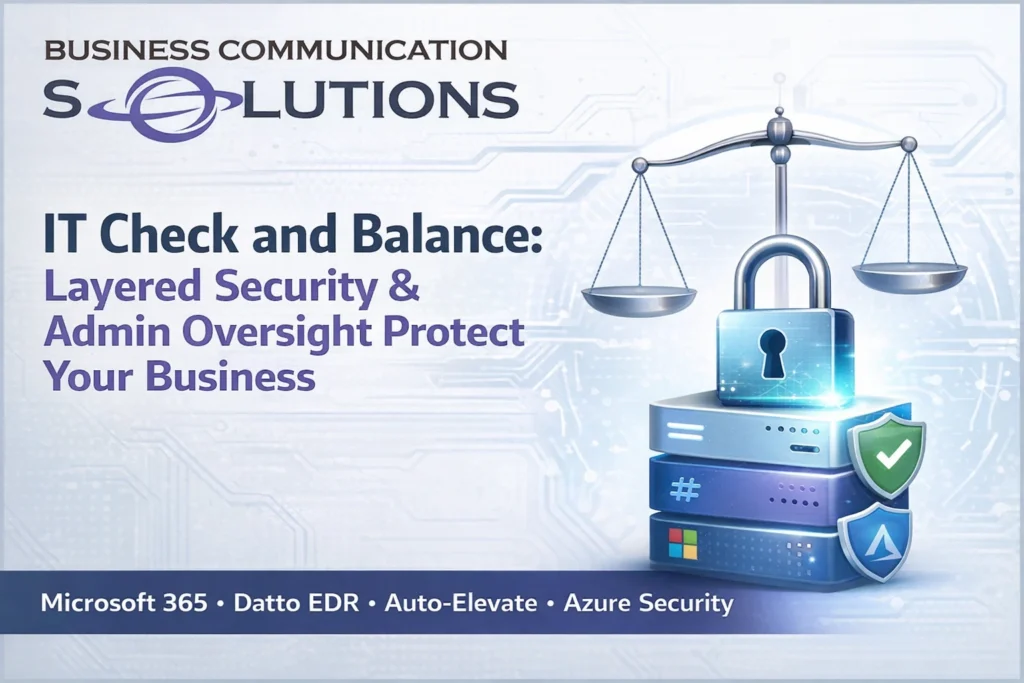
Modern cybersecurity is not about installing one antivirus program. It is about structured IT governance, layered security, and built-in administrative oversight. At Business Communication Solutions, we help businesses in Austin and Central Texas implement a “check and balance” IT structure using: Microsoft 365 and Azure (Entra ID) for identity security Datto EDR for endpoint detection and ransomware protection Auto-Elevate for controlled admin privileges Role-based access control and audit logging This approach reduces risk, improves accountability, and protects businesses from both cyber threats and internal mistakes. What Is IT Check and Balance? In IT management, “check and balance” means: No single administrator has unlimited, unchecked control All privileged actions are logged and reviewable Software installations are verified before approval Identity access is protected with multi-factor authentication Security tools validate human decisions This structure prevents: Credential compromise Unauthorized software installation Ransomware infections Insider threats Accidental system misconfiguration For small and mid-sized businesses in Austin, this layered model is critical. Layer 1: Microsoft 365 and Azure (Entra ID) for Identity and Access Management The foundation of modern cybersecurity starts with identity protection. Microsoft 365 with Azure Active Directory (Entra ID) provides: Multi-Factor Authentication (MFA) Conditional Access Policies Role-Based Access Control (RBAC) Device compliance enforcement Login monitoring and risk detection Why this matters: Most cyberattacks begin with stolen credentials. If identity is compromised, the entire network is at risk. Proper Azure configuration ensures: Only authorized users access business systems Admin roles are separated High-risk sign-ins are blocked automatically This is the first checkpoint in your security stack. Layer 2: Datto EDR for Endpoint Detection and Ransomware Protection Even with strong identity protection, endpoints remain a major attack surface. Datto EDR (Endpoint Detection & Response) provides: Real-time behavioral monitoring Ransomware detection Malicious script blocking Rollback capability Forensic investigation tools Unlike traditional antivirus, EDR does not rely only on virus definitions. It monitors behavior patterns to detect suspicious activity. If malware bypasses email filtering or user awareness training, EDR acts as a second layer of defense. Layer 3: Auto-Elevate for Controlled Administrative Privileges One of the biggest security risks in small businesses is giving users full local administrator access. Auto-Elevate allows businesses to: Remove permanent admin rights from users Review application hashes before approval Log all elevation requests Approve or deny software installations centrally This prevents: Employees installing unsafe software Malware disguised as legitimate updates Shadow IT risks Unauthorized system changes Every elevation request becomes part of your security audit trail. This creates accountability and structured oversight. Why Multiple Admin Oversight Is Important Many small businesses rely on one IT person with full access to everything. This creates risk. Proper IT governance separates responsibilities: Identity management is monitored Endpoint security is independently reporting Privileged actions are logged No single account controls the entire system Even trusted administrators can make mistakes. Layered systems provide visibility and protection for both the business and the admin. What Happens Without IT Check and Balance? Businesses without structured oversight face: Ransomware encryption events Compromised Microsoft 365 accounts Data loss Compliance violations Costly downtime The financial impact of a security incident often exceeds the cost of prevention. Cybersecurity Services in Austin, Texas Business Communication Solutions provides layered IT security and managed IT services for businesses in: Austin Cedar Park Round Rock Leander Georgetown Pflugerville Lakeway Kyle Buda Hutto And surrounding Central Texas areas Our services include: Microsoft 365 security configuration Azure Active Directory management Datto EDR deployment Auto-Elevate privilege control Network segmentation and firewall configuration Ongoing IT monitoring and support We design structured IT systems — not just install software. Why Layered IT Security Is Essential in 2026 Cyber threats continue to evolve. Insurance providers now require: Multi-factor authentication Endpoint detection and response Role-based access control Logged administrative actions Businesses that do not implement layered security may struggle with compliance, cyber insurance approval, or breach recovery. The future of cybersecurity is: Identity control Endpoint monitoring Privilege management Audit accountability Working together. Need Help Securing Your Microsoft 365 and Network? If your business does not currently have: MFA properly enforced EDR monitoring endpoints Controlled admin privileges Logged and auditable IT actions You may have gaps in your security posture. Let’s fix that. 📞 Call Business Communication Solutions at 512-257-1433 Serving Austin and Central Texas businesses with professional IT security and managed services. Structured. Layered. Accountable. Secure. Related Guides Protecting Your Business: The Vital Role of Cybersecurity in Managed IT Cloud Security What Is a Firewall? A Simple Explanation for Businesses in Austin, TX Importance of Network Security Network Security: When Is It Sufficient? Locked Out of Their Own Network? The Hidden Risk of Single-Point IT Control Managed IT Services: The Complete Austin Guide Why the Right Managed IT Provider Is Essential for the Future
Why Your Network Is Only as Fast as Its Slowest Device

(For Businesses in Austin, Round Rock, Cedar Park & Surrounding Areas) If you recently upgraded your internet speed in Austin, TX and didn’t see much improvement — you’re not alone. Many business owners assume slow performance is always an ISP issue. But in most cases, your network is only as fast as its slowest component. And upgrading your internet plan won’t fix internal bottlenecks. How Business Networks Actually Work Your internet speed depends on an entire chain of devices working together: Modem Router Network switches Ethernet cabling Wireless access points Network cards in computers Servers and cloud services If even one of those components is outdated or misconfigured, it limits everything behind it. Think of it like traffic on MoPac at rush hour — it only takes one slow lane to back up the entire highway. Common Network Bottlenecks We See in Austin Businesses After years of providing IT and network support in Austin and nearby cities like Pflugerville, Georgetown, and Lakeway, here are the most common slow points we find: 1. Outdated Network Switches Many offices still use 10/100 switches. Even with gigabit internet, your speed is capped at 100 Mbps internally. 2. Old or Damaged Ethernet Cabling Older Cat5 cabling or poorly terminated cables can prevent higher throughput and cause intermittent issues. 3. Entry-Level Routers Not all routers can handle high-speed fiber plans. Some max out under load — especially with VoIP phones, cameras, and cloud applications running simultaneously. 4. Slow Wireless Access Points Wi-Fi 5 vs Wi-Fi 6 makes a major difference in business environments with multiple users. 5. Device Limitations Older desktops and laptops may not support gigabit speeds due to aging network cards. 6. Server or Cloud-Side Bottlenecks Sometimes the limitation isn’t in your building — it’s the remote server you’re connecting to. Why Upgrading Internet Speed Doesn’t Always Help We frequently see Austin business owners double their internet plan expecting immediate improvements. But if your internal network isn’t designed to support those speeds, the upgrade won’t change real-world performance. Your system will always operate at the speed of its weakest link. Signs You Have a Network Bottleneck Speed tests vary dramatically across devices Wired speeds are much faster than Wi-Fi Some offices or rooms are slower than others Performance drops during busy hours Cameras or VoIP systems struggle during peak usage These aren’t always ISP problems. They’re often internal network design issues. The Smarter Approach for Austin Businesses Before increasing your internet package, evaluate: Are all switches gigabit or higher? Is your cabling rated and properly terminated? Can your router handle your fiber plan? Are wireless access points positioned and configured correctly? Is traffic properly segmented (cameras, guest Wi-Fi, office network)? A proper network assessment saves far more than guessing. Final Thoughts If your Austin-area business is dealing with slow or inconsistent network performance, the solution isn’t always “more speed.” It’s better design. Because no matter how fast your ISP connection is — your network will always run at the speed of its slowest device. And identifying that bottleneck is where real performance starts. Related Guides Affordable and Reliable Data Network Services in Austin Understanding DHCP and DNS: Essential Components of Modern Networks Understanding Subnetting: Why It’s Crucial in Networking Why Running Two Network Cables Can Crash Your Business Network SD-WAN: Transforming Network Management for Modern Businesses Cisco Router and Switch Command Line Network Troubleshooting and Support How Poor Data Cabling Affects Network Speed and Stability Supporting All 7 OSI Layers: How Managed IT Services Ensure Seamless Networks
Remote IT Support vs. Local IT Support in Austin, TX: Why Your Business Needs Both

Perfect — here’s the SEO-optimized version with a strong Austin, TX + surrounding cities location layer naturally built in (not stuffed). This helps with local ranking while keeping it readable and professional. Remote IT Support vs. Local IT Support in Austin, TX: Why Your Business Needs Both Businesses in Austin, TX rely heavily on stable internet, secure networks, and reliable technology systems. When something goes wrong, you need it fixed fast. That’s where remote IT support comes in. Remote service is efficient. It’s immediate. And for many issues, it’s the smartest first step. Password resets, user support, configuration changes, monitoring, and many troubleshooting tasks can be handled without anyone driving onsite. But here’s what many Austin business owners discover: Remote IT support works — until the problem becomes physical. What Remote IT Support Can (and Can’t) Do For companies in Austin and surrounding areas like Round Rock, Cedar Park, Pflugerville, Georgetown, and Leander, remote IT services are incredibly valuable for: Software troubleshooting User account management Network monitoring Cloud and email support Many internet-related issues However, some problems require onsite IT support. For example: A failed network switch Damaged Ethernet cabling Power supply issues Hardware failure after a storm Equipment that appears “online” but isn’t functioning correctly No remote tool can physically test a cable, inspect a rack, or reseat equipment inside a server cabinet. At some point, someone has to be there. The Risk of Remote-Only IT Providers in Austin Some IT providers operate as remote-only companies. While this model may work for minor issues, it creates limitations when physical troubleshooting is required. When no technician can respond onsite, businesses often experience: Extended downtime Staff walking through technical steps they don’t fully understand Trial-and-error troubleshooting Delays waiting for third-party contractors In a fast-moving market like Austin, downtime is expensive. Whether you operate a medical office, warehouse, professional firm, or retail business, your technology must work consistently. Even the best remote technician cannot fix a damaged cable or failed switch from behind a screen. Why Local IT Support in Austin Still Matters This is where having a local IT support company in Austin, TX makes the difference. A local IT partner can: Respond onsite when necessary Physically inspect networking equipment Test and verify cabling Diagnose infrastructure issues accurately Restore operations faster We provide remote IT support first — because it’s efficient and often resolves the issue immediately. But if the situation requires hands-on troubleshooting, we show up. That means businesses in Austin, Round Rock, Cedar Park, Pflugerville, Georgetown, and nearby areas aren’t left guessing when something critical fails. You get speed when possible. You get presence when necessary. The Right IT Support Strategy for Austin Businesses The most reliable IT strategy includes: Proactive monitoring Fast remote troubleshooting Local onsite IT support when required Remote support should be your first line of response — not your only line of response. Because when your internet goes down, your phones stop working, or your security cameras fail, you don’t need instructions. You need resolution. IT Support in Austin, TX That Shows Up If your business depends on its network, internet connection, cameras, phones, or cloud systems, your IT partner should offer both: Responsive remote IT support Reliable local onsite IT support in Austin and surrounding cities Efficiency matters. Accountability matters more. The strongest IT support model isn’t remote versus local. It’s having both — ready when your business needs them. Related Guides Managed IT Services: The Complete Austin Guide Best Managed IT Services in Austin BCS Offers Smart Hands Services Why the Right Managed IT Provider Is Essential for the Future The Fundamentals of Great IT: Principles That Never Go Out of Style Supporting All 7 OSI Layers: How Managed IT Services Ensure Seamless Networks Everything in IT Has a Side Effect: Austin IT Support and Cybersecurity When Do Austin Businesses Realize They Waited Too Long to Fix Their IT?
Why Running Two Network Cables Can Crash Your Business Network IT & Network Support in Austin, TX

Many business owners assume that adding an extra network cable improves reliability. It sounds logical. If one cable works, two must be better. In business networking, that assumption can shut down your entire system. At Business Communication Solutions, we’ve seen this simple mistake cause network outages for businesses across Austin, Round Rock, Cedar Park, Pflugerville, Georgetown, and Leander. Here’s why it happens — and how to prevent it. Can You Run Two Cables Between a Router and a Switch? In most business networks, the answer is no — not without proper configuration. You cannot simply connect: Two patch cables between a router and a switch Two cables between network switches Duplicate connections inside your server rack Unless the equipment is properly configured for redundancy, this creates a network loop. And network loops cause serious problems. What Is a Network Loop? A network loop happens when traffic can circulate endlessly between two devices. Instead of flowing in one clean path, data begins repeating itself. When that happens, your business may experience: Slow internet speeds Dropped VoIP phone calls Security cameras going offline Random disconnects Entire network crashes We regularly troubleshoot these types of issues for Austin-area businesses that unknowingly added a second cable thinking it would increase reliability. Instead, it created instability. Why Proper Network Configuration Matters True network redundancy is possible — but it must be engineered correctly. Professional business network design may include: Managed switches Proper spanning tree configuration Link aggregation (LACP) Structured cabling design Documented network topology Redundancy is not about adding more cables. It’s about proper configuration and intelligent network design. Without correct setup, a single duplicate cable can bring down an office. How This Impacts Businesses in Austin, TX For companies in Austin and surrounding cities, network downtime means: Lost productivity Interrupted cloud applications Phones not working Security systems offline Employees unable to work In fast-growing markets like Austin, businesses depend on stable, well-configured networks. Many outages are not caused by hardware failure. They’re caused by configuration mistakes. Professional IT & Network Support in Austin and Surrounding Cities Business Communication Solutions provides professional IT support and network services in: Austin, TX Round Rock Cedar Park Pflugerville Georgetown Leander We design, configure, and maintain business networks correctly — from the start. Our services include: Network design and installation Switch and router configuration Troubleshooting network outages Remote IT support Onsite IT support when needed We make sure your system is stable, secure, and built for reliability. Final Thoughts More cables do not equal more protection. In business networking: Correct configuration is better than double wiring. If your business depends on reliable internet, VoIP phones, cloud systems, or security cameras, your network must be configured properly. If you’re unsure about your setup, it’s better to review it now than deal with downtime later. Business Communication Solutions proudly provides IT support and network support in Austin, TX and surrounding cities. Related Guides Understanding Subnetting: Why It’s Crucial in Networking Understanding DHCP and DNS: Essential Components of Modern Networks Affordable and Reliable Data Network Services in Austin SD-WAN: Transforming Network Management for Modern Businesses Supporting All 7 OSI Layers: How Managed IT Services Ensure Seamless Networks Cisco Router and Switch Command Line Network Troubleshooting and Support Network Terminology Managed IT Services: The Complete Austin Guide
RV Park Wi-Fi Upgrade in Austin & Central Texas: Why Proper Network Design Matters

Reliable Wi-Fi is no longer a luxury for RV parks — it’s an expectation. Recently, Business Communication Solutions completed a full wireless network upgrade for a 150-site RV park in Central Texas, and the results were night and day. The Challenge: Outdated Wi-Fi in a Growing RV Park The RV park was operating with: Only two Wi-Fi 4 access points A mix of wired and wireless mesh connections One large, overcrowded network This setup struggled to handle modern demand. As more guests connected, speeds slowed, connections dropped, and roaming between areas became unreliable. Wireless mesh links introduced latency, and the limited number of access points caused congestion instead of coverage. This is a common issue we see at RV parks across Austin, Round Rock, Georgetown, Bastrop, and surrounding Central Texas areas. The Solution: A Fully Wired, Scalable Network Design Instead of patching the old system, we redesigned the network with long-term performance in mind. Our solution included: PoE-powered network switches for reliable power and data delivery PoE extenders to reach distant sections of the property Multiple access points installed throughout the park All access points hardwired — no wireless mesh backhaul VLAN segmentation, creating multiple smaller network domains Why This Design Works Better for RV Parks Outdoor properties like RV parks require a different approach than offices or homes. By eliminating mesh links and wiring every access point, we delivered: More available bandwidth per user Consistent speeds across the property Improved roaming between access points A network that scales as occupancy increases Segmenting the network with VLANs also reduced broadcast traffic, improving stability during peak usage times. The Results: Faster, More Reliable Wi-Fi for Guests After the upgrade, the RV park experienced: Stronger Wi-Fi coverage across all 150 sites Faster, more consistent speeds Fewer service complaints from guests This project highlights an important reality: Wi-Fi problems at RV parks are usually design problems — not internet provider problems. RV Park & Outdoor Wi-Fi Services in Austin & Central Texas Business Communication Solutions provides RV park Wi-Fi design, installation, and troubleshooting throughout Austin and Central Texas, including: Austin, Round Rock, Cedar Park, Leander, Georgetown, Pflugerville, Bastrop, Kyle, Buda, Manor, and nearby areas. Whether you’re dealing with slow speeds, unreliable mesh networks, or outdated equipment, we can design a wired and wireless solution that actually performs. 📞 Call Business Communication Solutions at 512-257-1433 Local. Reliable. Designed to scale. RV Park Wi-Fi – Austin & Central Texas What causes slow Wi-Fi at RV parks? Slow Wi-Fi at RV parks is usually caused by outdated access points, wireless mesh backhaul, and poor network design. Large properties need multiple wired access points, proper VLAN segmentation, and enough bandwidth per user to stay reliable. Do RV parks need wired access points instead of mesh Wi-Fi? Yes. Wired access points provide significantly more bandwidth and stability than wireless mesh systems. Mesh networks often introduce latency and congestion, especially in large RV parks with many users. How many access points does an RV park need? There is no fixed number. The correct number depends on park size, layout, occupancy, and usage. A properly designed RV park Wi-Fi network uses strategically placed access points that are hardwired and load-balanced to avoid congestion. What is VLAN segmentation and why is it important for RV park Wi-Fi? VLAN segmentation divides a large network into smaller, isolated domains. This reduces broadcast traffic, improves performance, and increases stability — especially important in RV parks with hundreds of connected devices. Can PoE switches be used in outdoor RV park networks? Yes. PoE (Power over Ethernet) switches are commonly used in RV parks to power access points and extenders without running separate electrical circuits. This simplifies installation and improves reliability. Why does Wi-Fi work better after replacing mesh with wired connections? Wired backhaul eliminates the bandwidth loss and interference that comes with wireless mesh links. This results in faster speeds, more consistent performance, and better roaming between access points. Who installs RV park Wi-Fi in Austin and Central Texas? Business Communication Solutions installs and upgrades RV park Wi-Fi networks throughout Austin and Central Texas, including Round Rock, Georgetown, Cedar Park, Leander, Bastrop, Kyle, and Buda. Can an RV park Wi-Fi network be upgraded without replacing everything? In many cases, yes. Existing cabling, poles, or enclosures can often be reused. A site survey determines what can be kept and what needs to be upgraded to improve performance. Is Wi-Fi design more important than internet speed? Yes. Internet speed alone does not fix Wi-Fi issues. Proper network design — including access point placement, wired backhaul, and segmentation — has a much bigger impact on real-world performance. Who should RV park owners call for Wi-Fi upgrades? RV park owners and property managers in Austin and Central Texas can contact Business Communication Solutions at 512-257-1433 for Wi-Fi design, installation, and troubleshooting. Related Guides Elevate Your Connectivity with BCS Wireless Networking Services in Austin Site Survey Affordable and Reliable Data Network Services in Austin Wi-Fi Controller vs Standalone Access Points: Choosing the Right Wireless Solution Enhancing Wi-Fi Performance: Bringing Access Points Closer to Users Why Your Network Is Only as Fast as Its Slowest Device Understanding DHCP and DNS: Essential Components of Modern Networks SD-WAN: Transforming Network Management for Modern Businesses
When Your Internet Is “Perfect” — According to the ISP (But Still Keeps Dropping)
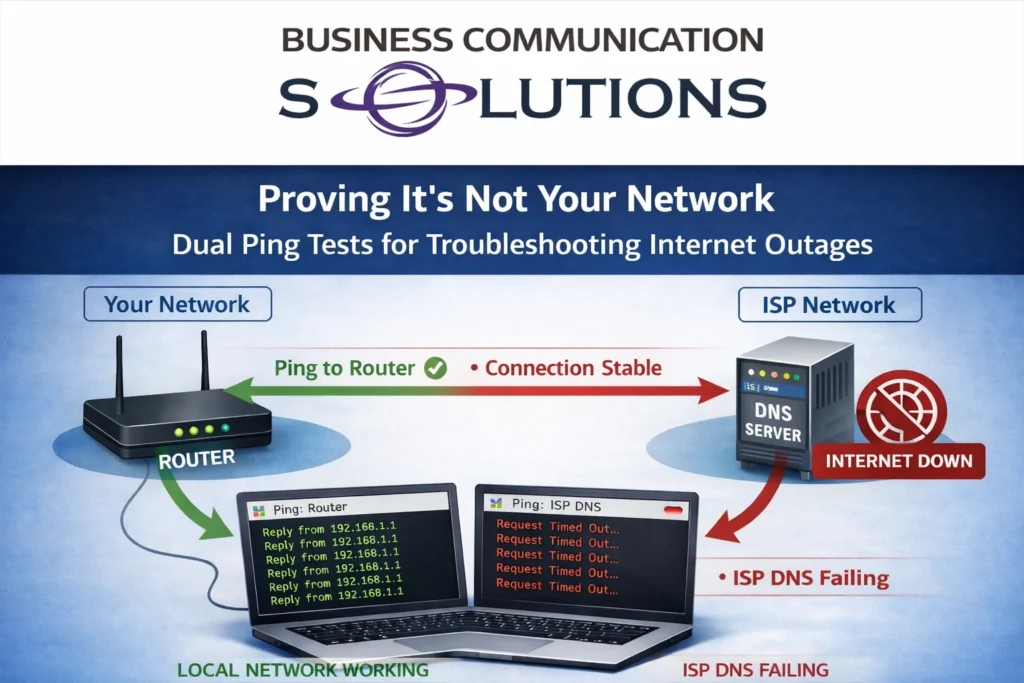
If you’ve ever called your internet service provider because your connection keeps cutting out, you’ve probably heard the same response: “Everything looks good on our end.” Meanwhile, your internet is clearly intermittent, video calls are dropping, cloud apps are timing out, and productivity is taking a hit. This is one of the most common issues we troubleshoot for homes and businesses in Austin and surrounding areas. The problem isn’t that the ISP is always wrong—it’s that most troubleshooting stops too early. How We Prove the Problem Isn’t “On Your End” One of the simplest and most effective tools in internet troubleshooting is a dual ping test. We run: A continuous ping to your internal router or firewall A continuous ping to the ISP’s DNS server (or another upstream target they provide) Here’s what we often see when customers report intermittent outages: ✅ Ping to the local router stays solid ❌ Ping to the ISP’s DNS server drops or times out This tells us something very important. If your router is still responding during the outage, your local network is working correctly. Cabling, switches, Wi-Fi, and internal equipment are not the problem. The failure is happening beyond your router, inside the ISP’s network. That’s not a “maybe.” That’s evidence. Why ISPs Often Say It’s Your Network Most ISP support is script-driven. If you don’t present clear data, the default assumption is: Bad Wi-Fi Faulty router Too many devices “Have you tried rebooting?” And if you’re not confident—or technical—during the call, the issue will almost always be pushed back onto you. This is especially true for intermittent issues, because by the time support checks, the connection may appear “up.” Confidence (and Data) Changes the Conversation When we speak with ISP support on behalf of our Austin clients, the tone of the call is very different. Instead of saying: “The internet keeps going out” We say: “We have continuous packet loss to your DNS server while the customer’s router remains reachable. This confirms the outage is upstream.” That shifts the conversation immediately. Suddenly: Tickets get escalated Line tests become more thorough Technicians get dispatched Problems actually get fixed This is why confidence matters. And confidence comes from proper testing and experience, not guessing. Why This Matters for Businesses and Work-From-Home Users Intermittent internet is often worse than a full outage. It causes: Dropped VoIP and Zoom calls Failed VPN connections Cloud application errors Corrupt uploads and backups Frustrated employees and customers Many Austin businesses assume they need “faster internet,” when the real issue is unstable service that no one has properly proven or escalated. Local Internet Troubleshooting in Austin (We Deal With the ISP So You Don’t) At Business Communication Solutions, we specialize in: Internet troubleshooting and stability testing ISP escalation and support coordination Router, firewall, and DNS diagnostics Business and residential network reliability We don’t care who your provider is—AT&T, Spectrum, Google Fiber, Astound, Optimum, or anyone else. If the problem is upstream, we know how to prove it and hold the ISP accountable. Still Being Told “It’s On Your End”? If your internet keeps dropping and your provider insists everything is perfect, it’s time to bring in someone who speaks their language. 📍 Serving Austin, Round Rock, Cedar Park, Leander, Pflugerville, and surrounding areas 📞 Call Business Communication Solutions at 512-257-1433 We’ll test it, document it, and make sure the finger-pointing stops—and the internet stays up. Related Guides Affordable and Reliable Data Network Services in Austin Why Your Network Is Only as Fast as Its Slowest Device Why Running Two Network Cables Can Crash Your Business Network Understanding DHCP and DNS: Essential Components of Modern Networks Cisco Router and Switch Command Line Network Troubleshooting and Support How Poor Data Cabling Affects Network Speed and Stability Managed IT Services: The Complete Austin Guide Supporting All 7 OSI Layers: How Managed IT Services Ensure Seamless Networks
Why Confidence and Communication Matter as Much as Technical Skills in IT
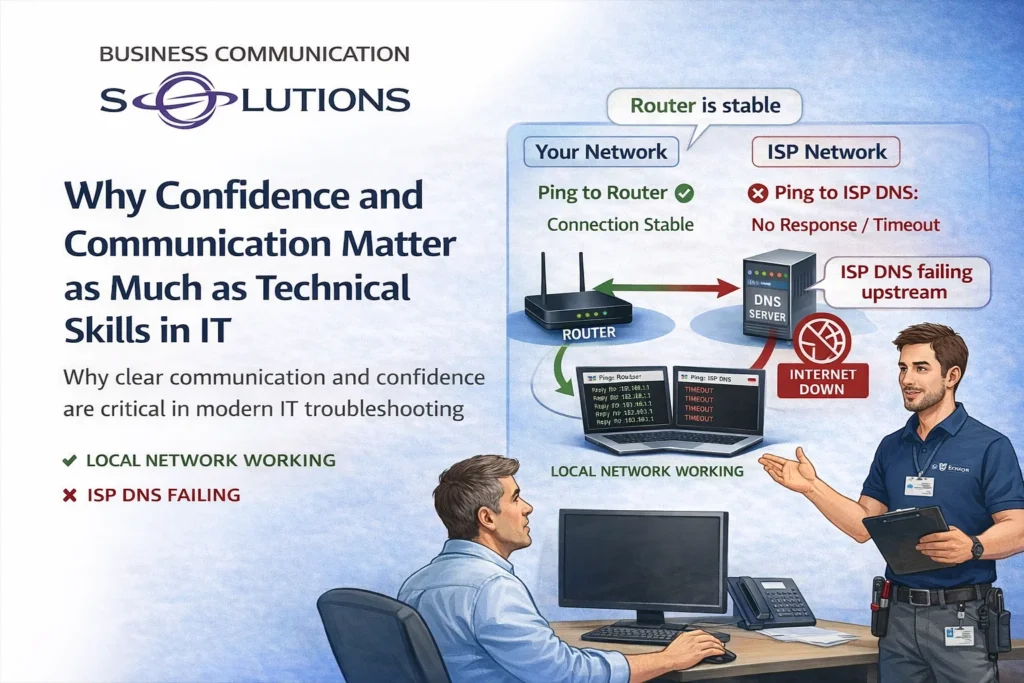
In IT, technical knowledge is essential—but it’s not enough on its own. Some of the most time-consuming and frustrating issues we see aren’t caused by bad equipment or complex failures. They happen because the real problem isn’t identified—or isn’t communicated clearly. At Business Communication Solutions, we’ve learned that confidence and communication skills are just as important as technical expertise, especially when troubleshooting complex issues involving multiple parties. When “The Internet Is Down” Isn’t an Internet Problem Here’s a real-world example we see more often than you might expect: A customer calls and reports: “The internet is down.” We arrive on site and quickly discover: The computer doesn’t power on The monitor is off The customer only uses that computer to access the internet From the customer’s perspective, the internet is down. But technically, there is no internet issue at all—there’s a power or hardware problem. Without clear communication, this kind of misunderstanding can: Waste hours of troubleshooting Trigger unnecessary ISP calls Create frustration on all sides Good IT support starts by confidently identifying the real issue and explaining it in a way the customer understands. Technical Skill Without Communication Goes Nowhere Even experienced technicians can struggle if they lack communication skills. If you know where the problem is—but can’t clearly explain it—troubleshooting often stalls. This is especially true in environments where multiple systems and vendors are involved. Common examples include: Internet Service Providers (ISP) Cloud service providers Firewalls and internal networks Customer devices and applications If a technician hesitates, second-guesses themselves, or fails to articulate findings clearly, responsibility gets passed around—and nothing gets resolved. Confidence Changes the Outcome Confidence in IT isn’t about ego. It’s about: Trusting your testing Standing by your findings Communicating clearly and professionally When a technician can say: “The local network is stable, the router is responding, and packet loss is occurring upstream with the ISP,” the conversation changes. Whether it’s speaking to a customer, an ISP technician, or a cloud provider, confidence backed by data leads to faster escalation, clearer accountability, and real solutions. Complex Problems Require Clear Ownership Modern IT environments are rarely simple. A single issue may involve: The customer’s device The local network The internet provider Cloud-based services or applications Without strong communication, each party assumes the problem belongs to someone else. An effective IT administrator acts as the translator—connecting technical findings across systems and ensuring everyone understands where the failure actually occurs. Why This Matters for BusinessesnterrRepeated service calls Blame shifting Lost productivity Strong communication, on the other hand: Builds trust with customers Speeds up resolution time Reduces unnecessary vendor calls Turns troubleshooting into a structured, logical process Local IT Support That Communicates Clearly At Business Communication Solutions, we don’t just fix problems—we explain them. We help Austin-area businesses and homeowners navigate complex IT issues by combining technical expertise with clear, confident communication. Whether we’re working with an ISP, a cloud provider, or an end user, our goal is always the same: identify the real issue and move the solution forward. 📍 Serving Austin and surrounding areas 📞 Call 512-257-1433 to work with IT professionals who know how to troubleshoot—and communicate—effectively. Related Guides Managed IT Services: The Complete Austin Guide Why the Right Managed IT Provider Is Essential for the Future The Fundamentals of Great IT: Principles That Never Go Out of Style Everything in IT Has a Side Effect: Austin IT Support and Cybersecurity When Do Austin Businesses Realize They Waited Too Long to Fix Their IT? Protecting Your Business: The Vital Role of Cybersecurity in Managed IT BCS Offers Smart Hands Services Supporting All 7 OSI Layers: How Managed IT Services Ensure Seamless Networks
In IT, Every Decision Has a Cost — and a Consequence

In IT, there’s no such thing as a “free upgrade.” Every choice—hardware, software, cabling, settings, or features—comes with a cost and an effect. Sometimes that cost is money. Other times it’s performance, stability, storage, time, or long-term reliability. At Business Communication Solutions, we regularly help customers understand that “best on paper” doesn’t always mean “best in real life.” More Isn’t Always Better — It’s Just Different Many IT decisions are influenced by forums, spec sheets, or marketing claims. While research is good, real-world environments don’t always behave the way online discussions suggest. The problem isn’t that customers want better systems. The problem is when side effects aren’t considered. Example 1: Shielded Cat6A for Cameras — The Hidden Installation Cost We recently worked with a customer who insisted on using Cat6A shielded cable because they believed it was “the best” option after reading online forums. Their use case? UniFi security cameras. Here’s the reality: Cat6A shielded cable is thicker and stiffer Shielded connectors are larger Many outdoor UniFi cameras are designed with waterproof glands Those glands are not designed for bulky shielded connectors The result: Cable wouldn’t fit cleanly Waterproof seals were harder to maintain What should have been a 1-hour install turned into 2+ hours Higher labor cost for zero performance gain Cat6A isn’t wrong—but it wasn’t the right tool for the job. Example 2: “Log Everything” — Until the Server Stops Working Another common request: “We want to log all events on the server.” Sounds reasonable. Until the side effects show up. What actually happens: Logs grow rapidly Hard drives fill up faster than expected Disk space hits critical limits The server slows down—or stops services entirely Now the system meant to improve visibility becomes the cause of downtime. Logging isn’t bad—but it must be: Scoped correctly Stored intelligently Rotated and monitored More data always comes with more responsibility. Example 3: High-Resolution Cameras on Underpowered NVRs Customers often want the newest, highest-resolution cameras, such as 16 MP models. The issue? Older or entry-level NVRs weren’t designed for that workload Limited CPU power Small internal hard drives Older compression support The result: Choppy or lagging video Delayed playback Hard drives filling up in hours instead of days Reduced reliability when footage is actually needed The camera wasn’t the problem. The system design was. IT Is a System — Not Individual Parts One of the most common mistakes we see is upgrading one component without considering the rest of the environment. In IT: Faster devices generate more data More data needs more storage More storage needs better performance Better performance requires proper planning Everything is connected. The Role of an Experienced IT Professional Good IT support doesn’t just install what’s requested. It explains: What will change What it will affect What trade-offs exist Whether the upgrade actually makes sense Sometimes the best recommendation is: A different cable A different camera A storage upgrade first Or not upgrading at all That’s not resistance—that’s responsibility. Local IT Guidance You Can Trust At Business Communication Solutions, we help Austin-area businesses and homeowners make IT decisions with full visibility into the consequences. Our goal isn’t to upsell. It’s to design systems that work reliably over time. 📍 Serving Austin and surrounding areas 📞 Call 512-257-1433 to plan IT upgrades that make sense—technically and operationally. Related Guides The Fundamentals of Great IT: Principles That Never Go Out of Style Everything in IT Has a Side Effect: Austin IT Support and Cybersecurity Why the Right Managed IT Provider Is Essential for the Future Managed IT Services: The Complete Austin Guide Protecting Your Business: The Vital Role of Cybersecurity in Managed IT Cloud Storage Is Not Cloud Backup Backups Aren’t About Files, They’re About People Why Slow Computers Are Quietly Costing Your Business Money
Wi-Fi 7 Explained: 2.4 GHz, 5 GHz, 6 GHz, MLO, and What It Means for Your Network

Wi-Fi 7 (802.11be) is the biggest upgrade to wireless networking in over a decade. While most people focus on “faster speeds,” the real advantages are lower latency, better reliability, and smarter use of multiple frequency bands at the same time. To understand why Wi-Fi 7 matters — and whether it makes sense for your home or business — it’s important to understand how the 2.4 GHz, 5 GHz, and 6 GHz bands work, what Multi-Link Operation (MLO) actually does, and how new devices remain backward compatible with older ones. Understanding the Wi-Fi Frequency Bands 2.4 GHz: Long Range, Lower Speed The 2.4 GHz band offers the longest range and best wall penetration, but it’s also the most congested. Many household devices share this spectrum, including smart home gear and Bluetooth devices. Best for: Smart home and IoT devices Older devices Long-distance connections 5 GHz: Performance and Balance The 5 GHz band provides higher speeds and better performance than 2.4 GHz, with less interference — but reduced range. Best for: Phones, laptops, TVs Everyday work and streaming Most current Wi-Fi devices 6 GHz: Clean Spectrum, Ultra-Low Latency The 6 GHz band is exclusive to Wi-Fi 6E and Wi-Fi 7 devices. Because legacy devices cannot use it, interference is dramatically reduced. Wi-Fi 7 expands this further with wider channels (up to 320 MHz) and improved efficiency. Best for: High-performance devices Video conferencing and VoIP Gaming, AR/VR, and large file transfers Busy homes and businesses What Is MLO (Multi-Link Operation)? Multi-Link Operation (MLO) is one of the most important features introduced with Wi-Fi 7. Instead of connecting to only one band at a time, Wi-Fi 7 devices can: Use multiple frequency bands simultaneously Dynamically move traffic between bands Combine links for faster speeds and lower latency Think of it like using multiple highways at once instead of being stuck in one traffic lane. Benefits of MLO Lower latency for real-time applications More stable connections Better performance in congested environments Faster real-world speeds, not just lab benchmarks One Shared Wi-Fi Name vs Separate SSIDs One Shared SSID (Recommended) Modern Wi-Fi 7 networks are designed to work best with one shared network name across all bands. Advantages: Devices automatically select the best band MLO works seamlessly Better roaming between access points Less confusion for users This is the best option for most homes and businesses. Separate SSIDs (Advanced or Special Cases) In some situations, separating bands still makes sense: Forcing IoT devices onto 2.4 GHz Troubleshooting performance issues Supporting older or poorly designed devices Trade-off: More control, but increased complexity and less automation. Device Compatibility: Who Can Use Wi-Fi 7 and 6 GHz? Devices That Support 6 GHz (Wi-Fi 6E & 7) Newer smartphones (select iPhone, Samsung, Pixel models) New laptops with Intel or Qualcomm Wi-Fi 6E / 7 chipsets High-end tablets and workstations Wi-Fi 7 Devices (Still Rolling Out) Flagship phones and laptops (2024+) Enterprise and prosumer access points New networking hardware Backward Compatibility Still Matters Wi-Fi 7 access points: Fully support Wi-Fi 6, 5, and older devices Do not break existing networks Allow gradual upgrades instead of full replacements This makes Wi-Fi 7 a future-proof investment, not an all-or-nothing upgrade. Do You Need Wi-Fi 7 Right Now? Wi-Fi 7 makes the biggest impact when: Many devices are connected at once You rely on cloud apps, VoIP, or video meetings Low latency and reliability matter You’re upgrading or building a long-term network Even if most of your devices aren’t Wi-Fi 7 yet, installing Wi-Fi 7 infrastructure today means: Cleaner spectrum with 6 GHz Better performance immediately Ready for future devices Wi-Fi 7 Installation & Network Design in Austin, TX Wi-Fi 7 isn’t just about buying new access points. Performance depends on proper design, cabling, placement, configuration, and tuning. Features like MLO and 6 GHz only work correctly when the network is designed for your environment. That’s where Business Communication Solutions comes in. We help homes and businesses across Austin and Central Texas design and install modern Wi-Fi networks that work reliably in real-world conditions. Our Wi-Fi Services Include: Wi-Fi 7 and Wi-Fi 6E access point installation 2.4 GHz, 5 GHz, and 6 GHz band planning MLO configuration and optimization Structured cabling (Cat6, Cat6A, and fiber) Dead-zone elimination and coverage planning Troubleshooting slow or unstable Wi-Fi We work with homes, offices, restaurants, warehouses, retail spaces, and multi-building properties. Local. Experienced. No Guesswork. Business Communication Solutions is a local Austin-based company — not a national installer or call center. We show up on-site, test your environment, and design your network around how you actually use it. Whether you’re upgrading an existing system or planning ahead for Wi-Fi 7, we’ll help you decide what makes sense now — and how to do it right. 📞 Call Business Communication Solutions Today 512-257-1433 Serving Austin, Round Rock, Cedar Park, Pflugerville, Leander, Georgetown, Buda, Kyle, Bee Cave, Lakeway, and surrounding areas. Related Guides Elevate Your Connectivity with BCS Wireless Networking Services in Austin Wi-Fi Controller vs Standalone Access Points: Choosing the Right Wireless Solution Enhancing Wi-Fi Performance: Bringing Access Points Closer to Users Why Wi-Fi Feels Slow in Some Rooms (And Why Reconnecting Often Fixes It) WiFi 2.4GHz vs 5GHz Wireless Network Austin Site Survey RV Park Wi-Fi Upgrade in Austin and Central Texas: Why Proper Network Design Matters Why Your Network Is Only as Fast as Its Slowest Device