

Outdoor Wi-Fi Installation in Austin: Designing a High-Density Network for a Large Tennis Facility
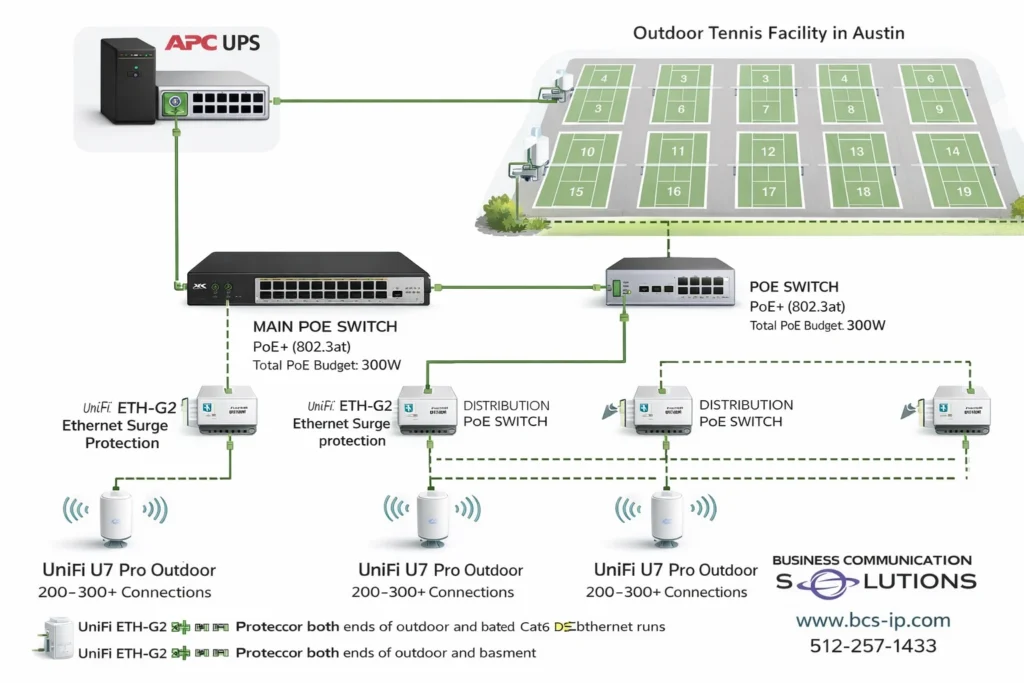
Outdoor Wi-Fi Installation in Austin Built for Reliability Outdoor Wi-Fi installation in Austin requires more than access points. A reliable design includes PoE-powered switches to eliminate outdoor electrical outlets, high-capacity outdoor access points like UniFi U7 Pro Outdoor, proper PoE wattage planning, enterprise-grade surge protection, and scalable subnetting. For large venues such as tennis courts and sports facilities, layered Ethernet surge protection and properly sized IP networks are critical for performance, uptime, and long-term reliability. This tennis facility Wi-Fi network was designed to: Eliminate outdoor electrical outlets Support hundreds of simultaneous users Protect equipment from lightning and power surges Scale for tournaments and future growth Deliver consistent performance across all 18 courts If you’re searching for outdoor Wi-Fi installation in Austin, proper design, PoE planning, and surge protection make all the difference. Outdoor Wi-Fi in Austin has unique challenges—heat, long cable runs, and electrical storms. For sports facilities like tennis complexes, reliable connectivity requires more than strong signal strength. It requires proper power design, surge protection, access point capacity, and scalable network architecture. For this project, we designed an outdoor Wi-Fi network for an 18-court tennis facility in the Austin area, using PoE-powered switching, UniFi U7 Pro Outdoor access points, enterprise-grade surge protection, and a /20 subnet built for high-density usage. Why PoE Is Ideal for Outdoor Wi-Fi Installations No Electrical Outlets Required at Access Points Power over Ethernet (PoE) allows both power and data to travel over a single Ethernet cable. In outdoor environments like tennis courts, this approach provides major advantages: No electrical outlets needed at poles or mounting locations Reduced electrician costs and faster deployment Flexible access point placement across courts Centralized power control at the network rack Remote power-cycling of access points for troubleshooting Seamless UPS backup integration Using PoE-powered switches, all outdoor access points are powered directly from the network infrastructure. PoE Wattage Planning and Limitations PoE design must be done carefully, especially in large outdoor environments. Key PoE Considerations Each PoE port has a maximum wattage limit Each switch has a total PoE power budget Cable length impacts available power at the device Outdoor access points draw more power under load High-performance outdoor access points typically require PoE+ or higher, particularly when supporting Wi-Fi 7 features and large client counts. Best practice: always design PoE capacity with additional headroom to avoid instability during peak usage. UniFi U7 Pro Outdoor for High-Density Tennis Courts For this facility, we selected UniFi U7 Pro Outdoor access points, designed specifically for outdoor, high-capacity environments. Why UniFi U7 Pro Outdoor Weather-rated for Texas outdoor conditions Supports up to 300 client connections per access point Designed for high-density Wi-Fi 7 deployments Excellent roaming performance across large outdoor areas While 300 connections represents a maximum limit, real-world performance depends on user behavior, channel planning, and how client load is distributed across access points. Surge Protection: Critical for Outdoor Wi-Fi in Austin Austin and Central Texas experience frequent lightning activity and power fluctuations. Outdoor Ethernet runs act like antennas and must be properly protected. UniFi ETH-G2 Surge Protection on Both Ends For every outdoor Ethernet run, we are installing UniFi ETH-G2 Ethernet Surge Protectors on both ends of the cable: One surge protector near the outdoor access point One surge protector at the building or network entry point This dual-ended approach: Protects PoE switches from voltage spikes Protects access points from lightning-induced surges Helps prevent damage from ground potential differences Increases long-term reliability of outdoor network equipment APC Ethernet Surge Protection at the Core Network In addition to field-level protection, the main PoE network switch is protected using Ethernet surge protection built into the APC backup battery (UPS). This provides: Surge protection for Ethernet lines entering and exiting the PoE switch Power conditioning for the PoE switch itself Battery backup during short power outages Clean shutdown protection during extended outages Layered surge protection—at the access point, cable entry, and network core—is critical for outdoor Wi-Fi installations in Austin. Subnetting Strategy: Why a /20 Network Is Used For a large outdoor venue, proper IP addressing is just as important as RF design. Benefits of a /20 Subnet 4,096 total IP addresses 4,094 usable addresses for devices Supports large crowds during tournaments Allows seamless roaming across courts Avoids IP exhaustion during peak events Risks of Subnets That Are Too Small Using a small subnet (such as a /24) can lead to: IP address shortages Clients unable to connect Unstable user experience Increased support calls For outdoor sports facilities, undersized subnets are a common and costly mistake. Managing the Risks of Large Subnets While large subnets offer flexibility, they must be managed properly. Best Practices Segment traffic using VLANs Separate guest, staff, and operational devices Limit broadcast and multicast traffic Improve security and troubleshooting This approach maintains performance while allowing large-scale growth. PoE Copper Cabling vs Fiber for Outdoor Wi-Fi For this project, all access points and devices are powered using PoE over copper Ethernet, rather than fiber. Advantages of PoE Over Copper Power and data on a single cable Faster installation and lower cost Simplified maintenance and expansion No fiber termination required at access points Important Considerations Copper has distance limitations Outdoor-rated, grounded cable is required Surge protection is mandatory in Texas environments In many outdoor Wi-Fi designs, fiber is used for long backhaul runs with PoE switches located closer to access points. When copper is used throughout, surge protection and proper layout are essential. Need Outdoor Wi-Fi Installation in Austin? If you’re planning Wi-Fi for tennis courts, sports complexes, parks, schools, restaurants, or large outdoor venues, working with a local Austin-based network installer matters. Business Communication Solutions specializes in: Outdoor Wi-Fi installation in Austin and surrounding cities UniFi access points and PoE network design Surge-protected outdoor Ethernet installations High-density Wi-Fi for events and sports facilities Troubleshooting networks other vendors won’t touch 📞 Call us today: 512-257-1433 📍 Serving Austin, Round Rock, Cedar Park, Pflugerville, Leander, Georgetown, Buda, Kyle, and surrounding areas. Local, responsive, and built for real-world environments—not cookie-cutter installs. Related
Bandwidth Planning Explained: How Many Users Can Your Network Support?
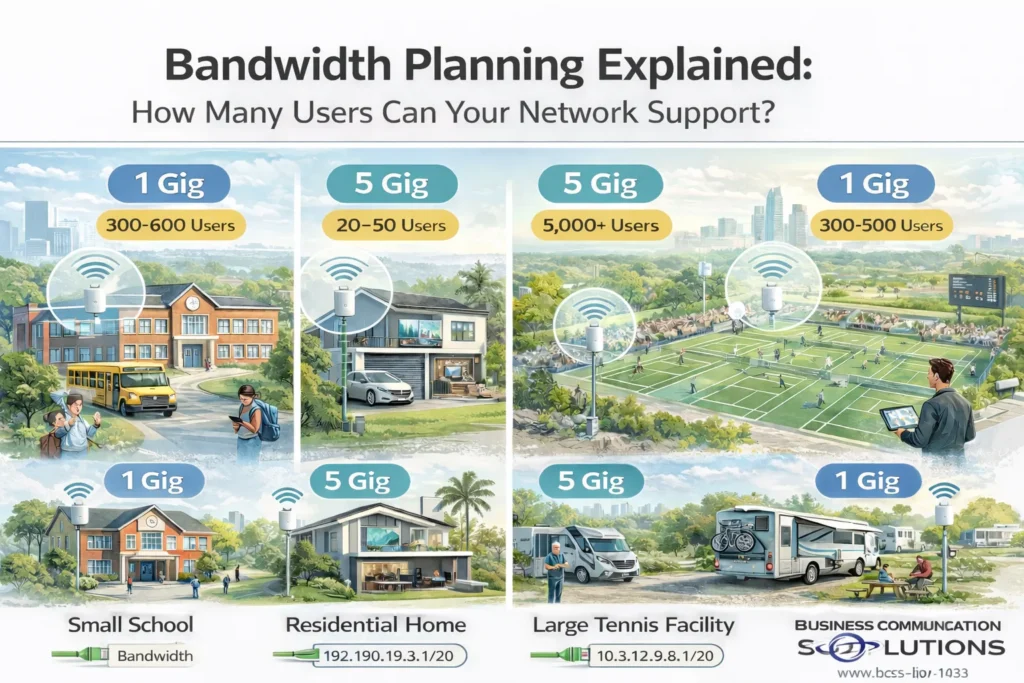
When customers ask, “How much internet speed do I need?” what they’re really asking is: How many users can my network handle without slowing down? The answer depends on bandwidth, Wi-Fi design, user behavior, and subnetting—not just the size of the internet circuit. At Business Communication Solutions, we design and install networks across the Austin area for schools, homes, sports facilities, and RV parks. Below, we explain how bandwidth really works, using real-world projects we’ve recently completed. Bandwidth vs Number of Users (The Biggest Myth) Internet speed (1 Gig, 5 Gig, etc.) is a shared resource. That means: 1 Gig does not mean every device gets 1 Gig Most users are idle most of the time A small percentage of users create most of the traffic What actually determines performance: Number of active users at the same time What those users are doing (streaming, browsing, uploading) Wi-Fi access point density and placement Switching and backhaul capacity IP address and subnet design A well-designed network can support thousands of users on the same internet connection. Real-World Network Projects (Austin Area) 🏫 Small School Network Internet Speed: 1 Gig Size: ~30 classrooms School networks have: Hundreds of devices Bursty usage (testing, downloads, cloud apps) Frequent device roaming With proper access point placement, VLANs, and subnetting, a 1 Gig connection can easily support hundreds of students and staff. Key design factors: Multiple APs per hallway or classroom zone Separate networks for students, staff, and administration Proper subnet sizing to avoid IP exhaustion 🏡 High-Speed Residential Network Internet Speed: 5 Gig Homes behave differently than commercial spaces: Fewer users Very high per-device demand Streaming, gaming, remote work, cloud backups In residential environments, internal network design matters more than raw speed. Cabling, switches, and Wi-Fi must support multi-gig speeds or the internet connection is wasted. 🎾 Large Tennis Facility Internet Speed: 5 Gig Estimated Users: ~5,000 Outdoor venues are high-density but low-usage per user: Most users browse, message, or check scores Only a small percentage stream video Users are constantly roaming With proper Wi-Fi design and large subnets, a 5 Gig connection can support thousands of devices simultaneously. Critical factors: High-density outdoor access points Load balancing across APs Large subnets (such as /20) Surge protection and centralized PoE power 🚐 RV Park Network Internet Speed: 1 Gig Size: ~70 RV slots RV parks behave like small neighborhoods: Long-term connected devices Evening streaming peaks High expectation for reliability A 1 Gig circuit can support dozens of RVs when: Wi-Fi coverage is evenly distributed Bandwidth is fairly shared Subnets support long-term device leases Bandwidth Comparison Table Environment Internet Speed Estimated Devices Key Design Focus Small School 1 Gig 300–600 VLANs, AP density, subnet sizing Home 5 Gig 20–50 Multi-gig wiring, low latency Tennis Facility 5 Gig 5,000+ High-density Wi-Fi, large subnets RV Park 1 Gig 300–500 Fair usage, long-term IP leases Why Subnetting Is Critical for Large Networks Subnetting controls how many devices can receive an IP address. If a subnet is too small: Devices fail to connect Wi-Fi looks “broken” Users blame internet speed If subnetting is done correctly: Devices connect instantly Roaming works smoothly The network scales effortlessly For large venues, we often use larger subnets (such as /20) combined with VLAN segmentation. Big Subnet vs Small Subnet Benefits of Larger Subnets Supports thousands of devices Seamless roaming across large areas No IP shortages during peak events Risks if Not Designed Properly Excess broadcast traffic Harder troubleshooting Requires proper VLAN separation Subnet size should always match environment size and usage patterns, not guesswork. Frequently Asked Questions How many users can 1 Gig internet support? A properly designed network can support hundreds of users on 1 Gig, depending on usage. Is 5 Gig internet overkill? Not for high-density venues or users with heavy upload/download needs. Why do networks feel slow even with fast internet? Most performance issues are caused by poor Wi-Fi design, small subnets, or overloaded access points—not bandwidth. Does subnetting affect Wi-Fi speed? Indirectly, yes. Poor subnet design can prevent devices from connecting or roaming properly. Bandwidth Planning in Austin Starts with Design More bandwidth doesn’t fix bad network design. Better design often performs faster on less bandwidth. At Business Communication Solutions, we design networks around: Real user behavior Peak demand scenarios Proper subnetting Scalable infrastructure Need Help with Network Design or Bandwidth Planning in Austin? If you’re planning a network for a school, home, sports facility, RV park, or large venue, we can help you size it correctly from day one. Business Communication Solutions 📞 512-257-1433 🌐 www.bcs-ip.com Serving Austin, Round Rock, Cedar Park, Pflugerville, Leander, Georgetown, Buda, Kyle, and surrounding areas. Related Guides Affordable and Reliable Data Network Services in Austin Why Your Network Is Only as Fast as Its Slowest Device SD-WAN: Transforming Network Management for Modern Businesses Understanding DHCP and DNS: Essential Components of Modern Networks Understanding Subnetting: Why It’s Crucial in Networking Supporting All 7 OSI Layers: How Managed IT Services Ensure Seamless Networks Wi-Fi 7 Explained: 2.4 GHz, 5 GHz, 6 GHz, MLO, and What It Means for Your Network RV Park Wi-Fi Upgrade in Austin and Central Texas: Why Proper Network Design Matters
Why Security Cameras Go Offline After a Power Outage (And How Static IPs Fix It)
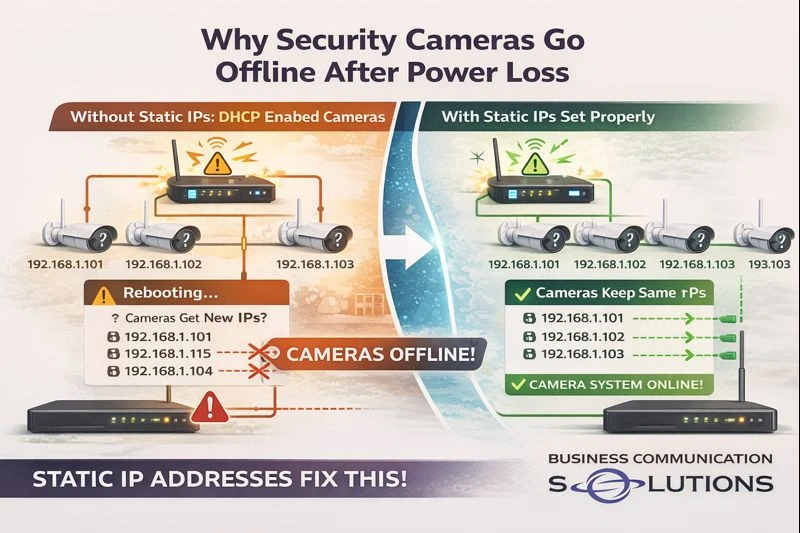
At Business Communication Solutions, we helped a customer in Austin, Texas today who was dealing with a frustrating issue: their security cameras kept going offline after network reboots and power outages—even though everything worked fine at first. The root cause? The cameras were not configured with static IP addresses. This is a common issue we see with plug-and-play camera systems, especially when cameras are installed on a regular network instead of a dedicated camera network. What Happens When Cameras Don’t Use Static IP Addresses Most security cameras ship in DHCP mode by default. That means: The network automatically assigns an IP address The IP can change after a reboot or power loss When the network restarts: The router hands out new IP addresses Cameras may no longer match what the NVR expects The NVR loses communication with the cameras Cameras appear “offline” even though they are powered on From the customer’s perspective, it looks random. From a networking standpoint, it’s completely predictable. Why This Is More Common on Regular Networks Many camera systems work perfectly when connected to: A dedicated camera switch A closed camera network isolated from the main LAN But when cameras are placed on: A shared business network A home network with phones, computers, printers, and Wi-Fi devices IP conflicts and address changes become far more likely—especially after: Power outages Router updates ISP equipment reboots This is where static IP addressing becomes critical. Why Static IP Addresses Matter for Security Cameras Setting cameras with static IP addresses ensures: Each camera keeps the same IP address permanently The NVR always knows where to find each camera Cameras reconnect properly after power loss No surprise “offline” alerts after reboots In short: Static IPs create stability. This is especially important for: Business security systems Remote camera viewing Cloud backups Multi-camera installations The Plug-and-Play Myth Plug-and-play camera systems work great: During initial setup While power stays on When the network never changes The problem is that real networks reboot. The first power outage is usually when: Cameras disappear Recordings stop Customers realize something isn’t right That’s often when we get the call. What We Fixed for Our Austin Customer For this Austin client, we: Identified cameras running on DHCP Assigned proper static IP addresses Matched NVR camera mappings correctly Verified reconnect behavior after reboot Ensured long-term stability of the system Once configured correctly, the cameras came back online immediately—and stayed online after testing power cycles. Why Local IT & Low-Voltage Support Makes a Difference Large camera vendors and installers often focus on getting systems up and running—not on long-term reliability. At Business Communication Solutions, we: Troubleshoot camera systems others walk away from Work with existing equipment Fix “small” issues that cause big headaches Provide local, on-site support in Austin and surrounding areas We understand networking—not just cameras. Cameras Going Offline in Austin? We Can Help. If your security cameras: Go offline after power outages Randomly disconnect from the NVR Work one day and fail the next 📞 Call Business Communication Solutions at 512-257-1433 We serve Austin and surrounding cities and specialize in reliable camera, network, and communication system setups that keep working when it matters. Related Guides Understanding DHCP and DNS: Essential Components of Modern Networks Why Network Printers Keep Disconnecting and How Static IPs Fix It Common Security Camera System Problems and How to Fix Them The Complete Guide to Business Security Camera Systems Why Professional Camera and Network Installation Is More Than Just Running Cable Affordable and Reliable Data Network Services in Austin Cisco Router and Switch Command Line Network Troubleshooting and Support When Your Internet Is Perfect According to the ISP but Still Keeps Dropping
TP-Link Network Installation & Support in Austin, Texas

Business Communication Solutions provides professional TP-Link network installation, configuration, and support for homes and businesses in Austin and surrounding areas. We specialize in deploying reliable, controller-based TP-Link networking solutions that deliver strong Wi-Fi coverage, stable wired connections, and long-term manageability. We install TP-Link systems the right way—designed, documented, and supported beyond day one. Authorized TP-Link Reseller Business Communication Solutions is an authorized reseller of TP-Link networking equipment. This ensures our customers receive genuine, manufacturer-supported hardware with proper licensing and warranty coverage. As an authorized reseller, we: Supply TP-Link routers, switches, and access points directly Design Omada controller-based networks Ensure firmware compatibility and long-term support Avoid gray-market or unsupported equipment Provide installation and ongoing local support TP-Link Routers, Switches & Wireless Access Points We work with a full range of TP-Link networking products, including: TP-Link business-class routers and gateways Managed and unmanaged network switches Indoor and outdoor wireless access points TP-Link Omada controller-based Wi-Fi systems Our installations support both residential and commercial environments, from single-building networks to multi-access-point deployments. TP-Link Omada Controller Setup & Management TP-Link’s Omada Controller allows centralized management of Wi-Fi networks, switches, and gateways—similar to enterprise networking platforms. With a properly installed Omada controller, customers can: Change Wi-Fi names and passwords easily Monitor connected devices and usage Receive network alerts Perform firmware updates safely Troubleshoot performance issues We ensure the controller is installed on a permanent platform, not a temporary laptop, so customers retain full access to their network. TP-Link Network Design for Homes TP-Link networking equipment is well-suited for: Large homes Guest houses and detached buildings Home offices Properties requiring multiple access points We design home networks for seamless roaming, consistent speeds, and reliable coverage in every room. TP-Link Networking for Businesses Businesses in Austin use TP-Link for: Offices and professional spaces Retail and restaurants Warehouses and light industrial environments Multi-tenant and mixed-use properties We design TP-Link networks that prioritize uptime, security, and easy management—without unnecessary complexity. Why Professional TP-Link Installation Matters While TP-Link equipment is affordable and capable, improper installation can lead to: Poor Wi-Fi roaming Inconsistent speeds Lost controller access Networks that work but cannot be managed Business Communication Solutions ensures: Proper access point placement Correct SSID and roaming configuration Secure network setup Static IP and VLAN planning when needed Documentation for future support Local TP-Link Network Support in Austin As a local company, we provide: New TP-Link network installations Support for existing TP-Link systems Wi-Fi troubleshooting and optimization Controller recovery and migration Network expansion and upgrades We support both home and business TP-Link environments throughout Austin and surrounding cities. Need TP-Link Network Installation or Support? If you’re using TP-Link networking equipment—or planning to—Business Communication Solutions can help you design, install, and support a network that actually works long-term. 📞 Call 512-257-1433 Serving Austin, Texas and surrounding areas Related Guides Elevate Your Connectivity with BCS Wireless Networking Services in Austin UniFi Network Installed but No Controller? A Common Problem in Austin Homes Wi-Fi Controller vs Standalone Access Points: Choosing the Right Wireless Solution Site Survey Affordable and Reliable Data Network Services in Austin Wi-Fi 7 Explained: 2.4 GHz, 5 GHz, 6 GHz, MLO, and What It Means for Your Network Understanding DHCP and DNS: Essential Components of Modern Networks Cisco Router and Switch Command Line Network Troubleshooting and Support
Why Network Printers Keep Disconnecting (And How Static IPs Fix It)
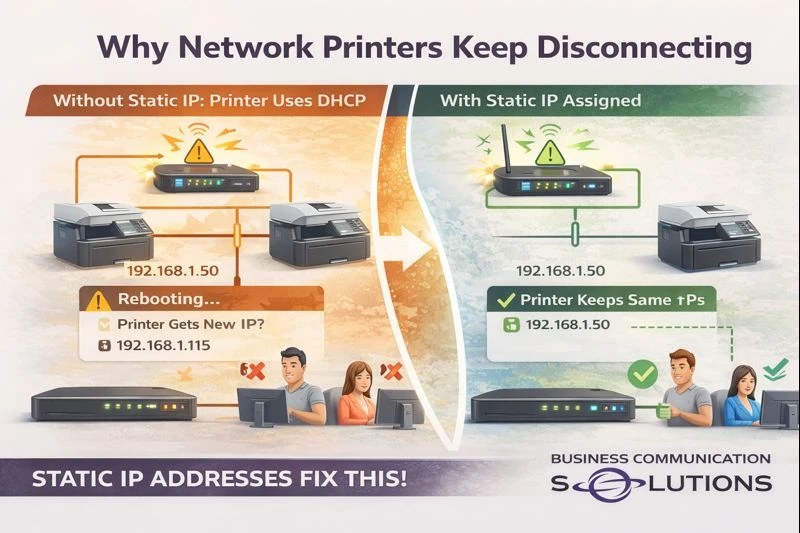
At Business Communication Solutions, we helped a customer in Austin, Texas today who was frustrated because their network printer kept disappearing. One day it worked perfectly, the next day no one could print—again. The cause wasn’t the printer hardware. It was the printer being set up with DHCP instead of a static IP address. This is one of the most common (and overlooked) issues with network printers. What Happens When Printers Use DHCP By default, most printers are configured to: Automatically receive an IP address from the router (DHCP) Accept any available address on the network That works fine—until the network: Reboots Loses power Receives an ISP modem/router update When that happens: The printer gets a new IP address Computers still try to print to the old IP Print jobs fail The printer shows “offline” even though it’s powered on From the user’s perspective, the printer just “randomly stopped working.” Why This Is Worse on Business & Shared Networks On regular business or home networks: Phones, laptops, tablets, TVs, and IoT devices are constantly joining and leaving IP addresses are reassigned dynamically Routers don’t care which device gets which IP Printers, however, need consistency. If a printer’s IP changes: Mapped printers break Accounting and POS systems lose access Scan-to-email and scan-to-folder stop working Users waste time reinstalling printers (over and over) Why Static IP Addresses Matter for Printers Assigning a static IP to a printer ensures: The printer always keeps the same network address Computers always know where to send print jobs Printing works after power outages No more “printer offline” errors after reboots In short: Static IPs eliminate printer instability. This is especially important for: Offices with multiple users Medical and legal offices Restaurants and retail POS printers Home offices with shared printers The Plug-and-Play Trap Plug-and-play printer installs are fine: On day one Before the first power outage Before the router reboots But once the network changes, DHCP-based printers often fail silently. That’s when customers call us—usually after reinstalling the printer three times. What We Fixed for Our Austin Customer For this customer, we: Identified the printer was using DHCP Assigned a proper static IP outside the DHCP range Updated all computers to point to the correct IP Verified printing after network reboot Prevented future disconnects Once configured correctly, the printer stayed online—even after testing power cycles. Why Local IT Support Makes the Difference Big vendors and printer manufacturers focus on installation—not reliability. At Business Communication Solutions, we: Troubleshoot printers others won’t touch Fix recurring “offline” printer issues Work with existing routers and networks Handle the small network problems that cause big productivity losses Because we’re local, we actually come on-site and fix the root cause. Printer Keeps Going Offline in Austin? We Can Help. If your printer: Randomly shows offline Stops working after power outages Needs to be reinstalled constantly 📞 Call Business Communication Solutions at 512-257-1433 We serve Austin and surrounding areas and specialize in stable, properly configured business and home networks. Related Guides Understanding DHCP and DNS: Essential Components of Modern Networks Affordable and Reliable Data Network Services in Austin Cisco Router and Switch Command Line Network Troubleshooting and Support When Your Internet Is Perfect According to the ISP but Still Keeps Dropping Why Your Network Is Only as Fast as Its Slowest Device Supporting All 7 OSI Layers: How Managed IT Services Ensure Seamless Networks Managed IT Services: The Complete Austin Guide Why Running Two Network Cables Can Crash Your Business Network
UniFi Network Installed but No Controller? A Common Problem in Austin Homes & Businesses
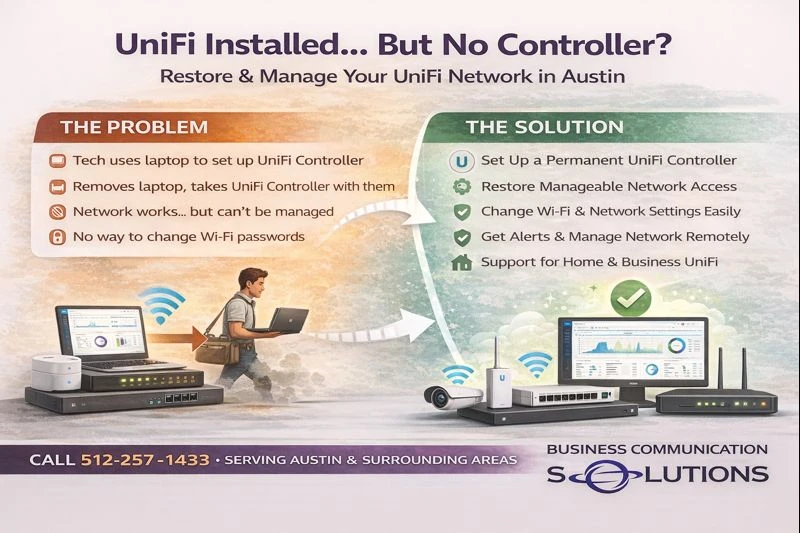
At Business Communication Solutions, we visit many homes and businesses in Austin, Texas that have UniFi (Ubiquiti) networking equipment installed—but no active controller in place. The access points are mounted. The network “works.” But when the customer needs to change a Wi-Fi password or troubleshoot an issue, things get complicated fast. Why UniFi Controllers Often Go Missing In many installations, the original installer: Used a laptop-based UniFi Controller Adopted all the devices Completed the install Then took the laptop with them Once that happens: The controller no longer exists on-site The customer does not have admin access Network settings become difficult or impossible to change This is one of the most common UniFi support calls we receive in Austin. What Happens Without a UniFi Controller UniFi access points and switches will continue to pass traffic without a controller, but management is lost. Without an active controller: Wi-Fi passwords can’t be easily changed Firmware updates are difficult Network troubleshooting is limited New devices can’t be adopted Logs and alerts are unavailable For businesses, this becomes a real operational issue. For homes, it turns simple changes into major headaches. What Is a UniFi Network Controller? A UniFi Controller is the management platform that: Controls Wi-Fi networks Manages switches and gateways Handles user access and security Provides monitoring and alerts It can run on: A Cloud Key A UniFi Gateway A local server A properly maintained computer The key is that it must stay available. Pros of Using a Proper UniFi Controller When set up correctly, UniFi offers major advantages: Centralized network management Easy Wi-Fi password changes Remote troubleshooting Scalable for homes and businesses Enterprise-grade features at a reasonable cost Excellent visibility into network health This is why UniFi is so popular—but only when installed correctly. Cons (When Installed Incorrectly) Most UniFi complaints we hear are not about the hardware—they’re about how it was deployed. Common problems include: Controller installed on a technician’s laptop No admin credentials left behind No backups of the configuration No documentation In these cases, customers often believe their system is “locked” or broken—when it’s actually recoverable. How Business Communication Solutions Helps UniFi Users in Austin We specialize in: Recovering UniFi networks with missing controllers Migrating laptop-based controllers to permanent solutions Setting up Cloud Keys or gateway controllers Restoring admin access Securing and documenting networks Supporting both residential and business UniFi systems We work with existing installations—not just new builds. Home & Business UniFi Support in Austin Whether you have: UniFi access points at home A UniFi network in your office An installer who disappeared No way to manage your Wi-Fi 📞 Call Business Communication Solutions at 512-257-1433 We provide local UniFi and Ubiquiti support in Austin and surrounding areas for homes and businesses. UniFi Installed? But No Way to Manage It? You don’t need to replace your network. In most cases, we can: Restore control Improve performance Make your UniFi system easy to manage again Local help. Real solutions. No vendor lock-in. Related Guides Elevate Your Connectivity with BCS Wireless Networking Services in Austin Wi-Fi Controller vs Standalone Access Points: Choosing the Right Wireless Solution Affordable and Reliable Data Network Services in Austin Site Survey Why Your Network Is Only as Fast as Its Slowest Device Cisco Router and Switch Command Line Network Troubleshooting and Support Managed IT Services: The Complete Austin Guide Supporting All 7 OSI Layers: How Managed IT Services Ensure Seamless Networks
Why Complex Phone & Network Systems Require a Realistic IT Budget
We were recently called to help a business experiencing ongoing VoIP phone and network issues. The customer was using a custom VoIP phone system integrated with their CRM, complete with advanced workflows and automation. While powerful, systems like this require proper computers, network capacity, and infrastructure to perform reliably. The customer reported: Slow PCs Software freezing or locking up Dropped or poor-quality VoIP calls Overloaded Wi-Fi What We Found After evaluating the environment, several challenges stood out: Nearly 200 employees sharing Wi-Fi Only five wireless access points deployed Minimal hard-wired network connections Entry-level PCs running demanding software No budget for business-class computers or structured cabling We installed additional hard-wired network cabling to reduce wireless congestion, which improved stability. However, some issues remained — not due to improper installation, but because the overall infrastructure simply wasn’t designed to support the scale and complexity of the operation. The Reality of Business IT There are limits to what optimization alone can fix. When businesses rely on: Low-cost PCs Underbuilt networks Overloaded Wi-Fi Complex VoIP and CRM platforms performance issues are inevitable. Even the best phone system or network design cannot overcome hardware and capacity limitations. Why IT Budgeting Matters When Scaling If your business is planning to hire 100–200 employees, your IT budget must scale accordingly. That includes: Business-class computers Proper network cabling Adequate Wi-Fi coverage VoIP systems designed for high call volume Ongoing support and planning Cutting costs in these areas often leads to lost productivity, frustrated employees, and constant troubleshooting. How Business Communication Solutions Helps At Business Communication Solutions, we work with businesses across Austin and Central Texas to design, install, and support: VoIP phone systems Structured network cabling Wi-Fi for high-density environments Network troubleshooting and optimization We’re honest, practical, and focused on solutions that actually work — not just quick fixes. Call to Action Struggling with VoIP, slow networks, or overloaded Wi-Fi? Before your problems grow with your team, talk to a local expert. 📞 Call Business Communication Solutions today at 512-257-1433 📍 Serving Austin, Round Rock, Cedar Park, Pflugerville, Leander, and surrounding areas We’ll help you understand what’s fixable, what’s limiting performance, and how to plan your IT infrastructure the right way. Related Guides How Business Communication Solutions Enhance Your Projects with Cost-Effective Technology Managed IT Services: The Complete Austin Guide Why the Right Managed IT Provider Is Essential for the Future Supporting All 7 OSI Layers: How Managed IT Services Ensure Seamless Networks Affordable and Reliable Data Network Services in Austin Selecting the Right VoIP Phone Service for Your Business When Our Customers Grow, We Grow The Fundamentals of Great IT: Principles That Never Go Out of Style
When Internet Troubleshooting Gets Complicated: Real-World Connectivity Challenges in Austin Homes & Businesses

At Business Communication Solutions, we often get called in after customers have already spent hours—or days—on the phone with their internet service provider. On paper, the service should work. In reality, modern internet issues can be far more complicated than most people expect. Here are some of the most common problems we see across Austin and surrounding areas—and why a one-size-fits-all internet connection rarely delivers reliable results. Inconsistent Internet Providers Make Troubleshooting Harder Many internet service providers oversubscribe their networks. That means multiple homes or businesses are sharing the same bandwidth, especially during peak hours. When the provider’s network is inconsistent: Speeds fluctuate throughout the day Video calls drop or lag Cloud apps feel slow for no obvious reason VoIP phone calls become choppy or unreliable From the customer’s side, everything looks fine. From a network standpoint, the connection is struggling upstream—and that’s not something you can fix by rebooting a modem. Shared Internet Connections Are Not Ideal for Reliability Shared internet is one of the biggest hidden issues we see. In apartment buildings, shopping centers, office parks, and even some neighborhoods: Bandwidth is shared among many users Heavy usage by others impacts your performance Troubleshooting becomes guesswork because the problem isn’t always inside your building This is especially problematic for businesses that rely on: VoIP phone systems Video conferencing Cloud-based POS systems Remote work setups Reliable communication depends on consistent bandwidth—not just advertised speed. Why Coaxial Internet Falls Short Compared to Fiber Coaxial (cable) internet is still common, but it has real limitations. Coaxial Internet: Shared medium More prone to congestion Slower upload speeds Performance drops during peak hours Fiber Internet: Dedicated or less-shared bandwidth Symmetrical upload and download speeds Lower latency Far more reliable for modern applications For VoIP phones, cloud services, and business-critical operations, fiber simply performs better. When customers complain about “random issues,” the root cause is often coaxial infrastructure doing its best—but hitting its limits. Big, Beautiful Homes… With Thick Walls That Kill Wi-Fi We also frequently work in large, high-end homes with: Stone, brick, or concrete walls Metal framing Multiple floors Long distances between rooms These materials look great—but they are brutal on Wi-Fi signals. In these cases: The internet connection itself may be fine Wi-Fi simply can’t reach where it’s needed Store-bought routers are not enough This is where professional Wi-Fi design, proper access point placement, and hardwired backhauls make a massive difference. Why Local Support Matters Large internet providers focus on getting you online—not optimizing how your network actually performs inside your home or business. At Business Communication Solutions, we: Diagnose ISP-related issues beyond “restart the modem” Identify shared bandwidth problems Recommend fiber-based solutions when available Design Wi-Fi systems that work with thick walls and large spaces Support VoIP phone systems that depend on stable internet Because we’re local, we can actually come on-site, see the environment, and fix the real problem—not just read from a script. Need Help With Internet or Network Issues in Austin? If your internet feels unreliable, slow, or inconsistent—and your provider keeps saying everything looks fine—it’s time for a second opinion. 📞 Call Business Communication Solutions at 512-257-1433 We serve Austin and surrounding areas and specialize in making internet and communication systems actually work in the real world. Related Guides When Your Internet Is Perfect According to the ISP but Still Keeps Dropping Affordable and Reliable Data Network Services in Austin Cisco Router and Switch Command Line Network Troubleshooting and Support Understanding DHCP and DNS: Essential Components of Modern Networks Why Your Network Is Only as Fast as Its Slowest Device Why Running Two Network Cables Can Crash Your Business Network Managed IT Services: The Complete Austin Guide Supporting All 7 OSI Layers: How Managed IT Services Ensure Seamless Networks
Conduit Does NOT Waterproof Cable: A Common Underground Cabling Mistake in Austin, TX
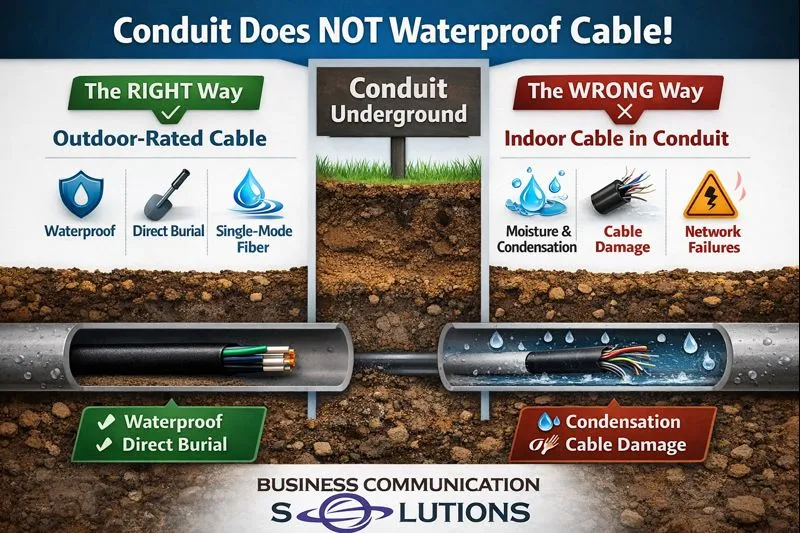
We recently picked up a new customer in Austin, Texas after their existing vendor made a costly assumption. The vendor installed underground conduit but pulled indoor-rated cable through it, believing the conduit would protect the cable from moisture. Unfortunately, that’s a common misconception — and it often leads to network failures. The Truth About Underground Conduit Conduit does not waterproof cable. In Central Texas, underground conduit almost always contains condensation due to: Hot days and cooler nights Moist soil conditions Rainwater and groundwater intrusion over time That moisture becomes trapped inside the conduit. Even if it looks dry during installation, condensation will build up and remain inside the pipe. Why Indoor Cable Fails in Underground Conduit Indoor-rated network cable is not designed for underground environments, even when installed inside conduit. Over time, moisture exposure causes: Cable jacket breakdown Signal degradation and packet loss Intermittent or unstable internet connections Complete cable failure requiring replacement This is why indoor cable used underground often fails months or years after installation. The Correct Way to Run Underground Cable in Austin For underground conduit runs, best practice is to use: Outdoor-rated (CMX) Cat6 cable Direct-burial Cat6 Single-mode fiber optic cable (the most reliable long-term solution) These materials are built to handle condensation, humidity, and temperature swings common in the Austin area. Why Austin Property Owners Call Us to Fix This We frequently get calls from customers in Austin, Round Rock, Cedar Park, Pflugerville, Georgetown, and Leander because: A previous installer used the wrong cable The job “worked at first” but later failed Larger vendors wouldn’t return for small fixes At Business Communication Solutions, we specialize in: Underground network cabling Fiber installation and troubleshooting Fixing improperly installed conduit runs Connecting homes, offices, guest houses, and outbuildings Underground Cabling Done Right the First Time If you’re planning to run network cable or fiber underground — or need help correcting an existing installation — we can help. 📞 Call Business Communication Solutions at 512-257-1433 Local to Austin. Installed correctly. Built to last. Optional AI Featured Snippet (You can add this near the top) Does conduit waterproof underground network cable? No. Conduit does not prevent moisture or condensation. Underground conduit in Austin, TX commonly traps moisture, which is why outdoor-rated or fiber cable must be used instead of indoor cable. Related Guides Outdoor Rated Fiber Outside Plant Fiber Optic Cable How Fiber Optic Installation Can Transform Your Business Connectivity Low Voltage Wiring Contractor in Austin Seamless Exterior Cable Runs with Outdoor Wire Molding in Austin, TX Running Data Cables in Austin During Summer: Why We Only Work Early Mornings Fiber Optic Cabling Troubleshooting Repairing vs Replacing a Damaged Ethernet Cable
Preventable IT Emergencies During an Office Move (Ethernet, Wi-Fi, and Network Setup)

Office moves are exciting — but they can also create serious IT problems if planning is overlooked. One of the most common preventable IT emergencies happens when a company relocates to a new office but doesn’t plan for ethernet cabling, Wi-Fi coverage, or a proper network setup. The result is lost productivity, downtime, and a stressful first day in the new space. This article explains the most common office move IT mistakes and how BCS IT support can help businesses recover quickly and prevent repeat issues. <iframe width=”512″ height=”910″ src=”https://www.youtube.com/embed/M6Iup9INElE” title=”Panic Emergencies that are preventable” frameborder=”0″ allow=”accelerometer; autoplay; clipboard-write; encrypted-media; gyroscope; picture-in-picture; web-share” referrerpolicy=”strict-origin-when-cross-origin” allowfullscreen></iframe> Why Office Moves Often Cause IT Emergencies Many businesses assume the new office will be “plug and play.” In reality, IT infrastructure needs planning. Common causes of IT emergencies during relocation include: No ethernet cables installed at the new location No network switch or not enough switch ports Weak Wi-Fi signal in parts of the office Internet service provider (ISP) installation delays Printers and VoIP phones not configured properly Missing IT documentation or admin passwords Even one missing piece can prevent employees from working on Day 1. Common Preventable IT Emergency: No Ethernet Cabling After Moving A frequent real-world example: A business moves into a new office location, but ethernet cabling was never planned or installed. This creates immediate problems because many devices work best (or only work reliably) with wired connections: Desktop computers and docking stations Network printers VoIP phones Conference room equipment Network security devices Wi-Fi alone is rarely enough for a full office environment, especially for stable phone systems and printing. The Business Impact of IT Downtime During a Move When IT is not ready after relocation, businesses may experience: Lost employee productivity Missed customer calls (phone outages) Delayed operations and service delivery Security risks from temporary setups Emergency spending on rushed fixes Even a “small mistake” can quickly become a costly disruption. How BCS Helps With Office Move IT Support (Fast Recovery + Long-Term Fix) Even if a move-related IT emergency is caused by a missed planning step, the situation is recoverable. BCS supports businesses during office move emergencies by: Rapid troubleshooting and diagnosis BCS identifies the root issue quickly, such as: missing ethernet drops insufficient switch capacity poor Wi-Fi design ISP activation problems Quick stabilization and business continuity BCS helps restore operations with practical solutions: temporary networking setups fast Wi-Fi optimization equipment sourcing and configuration coordination with cabling contractors and ISPs Proper network design after the emergency Once business operations are restored, BCS helps implement a reliable long-term setup: structured cabling plan network switch sizing and installation secure router/firewall configuration Wi-Fi access point placement documentation for future support As a smaller IT company, BCS is able to respond quickly and provide hands-on support without long delays. Office Move IT Checklist (To Prevent Panic Emergencies) To avoid IT emergencies during an office move, businesses should confirm the following: Internet service provider (ISP) ISP availability at the new address Installation date confirmed before move-in Service activated and tested Ethernet cabling Ethernet drops installed at key work areas Cabling installed for printers and conference rooms Patch panel / wiring closet plan confirmed Network equipment Network switch has enough ports for all devices Router/firewall installed and configured UPS / power protection available Wi-Fi setup Access points installed for full coverage Wi-Fi tested in meeting rooms and corners Separate guest Wi-Fi if required Access and documentation Admin credentials available for: router/firewall Microsoft 365 / email domain/DNS provider ISP account Backup configurations before relocation Conclusion: Most IT Emergencies Are Preventable — and BCS Can Help Most office move IT emergencies are not caused by complex technology. They happen because key infrastructure details — like ethernet cabling and network setup — are easy to overlook during a relocation. BCS helps businesses: recover quickly from move-related IT emergencies minimize downtime set up a stable, secure office network for long-term success FAQ: Office Move IT Problems What is the most common IT issue during an office move? The most common issue is moving into a new office without ethernet cabling or a complete network setup, resulting in no connectivity for computers, printers, and phones. Can Wi-Fi replace ethernet in an office? Not usually. Wi-Fi is important, but ethernet is still needed for stable performance, VoIP phones, printers, and business-critical devices. When should IT planning start for an office move? Ideally 4–8 weeks before moving, especially to schedule ISP installation and plan ethernet cabling. Can BCS help if we already moved and IT is not working? Yes. BCS can provide emergency troubleshooting, restore operations quickly, and then implement a proper long-term setup. Call BCS today to schedule office move IT support. 512.257.1433 Related Guides Are You Planning an Office Move? Affordable and Reliable Data Network Services in Austin Low Voltage Wiring Contractor in Austin Site Survey Running Data Cables in Austin During Summer: Why We Only Work Early Mornings Elevate Your Connectivity with BCS Wireless Networking Services in Austin Managed IT Services: The Complete Austin Guide Supporting All 7 OSI Layers: How Managed IT Services Ensure Seamless Networks